Tagged 'PBR'

V-RayMax Converter PRO

168 votes

V-RayMax Converter PRO is the best tool for convert 3d scene (materials, maps, lights, cameras, proxies, modifiers, helpers, render elements, etc.) from other render engines to V-Ray and from V-Ray to Corona Renderer, and also for converting V-Ray and Corona materials to Standard/Physical/PBR/OpenPBR materials and to glTF Material.

Current version: 4.0061

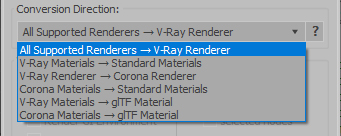
Supported for conversion:

To V-Ray from:
  • Standard (Default Scanline)
  • Corona Render
  • FStorm Render
  • Octane Renderer
  • finalRender
  • Arnold
  • Brazil_Advanced (RS v 1.2) material
  • NVIDIA iray (unofficial) material.
From V-Ray to:
  • Standard / Physical / PBR / OpenPBR materials
  • Corona Renderer
  • glTF Material (3ds Max 2023 or later)
From Corona to:
  • Standard / Physical / PBR / OpenPBR materials
  • glTF Material (3ds Max 2023 or later)
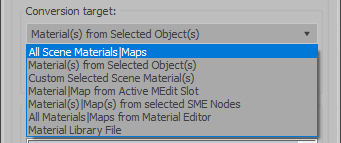
Сonversion scope:

Full list of supported conversions.

Main features:

  • Converts materials, maps, lights, cameras, modifiers, helpers and GI environment from other render engines to V-Ray and from V-Ray to Corona
  • Converts clouds from CoronaSky to VRaySun and vice versa.
  • Converts Night Sky system (Moon, Stars & Milky Way) from V-Ray to Corona and vice versa
  • Converts Render Elements to V-Ray (currently supported Scanline RE, Corona RE, FStorm RE, Octane RE) and from V-Ray to Corona
  • Converts V-Ray and Corona materials to Standard (Default Scanline) materials
  • Converts VRayMtl and CoronaPhysicalMtl materials to Physical Material and OpenPBR Material
  • Converts V-Ray and Corona materials to glTF Material (which is necessary for exporting to the .glb for corresponding 3d software: Blender, Gestaltor, Babylon.JS etc).
  • Converts proxies (currently supported from Corona, FStorm, Octane) to V-Ray Proxy (static and animated)
  • Converts V-Ray Proxy to Corona Proxy (static and animated)
  • Converts standard Bitmaps to VRayBitmap and vice versa
  • Converts standard Bitmaps to CoronaBitmap and vice versa
  • Converts 3ds Max Physical cameras to V-Ray Physical cameras and vice versa
  • Automatic configure ACEScg workflow in V-Ray
  • Batch processing for multiple 3dsMax Scene (*.max) or 3dsMax Material Library (*.mat) files
  • Programmatically interact with most converter functions using built-in maxscript methods (API), which allows you to use the converter without UI and in combination with other 3rd-party scripts.
  • ...and more additional tools for fixing and adjusting the scene.

PBR Material Generator

3 votes

The PBR Materials Generator is a powerful add-on for Project Manager and Materials Manager designed to expedite the creation of high-quality PBR materials.
It empowers users to batch generate materials using custom settings and presets, all within the familiar Project/Materials Manager interface.

Content Browser

2 votes

The Content Browser helps you quickly browse and import 3D assets on your computer.

Load any folder accessible on your machine and the Content Browser will find any materials, hdri’s, models, and max files. It will group, organize and display these files as assets, recognizing previews, LODs, mapping channels, resolutions and other important information automatically. 

It simplifies the importing and merging process for 3d models, max files, material creation and hdri environment maps by allowing you to directly browse, filter and drag all of your 3D assets from sources like MegaScans, PolyHaven, gameTextures, Poliigon, Arroway into 3ds max viewport or material editor. 

Main Features

  • Load any folder and find 3D models, max files, materials and hdri’s.
  • Show grouped files as assets, group matching assets and find preview images.
  • Drag and Drop asset into the 3ds max viewport or the Slate Material Editor
  • Import assets to Slate and Compact Material Editors
  • Default Merge and Import 3d files and max scenes, with automatic relinking filepaths
  • Choose LODs/resolution/variations and Import multiple assets at once
  • Folder hierarchy, File list and Preview Gallery

Material Texture Loader

7 votes

Description
  The Material Texture Loader loads in textures and instantly creates advanced materials.
  Use pre-defined or customized map and material settings to build re-usable material setups.
  Fully supports Vray, Corona, Redshift, Arnold, FStorm, Physical, Octane, and Standard map and materials.
 
Main Features

  • Automatic texture channel recognition 
  • Parameter linking for all texture mappings
  • Predefined Color-spaces: ACEScg - sRGB - linear-sRGB - Raw - Gamma - Auto
  • Mapping: Tiling - Real-world - Tri-Planar -  Random Rotation - Spherical
  • Live edit settings and disable channels
  • 2-Sided materials
  • MaxScript commands
  • UDIM map loading
  • Drag and Drop
  • Presets

Get it on Gumroad
Latest version: 1.830

Vray To Unity OneClick Converter

1 vote

Script for automatic conversion 3ds Max scene with V-ray renderer to Unity Engine (HDRP and URP).

Documentation: https://docs.google.com/document/d/19XJjX2VO_rHNIj4ZDcKPlwhYR0FFi8a77FyG...

Скрипт по автоматической конвертации сцены из 3ds Max V-ray в Unity (HDRP и URP)

Документация на русском : https://docs.google.com/document/d/122-TyKZj-STQIXhajocWSvXzTZeeRxgscq3P...

https://u3d.gumroad.com/l/3dsmaxVray2unityPRO PRO version without texture size limit.

Telegram Support Channel https://t.me/OneClickExporter

Texture Set Loader

1 vote

The Texture Set Loader is a 3ds Max tool that is designed to make it quick and easy for artists to batch load in texture sets and create materials. It’s flexible enough to work with any sort of color workflow, whether you are working in PBR, Glossiness, Metallic or even custom. You can use the tool to even build completely custom shaders by simply assigning any maps you want to the map channels available in the interface.

PBR Material Importer

1 vote

postimage
A script i made during production that requiring importing a lot of PBR map into Vray.
This script require at least 4 map to run: Diffuse,reflection(specular),glossiness and normal.
It will create a Vray material with setting to look indentical to Quixel 3DO or substance viewport.
If your map have Mixed Dielectric and Metal , you will need to export Metalness Map.

Syndicate content