Tagged 'pivot'

Universal Transform

4 votes

Universal Transform has Alot of Featuers for Moving Rotating Scaling Randomizing Scattering Objects and Working with Pivot and Working Pivot and More .

The Script has 5 Modes (Move, Rotate, Scale, Pivot, Random) . and 3 Type of Auto Switching to Switch Between Them (to not Get Confussed) .

The 3 Auto Modes is (Auto T, Auto D, and The MacroScript (Universal Transform - Auto Switch)) .

- it has 3 Options :

1- By Spinners or (Type-in) .

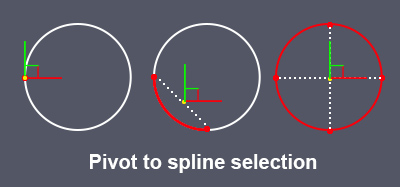
Pivot to spline selection

0 votes

Sets the pivot in the center of the spline selection.
Works with vertices, segments and splines.

pivot to spline selection

Prepare object for UE4

1 vote

This simple macroscript prepare selected objects to export to unreal engine.

Select objects and execute the macro script will do the nexts steps for all of them:

- Center pivot on Z base
- World align pivot
- Reset Xform
- Convert to Edit Poly
- Callapse to Editable Poly

Align Pivot to Direction

8 votes

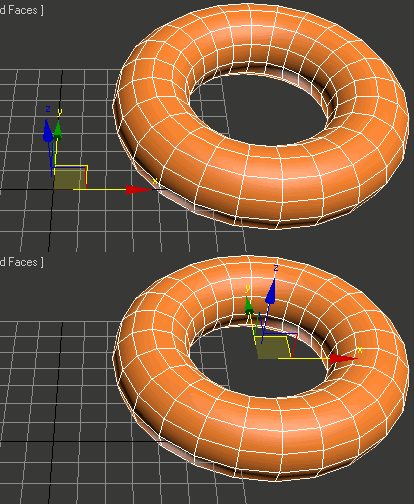
 Align Pivot to DIrection(vector) allows you to align the X, Y,Z or XYZ axis of the local pivot of each of the selected objects to the direction(vector), defined by two picked in the scene points. SNAP will be turned ON automatically.  If the Shift key is down when the axis is choosen the pivot will be moved to the first picked point.

Version 1.1 should works properly with Pen(tablets).

Rig Ready Script

0 votes

Hello, my first MAXscript is complete.
Script for 3D modelers and 3D animators.
It is recommended that you use the Y up coordinate system to perform operations on character assets such as unity3D.

Use after 3D modeling mesh editing and size checking.

[Option]
Rotation XYZ : Pivot coordinate Change.

Option_Move : Moving the Selected Model is Location is all 0.0
Option_Rotate: When released, it is not affected by the coordinate system.

Final Apply : Button is apply all of the above.

Created using 3ds max official manual and internet.

Align PivotPoint to WorkingPivot

4 votes

Hello! This script aligns PivotPoint to the WorkingPivot.

Visual Pivot Placer

38 votes

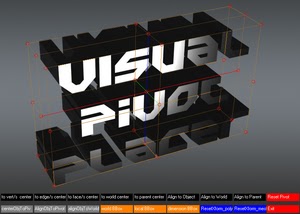
The image above says all. :)

Places the pivot of the selected object/s in one of the red colored circle.

For Editable Poly object/s you can place the pivot in the center of selected vert/s. edge/s, face/s.

Click with LMB on one of the red circle will tread all selected objects as one and the pivots of all objects will be in the same place.

Zero-Center Pivot Unimover

3 votes

v2.17 Fixed bug of pivot point to knot of shape when command panel pull out of 3dsmax

Editable_Poly,
Edit_Poly,
Editable_Mesh,
Edit_Mesh,
Splines


"More Video - Ещё видео"

Milyan's object cleaner

1 vote

SmartGroup

1 vote

Group selected objects without popup for naming and set group pivot to Z minimum.

Syndicate content