3ds Max | All

Hunter

13 votes

Search the scene for items (objects - modifiers - etc] with specified properties (instance of - same type as - etc.) - and do something to them (select - delete - disable - etc.)

Maya Camera Export

11 votes

"Let's you output camera data (including transformation. fov. resolution and other camera specific data). It exports to an ascii file. with format comments in the file itself. Also attached in the zip is a script for maya that does the same thing (melscript written by Imre Lovasz) (basically. this set is good for exchanging animated camera between the two apps).

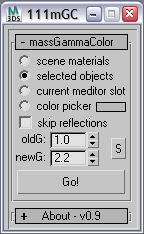
massGammaColor

18 votes

this script converts colors from one gamma space to another. it affects color picker fields in material editor.


Select Hidden, Visible or Occluded Objects

5 votes

Select only visible objects! Delete all objects hidden inside other objects!

If you are working with object heavy CAD models you probably know that often 90% of the objects are hidden internal components of the rig. Stuff you usually don't need or want. Object count that make 3dsMax crawl.

This script lets you either select what is visible or hidden from the current view - or let you scan the whole scene. 
It's a very efficient way to clean up your scenes with a high accuracy!

Batch Camera Previews

2 votes

This script will render out via "Preview - Grab Viewport" for multiple cameras at once. Useful if you create preview cameras a lot, or need to make multiples at once.

Installation:

1. Run script

2. In Max goto "Customize->Customize User Interface...->Toolbars tab->Category: ColinScripts->OpenGL Previews" and drag "OpenGL Previews" to a toolbar, click to run.

Resize Splines From First

27 votes

Tools that resize spline sub-objects in regard to their first vertex, one with a scaling factor, the other using a fixed size.

Material randomizer

15 votes

With this script you can randomize materials over selected objects, you can also temporary store aranged materials to three memory slots.

functions:
- picking materials from material/map browser
- 2click on material to delete it
- shift+click on store button to store material list
- click on store button to restore material list

Helixometry

-10 votes

Helixometry is a geometry plugin for 3ds Max that creates helix shaped meshes. All of its controls are animatable. The biggest benefit to this over the spline helix is the ability to taper the thickness of the mesh as well as twisting and turning. Check it out.

https://vimeo.com/65155264

Helixometry 1.0
- Start/End radius
- Height/Radius bias control
- Number segments that make up helix
- Number of turns
- Height of helix
- Radius randomizing option

Shuffle

8 votes

Randomly swaps the positions (but not rotation) of selected objects. I use it to save time populating parking lots - by creating groups of identical cars - then running shuffle to get the random distribution.

RelaxBySG (Relax By Smoothing Group)

3 votes

Modifier to smooth meshes without destroying hard edges defined by smoothing groups.

RelaxBySG works on the same principle as the standard Relax modifier, but offers a greater degree of control.
Rather than relying on the modifier to find boundaries and corners and hoping for the best, you can use smoothing groups to define them yourself.


Syndicate content