3ds Max | All

Dappled Light Generator

0 votes

DAPPLED LIGHT GENERATOR is a script that is efficient in automatically creating dappled light effect in 3dsMax. It can be applied flexibly in Archviz projects while saving a lot of time for 3D artists.

.: Compatible with 3dsMax 2018 and higher

.: Compatible with Corona Renderer & Vray Renderer

If you have any comments or questions, please don't hesitate to contact us via email: [email protected]

We will respond as soon as possible.

---

© ArchvizTools  

Little Batch Render

33 votes

Vray - LittleBatchRender
Version 0.84

Description:
with the "LittleBatchRender"-script you can easily render multiple cameras in your scene with one Click
Features:


• correct autonaming for Render Elements
• NetRenderSupport
• Spawning can be disabled when rednering with NetRender
• consistent Naming for local and NetRender - no relinking in Compositing necessary
• Turning of and on individual Xrefs for individual Cameras

Blinds Curtains Generator

1 vote

BLINDS CURTAINS GENERATOR is a script that is efficient in automatically creating blinds / curtains in 3dsMax. It can be applied flexibly in Archviz projects while saving a lot of time for 3D Artists.

.: Compatible with 3dsMax 2018 & higher

.: Compatible with V-Ray & Corona Renderer

.: Compatible with System Units: Millimeters, Centimeters, Meters, Inches & Feet

.: Version: 1.0

.: Author: Wuan Hyu

If you have any comments or questions, please don't hesitate to contact us via email: [email protected]

We will respond as soon as possible.

---

© ArchvizTools  

Backdrop Generator

2 votes

BACKDROP GENERATOR is a script that is efficient in automatically creating 2D background in 3dsMax. It can be applied flexibly in Archviz projects while saving a lot of time for 3D artists.

.: Compatible with 3dsMax 2018 and higher

.: Compatible with Corona Renderer & Vray Renderer

.: System Units: Millimeters, Centimeters & Meters

.: Version: 2.0

.: Author: Wuan Hyu

If you have any comments or questions, please don't hesitate to contact us via email: [email protected]

Fire Flame Generator

0 votes

Fire Flame Generator is a script that is efficient in automatically adding simple 2D fire flame & smoke images to your 3dsMax scene. It can be applied flexibly in Archviz projects while saving a lot of time for 3D Artists.

.: Compatible with 3dsMax 2018 & higher

.: Compatible with V-Ray & Corona Renderer

.: Compatible with all System Units

.: Version: 1.0

.: Author: Wuan Hyu

Free to download and use.
Coupon code discount 100%: “cgtricks”

VrayProxy Thumbnail Generator

2 votes

This script was requested by 1rv here:
http://www.scriptspot.com/forums/3ds-max/scripts-wanted/generate-vraypro...

It is converting selected objects to VrayProxies with their materials as .mat files and create thumbnails (two options are available rendered thumbnails or viewport grabbed thumbnails)

if selected objects are already vrayproxies it will generate the corresponding .mat files and thumbnails and copy the existing vrayproxies in the destination folder.

The objects need to be oriented toward the front view.

Camera Clipping Pro

0 votes

Camera Clippping Pro 3dsMax plugin by SplineDynamics

DESCRIPTION

Camera Clipping Pro adds special controls to the camera for driving clipping planes using objects in the scene and auto-adjusting the focal length to retain the same framming while you move the camera closer or further away from the target.

Import Illustrator Files

2 votes

This Script imports multiple Illustrator files in one click, it attaches splines and weld vertices. you can add an extrude modifier by Shift Clicking the button.

Make sure to save your .ai files to illustrator 8 as 3dsmax can't import more recent version of illustrator files.

Install by drag and dropping in the viewport, then go to customize, customize user interface, tool bar, category "SimonScripts", create a new toolbar if you haven't got one already, then drag "Import AI" inside the toolbar.

CoronaColorCorrection-Auto

1 vote


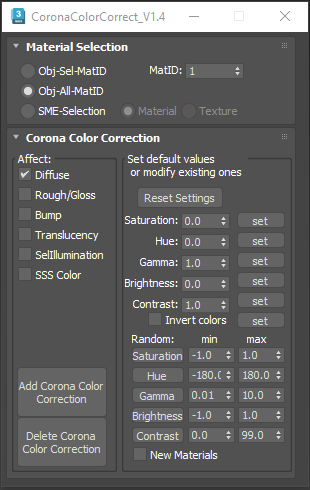
This script is intended to add and tweak settings of Corona Color correct nodes.

You can add some Corona Color correct with any specified values on any selected material slot (Diffuse, Bump, Roughness, Translucency, Self Illumination),the existing bitmaps will be kept inside the color correct.

Pivot & Align Tools

10 votes

Pivot & Align Tools (PAT) are a set of macros bundled into a quad menu that allow you to perform various object alignment, pivot alignment and object snapping functions... among others. Most of the functions can operate on a selection of multiple objects at once, including grouped objects as part of the selection (open or closed).


NOTE: This script now handles quad setup for both 3dsmax 2025 and above, as well as previous versions of Max.


See online guide in links section. 

Syndicate content