3ds Max | All

Quick Skybox

0 votes

A QUICK WAY TO GET 6 IMAGES FOR A SKYBOX OR CUBEMAP FROM YOUR 3DSMAX SCENE.


  • Create your SKYBOX or CUBEMAP in seconds!
  • 6 images ready to use in UNITY or your favorite 3D Game Engine.
  • Options: Auto-create or pick custom camera || With or without Alpha channel || Set image Size


USAGE:

Just set the few required options (camera / image size / alpha / output file) and hit 'RENDER SKYBOX'.


INSTALLATION 

Total Animation Baker

3 votes


A POWERFUL TIME-SAVER TOOL TO BAKE THE ANIMATION OF YOUR ENTIRE SCENE WITH JUST ONE CLICK.

This script can bake a complete scene with complex procedural animations and sophisticated rigs, including all kind of objects, controllers and character animations, and set it ready to export to your favorite game engine.


It works on any kind of object with any kind of animation controller!

From simple animated objects to complex animated scenes with deep level of hierarchies and script-driven.

Delete Unselected

0 votes

Delete all non-selected objects in 3dsMax scene, including hidden and frozen ones, leaving just the ones you need in the scene.

This simple script is very handy when you need to re-save only one or a few models from a complex scene, but keeping all the scene setups. It’s also good for exporting objects to external software that requires scene data from 3dsMax.

Pivot point Align managment tool

2 votes

Her is a simple tool i just created to help align the pivot position around any mesh cage, as you can align the pivot point to 27 point around the object cage, and move the pivot point to the scene orgine and rotat the pivot point 90 degree on the X axise if you are exporting mesh to unity 3d that will import the object to unity with out any rotation values.

Lesson 21-3DS Max-Total Beginners-Multi SubObject Material And Multi UVWMaps

0 votes

In this tutorial, for total beginners, we will learn how to apply multiple materials to the same object, and starting from minute: 3:47 We will add a texture map for each of those materials, then, we will learn how to apply multiple UVW Maps modifiers to the object and have each one of them control a specific texture from those sub-materials.

Lesson 21-3DS Max-Total Beginners-Multi SubObject Material And Multi UVWMaps

0 votes

In this tutorial, for total beginners, we will learn how to apply multiple materials to the same object, and starting from minute: 3:47 We will add a texture map for each of those materials, then, we will learn how to apply multiple UVW Maps modifiers to the object and have each one of them control a specific texture from those sub-materials.

Multimaterial from Files

0 votes

The script lets you pick multiple image files from your drive and creates one material per file, with the image assigned as diffuse texture, and builds a multimaterial with all of them. Then assigns the multimaterial to the selected objects.

ModMac Script - Modelling Macros and Modifier Presets

3 votes

This is a collection of macros that quickly assigns modifier presets to objects to speed up initial modelling workflows. It also simplifies Boolean operations. Adds Boolean Modifier and Array Modifier support. (2024+)

Features

- Quickly Bool with Objects and Splines.

- Assign Symmetry to multiple Objects with the Gizmo set to certain positions.

- Modifiers get assigned as instances exceptions are mCloth and Unwrap, at least for now.

- Chamfer Objects and Splines.

- Assign mCloth with pinned Vertexes.

- Assign some basic materials.

Interactive Retopo

1 vote

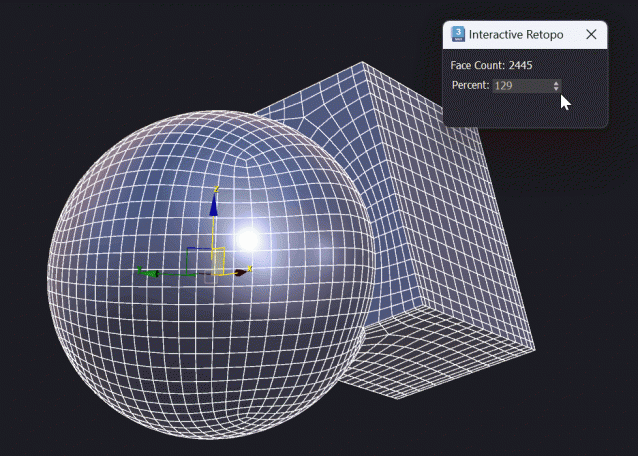
This script assigns the Retopology Modifier and interactively updates it.
Works well up to 10.000 polygons, depending on your machine.

Features
- Interactive Retopology based on percentage of the original polygon count.

Install: Drag and Drop to the Viewport
Tested in Max 2024, 2025


Script Box

3 votes

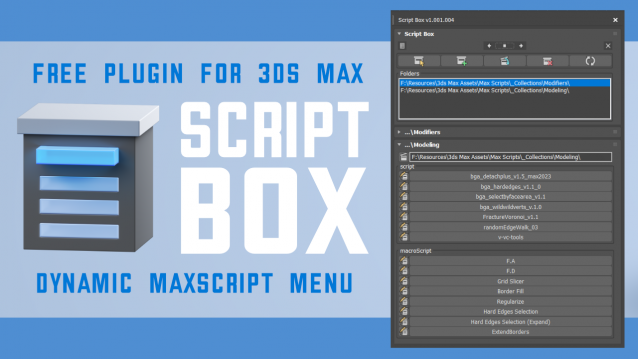
Script Box optimizes your scripting workflow by creating a dynamic dialog menu for Maxscript files.

Simplify installation and execution of Maxscripts by selecting any folder and get a menu that can launch external MaxScripts without adding custom buttons. Freely organize and integrate macroScripts, plugins, utilies and regular scripts inside 3ds max without going through a set of complicated steps.

The current version is free with no limitations, offering the same functionality as the paid version. Future updates are exclusive to paid users.

Main Features

  • Dynamic dialog menu 
  • Execute MaxScripts from any folder
  • Multi-threaded file loading
  • Organized by macroScript, plugin, utility and regular scripts
  • Configure buttons and minimize UI
  • Custom tooltips with aditional information
  • Create, archive and open MaxScripts
  • Dock, resize, and collapse dialogs
  • Launch on start-up

Syndicate content