3ds Max | All

PowerCoreTools: 3ds Max's CPU management tool

8 votes

PowerCoreTools:

Just released version 1.2 of my PowerCoreTools CPU managment script for 3ds Max

A tool to control CPU usage while 3ds Max is rendering. Automatically sets process priority and affinity ( the number of  CPU cores the render process uses) at render start. Restores the initial settings when the rendering is done. Can be configured to run in a complete transparent  No-UI mode, which is launched right after 3ds Max has started.
This keeps your workstation responsive for other tasks while rendering. A second 3ds Max session stays responsive and can be used to continue work on different tasks.

A look at the following screenshot will probably tell more than thousand words:
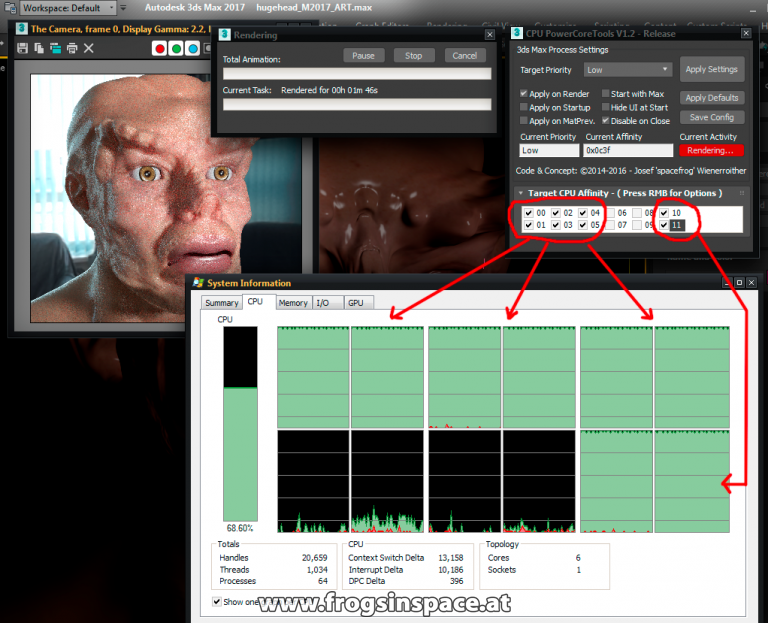
PowerCoreTools in Action

Safe Frame Render Effect

8 votes

Render Effect: Adds Safe Frame and/or Grid to your render.

Mesh Baker

8 votes

Changes animated mesh modifiers to vertex animation. Useful for game exporting.

Expert Mode with Command Panel

8 votes

This is just small script - similar to Expert Mode (shortcut "Ctrl+X") but it keeps Command Panel visible

You can used as shortcut or toolbar button

P Explosion Generator

8 votes

Generates explosions for all those things you feel like blowing up.

ResizePrimitives Right-Click Menu

8 votes

Implements additional RightClick Menu options when a single Object is selected. Lets the user redefine basic parameters (Height -Radius -Width -Height) of the Standard Primitives by picking a new point in space (using 3D Snaps - too). Works with the base obje

PEN Duplicate Name Finder

8 votes

The Duplicate Name Finder will do just that and then alow you to select the duplicates for renaming.

3DS Max - Convert Unique Objects To Instances - Plugin

8 votes

In this video, I will present you with a new plugin I created that converts unique object/objects into instances of a selected source object.

PG.CamSelect

8 votes

.

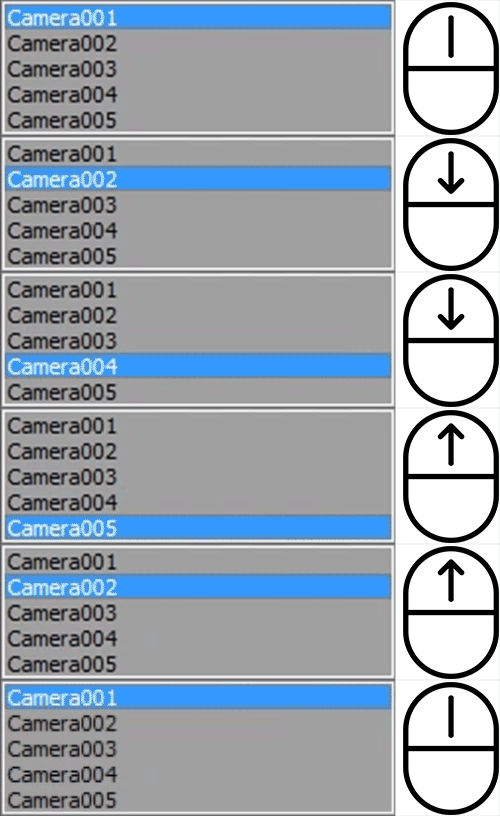
Change camera quickly with your mouse wheel.

After instalation, script is availabile in "Pawel Grzelak" category.

How to use:
• Hit the keyboard shortcut
• Scroll your mouse to change camera
• Left click to accept
• Right click to select camera object
• Right click + Shift to select camera target
• Esc to return to previous camera

miauu's Scalpel

8 votes

Syndicate content