
Autoweight - Automatic skinning tool for 3ds Max
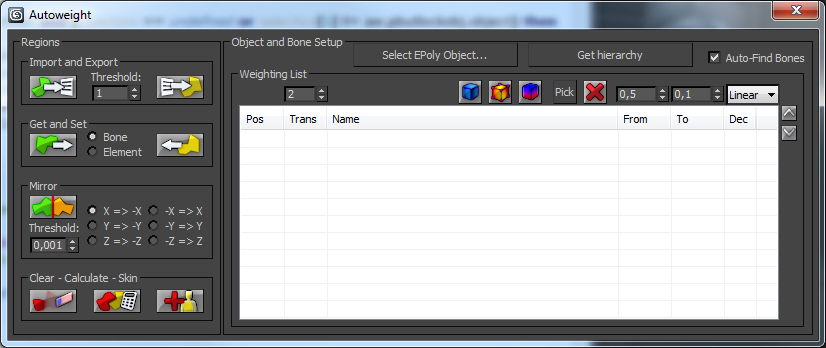
Autoweight is a script designed for 3D Studio Max helping you speeding up the skinning process of characters and machines.
You define special polygon regions and the script finds the appropriate bones, calculates the appropriate skin-vertices and sets up smooth transitions between those regions.
There are also Youtube video tutorials explaining the script step-by-step.
The new version 1.0 comes with an installer so you don't need to hassle around with the mzp-stuff anymore.
After starting 3DS Max you'll find "Kogen Tools" -> "Autoweight" in your "Customize user interface" category when everything went right.
Version 1.0 features:
* Working with Max 2009 - 2015
* Completely rewritten core
* Region Painting
* Customizable bone-falloff-transitions
* View modes
* Import + Export of regions to AWB-files
* Using custom hierachies for bone objects (you're not longer forced to use bones or biped, you can use any object of a provided hierachy).
* Some additional tweaks
Kind regards
ko'gen
| Attachment | Size |
|---|---|
| awui.jpg | 143.03 KB |
| 3dsmax2009-2011-addendum.zip | 493 bytes |
| autoweightinstaller_3ds2009-12.zip | 1.57 MB |
| autoweightinstaller_3ds2013-15.zip | 1.57 MB |
Comments
transition "in between bones", not just downstream.
Thank you for sharing this very useful script.
Is there a way to configure the transition so that works both ways? Currently the transition parameter seems to describe the way a bone's influence transitions to child bones, but not also to parent bones.
problem after symmetry
Hello everybody
I've followed the alien tutorial made by seb, but after I made the symmetry of the half, attached the two halves and welded the middle, autoweight only works on one half of the character: "get region from selected polys only works on one half and one the other half it doesn't select the region it just deselect everything.
And worse, when I calculate autoweight script only calculate on this only half. It seems that it's the first half created that's taken in account, and that the "Attached and merged" one is ignored.
Even if I manually redefine separate regions for the pair parts of the second half (Arms, hands, legs, etc)in order to have the script recognize them for calculation, it only calculates one half.
It makes the script unusable
Great Script, possible request:
Thanks for the script. Is there any way to get the region selection back when I re-launch AutoWeight? Maybe a reverse of the setting the ploy vert colors?
Thnx
Thank you for such a smart script!
Hey, your idea is ten times better than Autodesk. I am so shocked skinning can be so easy!
I just played it for two hours after watching all your videos. Eventually I still had to switch to Bones Pro because of some bugs in your script.
For some reason,
1, it doesn't allow me to assign a region to some certain bones. In my case, the waist was assigned to the wrong spine. I chose the region, and clicked on PICK. It doesn't allow me to click on the right spine.
2, For CAT bones, there are always couple of extra bones, it can be ribcage, or some spine. Then your script doesn't allow to continue calculating skin.
3, Here is the real bug. I finally made all the regions on the whole character, and clicked "calculate all regions", then, some of my regions are messed up. I had to go back and correct couple of regions for many times, it still acted strange.
Really hope you can achieve more! Good job and keep going! Thank you!
It didn't work the way u said
It didn't work the way u said for me
what i did
1. Rename the mzp-file to "temp.zip"
2. Extract all data from the new ZIP File.
3.Drag AutoweightInstaller to Max
and it worked
Yep, Usually I'm skining
Yep, Usually I'm skining model approximately ~ 40k triangles and smoothing weights in skin mod. realy horrible and buggy.
Hei sbk, thanks. When you say
Hei sbk,
thanks. When you say "Weight-Painting" do you mean something like "region-painting"? Basically it is possible. Currently I'm thinking about how such a feature can be implemented and how it could speed up and improve the workflow.
-k.
"Arrogance kills."
Very fast and simple tool, a
Very fast and simple tool, a much better than default skin weights. Thank you.
How about weight's paint in difficult places by brush? In future version
It's possible?
Little bugfix
I was told about a crazy bug concerning non existing edges in an editable poly o_O.
Another bug occured when you had more regions than bones (forgot to put the code in an if-clause.)
I fixed both issues and if you had problems with one of them, feel free to donwload the latest version 0.056.
@ rattle-snake: You're welcome, I appreciate your feedback.
"Arrogance kills."
Yeaaah
Thx a lot Kogen !
That's really great (mirror mode héhé).
Really nice Job, you rock :D