ScriptSpot

Script

PolyUnwrapper

By PolyTools3D · 2012-07-11

Version
4.7.0
Version requirement
3ds Max 2016 - 2027
Date updated
2026-04-10
Votes
41
Download
Download
Description

PolyUnwrapper is a complete set of professional tools designed for the texture artists, especially for the architectural and game industries.

It contains plenty of features that will greatly help you improve your unwrapping workflow.
PolyUnwrapper


Main Features Features

  • Multi Stitch. Stitch Multiple Shells at once
  • Custom Packing algorithm and tools
  • Tool for matching the Shells Width and Height
  • Easy Grid Spacing
  • Render UV Tiles (UDIM)
  • Cycle Checker map
  • PolyUnwrapper Toolbar now keeps on top of the Unwrap Editor
  • Render Open Edges
Videos

Tags: UVW, Unwrap, tool, mapping, Unwrap UVW, texture, UVs, normalize, checker, cluster, hard edges, shell, Render UV Template, Select Element, UV shell, PolyUnwrapper, Polytools3D, pack, Render Edges, Render Smoothing Groups, Render Material IDs, Model Elements, UV Tool, checkermap, pack uv, multi stitch

Comments (176)

PolyUnwrapper v4.7.0 Released

PolyTools3D · 2026-04-10

What's New

+ NEW Added Support for 3ds Max 2027
+ NEW Export UV template as SVG
+ NEW UV Pixels Scaler tool
+ NEW Find UV Shells by Size
- Fixed bug where PolyUnwrapper toolbar would stay on top of all windows
- Fixed missing button icons when re-opening popup dialogs
- Improved minimized toolbar flickering when moving on top of Unwrap UVW modifier
- Changed select Open Edges button is now enables in all subobject modes
- Updated Registration Process


PolyUnwrapper v4.6.2 Released

PolyTools3D · 2025-04-30

What's New

+ NEW Added Support for 3ds Max 2026

Windows 11 24H2

PolyTools3D · 2024-10-11

Upgrading to Windows 11 24H2 might lead to an issue where our tools don't load automatically. This could be due to a bug in 3ds Max or Windows, which prevents 3ds Max from loading scripts from the user’s startup folder and macroscripts. If you're experiencing this problem, please contact us.

PolyUnwrapper v4.6.1 Released

PolyTools3D · 2024-09-30

What's New

- Fixed toolbar not displaying in some systems where other scripts corrupts the system callbacks

PolyUnwrapper v4.6.0 Released

PolyTools3D · 2024-09-19

What's New

+ NEW Added Normalize UV Shells using custom Texel Density
+ NEW Added Get Texel Density from selected faces
+ NEW Added Create UV mesh from UV Mapping Channel (+Morph)
+ NEW Added Open Map Channel Info Utility
+ NEW Added Clone rendered UV template to 3ds Max VFB
+ NEW Added quick access (+-) to common power of 2 textures sizes
+ NEW Open PolyUnwrapper Utility from the toolbar
+ NEW PolyUnwrapper can now be unloaded from the toolbar
+ NEW Added the option to force packing when UV Shells area are too small
- Fixed Distribute Shells using selection distance not working properly
- Fixed bug in Quick Pelt Mapping
- Fixed bug in errors not being printed out to the listener
- Fixed VFB menu bar not displaying the correct colors
- Fixed logo images
- Fixed Report grid columns/rows scale for high-DPI displays
- Fixed bug index out of bounds in swap checker material
- Fixed bug in "Center & Fit" Macro
- Removed all references to iDisplayGamma interface
- Improved some icons for better visibility in dark theme
- Changed icons resources to individual files

PolyUnwrapper v4.5.1 Released

PolyTools3D · 2024-06-09

What's New

- Fixed textures no longer reload when Gamma is enabled and PolyUnwrapper opens (Max 2024+)
- Fixed viewport textures being sometimes unloaded when PolyUnwrapper opens
- Improved "Center & Fit" function now uses padding in pixel units
- Improved minor UI fixes

PolyUnwrapper v4.5.0 Released

PolyTools3D · 2024-05-23

What's New

+ NEW Added Support for 3ds Max 2025
+ NEW Added Distribute Shells horizontally and vertically
+ NEW You can now use up to 6 checker bitmaps
+ NEW Added Hide Error messages option
+ NEW Added Collapse dead structures
- Fixed icons colors
- Improved Toolbar style, position and size
- Improved Pixel Packer
- Updated Help file

PolyUnwrapper v4.4.0 Released

PolyTools3D · 2023-04-17

What's New

+ NEW Added Support for 3ds Max 2024
- Fixed bug in Rectangle Paxker "Get Packing Area From Selection"

2024

Evgeniy Poyan · 2023-04-14

Hey

1. 2024?
2. Ive got a feature request, I use "Set Texel Density" very often, could you please make this available as a macros so I can assign a hotkey?
3. also would be awesome If I could customize a fixed window position of PolyUnwrapper?

Cheers!

PS: got an error on your website "An error ocurred while processing the form.
Make sure you haven't included any URL in the Message.

Please try again.
"

2024

PolyTools3D · 2023-04-14

Hello Megaman,

Thank you for your feedback.

When a new version is available you will be notified by email.

If for reason the online contact form isn't working, you can always contact us by email, to the same address from which you received your license information.

Best regards,
Jorge

PolyUnwrapper v4.3.9 Released

PolyTools3D · 2022-04-12

What's New

+ NEW Added Support for 3ds Max 2023
- Dropped support for 3ds Max 2014-2015

todor · 2021-04-23

It looks cool ! :)

PolyUnwrapper v4.3.8 Released

PolyTools3D · 2021-04-23

What's New

- Fixed bug in Unfold Mapping

PolyUnwrapper v4.3.7 Released

PolyTools3D · 2021-04-01

What's New

+ NEW Added Support for 3ds Max 2022
- Fixed Render and Tools icons
- Dropped support for 3ds Max 2010, 2011, 2012, 2013

PolyUnwrapper v4.3.6 Released

PolyTools3D · 2020-09-18

What's New

- Fixed some icons not showing correctly when UI is scaled

PolyUnwrapper v4.3.5 Released

PolyTools3D · 2020-04-07

What's New

+ NEW Added Support for 3ds Max 2021

Can't set hotkey in Max2020.1 Update

exe · 2019-12-19

Very useful tool.I love it.But there is no PolyUnwrapper in new hotkey window of Max 2020.1 Update.

Can't set hotkey in Max2020.1 Update

PolyTools3D · 2019-12-19

I just verified it and it is working correctly in Max 2020.

Just make sure you follow the instructions in this page:
https://www.polytools3d.com/tools/polyunwrapper/help/02_install.html

Please keep in mind that this is not an official support website, so if you are still experiencing any issues, feel free to email me directly so I can offer you further support.

Thank you!
Jorge

PolyUnwrapper v4.3.4 Released

PolyTools3D · 2019-08-13

What's New:

- Fixed bug where the UV Template Render window could be off screen on dual monitors setup
- Render UV Template Render window now remembers the latest used position

PolyUnwrapper v4.3.3 Released

PolyTools3D · 2019-04-30

What's New:

+ NEW Added support for 3ds Max 2020
- Fixed bug in Preview Checker Map where map would not update correctly in Max 2020

MultiStitch algo question

Noors · 2018-12-18

Hello Jorge, I'm trying to script a multistitch script that works slightly differently than yours (it auto-stitches (hundreds of) selected clusters). I'm actually using built-in .stitchVertsNoParams() which is painfully slow. One way of optimizing my script would be to perform a cluster stitching instead of linear, idealy based on each cluster faces count. But i was wondering, if you use mesh operations instead of unwrap to deal with your multistitch as i know you use that brilliant idea a lot ? I use it to detect the shared seams between selected clusters and it is very fast. But the stitching funtion is like 99% of process time.
So basically did you code a mesh stitching function in order to feed the unwrap for your multiStitch ? Thanks !

MultiStitch algo question

PolyTools3D · 2018-12-19

Hello Noors,

The Multi-Stitch function does not use the internal Stitch method, neither does it uses a trimesh to handle the data, as the overhead of converting back and forth would be too costly.

It is a custom algorithm build from scratch that only uses the very basic Unwrap modifier methods to manipulate vertices and faces.

Basically it builds a custom optimized UV topology and once everything is done the result is transferred to the Unwrap modifier.

Noors · 2018-12-19

Thanks ! As i was already using trimesh to collect clusters, i missed that all data collected to build the trimesh are actually already sufficient to move tverts. But you've made a custom function, and that's what i wanted to know.

PolyUnwrapper v4.3.2 Released

PolyTools3D · 2018-11-21

What's New

- Increased Rectangle Packing padding to 256 pixels

override functions

PolyTools3D · 2018-07-29

@brainsgonedead

Thank you for your feedback.
The XForm validation can be turned off from the options "Verify Nodes XForm".

Regarding the "Bridged faces", could you please email me the details of the issues you are experiencing, as well as a way of reproducing it.

Thanks,
Jorge

override functions

brainsgonedead · 2018-07-28

Hi, there is one issue I have with PolyUnwrapper. As great as it is, I find things like "You need to reset xform" and several other things I don't do until I completely finish modelling it would be nice to turn of the popup messages and still have PolyUnwrapper work. Such as using Bridge faces always causes an error in PolyUnwrapper so I have to delete those faces and bridge the edges so it works. So it would be nice to turn of the popups and still have PolyUnwrapper work as it should.

I hope this makes a future possibility.

Cheers...

try this

brainsgonedead · 2018-07-28

Hi, try deleting the Polyunwrapper.ini file found in the ENU folder. It might work.

C:\Users\yourusername\AppData\Local\Autodesk\3dsMax\3d max version - 64bit\ENU\scripts\PolyUnwrapper

hidde panel

f4r3l · 2018-07-28

Hi!
I have a problem. I've hidden The polyunwrapper panel and now I can't get it back.

brainsgonedead · 2018-07-28

try this
Hi, try deleting the Polyunwrapper.ini file found in the ENU folder. It might work.
C:\Users\yourusername\AppData\Local\Autodesk\3dsMax\3d max version - 64bit\ENU\scripts\PolyUnwrapper

PolyUnwrapper v4.3.1 Released

PolyTools3D · 2018-06-05

What's New

+ NEW Added support for 3ds Max 2019
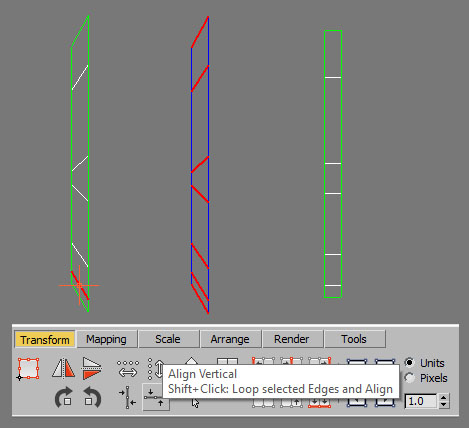
+ NEW Ring and Align Edges command
+ NEW Loop and Ring works on Geometry level when Shift is pressed
+ NEW Check for Updates
- Fixed bug in Select Pelt Seams
- Fixed bug in Unfold Map in Max 2018+
- Improved Align Edges Undo
- Changed Render UV Tile to match the Unwrap modifier nomenclature
- Changed Extended the range of Render UV Tile

Ring and Align

PolyTools3D · 2018-02-13

I'll make sure to add that option.

Ring and Align

milie · 2018-02-09

Hey again,

Could you implement ring & align vertical/horizontal please ?
Right now only loop & align is available (Shift+Button) so maybe a Ctrl+Button could do a ring and align.

Thanks

Attachments

PolyTools3D · 2018-02-08

Thank you headd for the suggestion. It can definitely be done and I will look into it for the next release.

Orient UVs to world

milie · 2018-02-08

Hey,

Is there any way to implement a rotation/align of UV shells based on world rotation ?

This will allow better textures from programs like DDO that base their output on UV shells orientation, for things that require direction like leaks and such.
Even for overlaying a texture in Photoshop will help because all shells will be aligned properly and no weird directions of leaks will be seen on the 3d model.

There are standalone tools that allow this kind of rotation, like "Initial Orientat" in Unfold3D or "Align to Vertical" in UVLayout.

Thanks :)

PolyTools3D · 2017-11-05

Hello Andrew,

There have been 8 updates since version 4.0.3. If you have not received any of the update emails, there must be a problem with your email address.

Please send me an email and I will be glad to assist you.
Thank you!

Andrew Salov · 2017-11-05

Oh thank you! I found it deeply in my spam folder on an old mail which was used for purchasing the product.Now issue is solved

Regards,
Andrew

Update

Andrew Salov · 2017-11-04

Hello!Can`t figure out how to update from 4.0.3 to the last version.On web page I found only demo version.Is it possible to do it or I missed something?
Regards,
Andrew

PolyUnwrapper v4.3.0 Update - Released

PolyTools3D · 2017-10-20

What's New

- Modified code to work with 3ds Max 2018 update 2 that crashed due to some removed Unwrap modifier features
- Fixed Clear Pelt Seams to work in Max 2018.2
- Fixed Select Pelt Seams to work in Max 2018.2
- Fixed Shift Cylindrical Textures to work in Max 2018.2
- Fixed Multi-Stitch to work on Max 2018.2

PolyUnwrapper v4.2.9 Update - Released

PolyTools3D · 2017-08-07

What's New

+ NEW Rotate Shells now supports float values
- Fixed About Dialog not opening
- Fixed bug in Max 2010 for some dialogs not opening

PolyUnwrapper v4.2.8 Update - Released

PolyTools3D · 2017-05-24

What's New

+ NEW Added Support for 3ds Max 2018

PolyUnwrapper v4.2.7 Demo Released

PolyTools3D · 2016-10-05

A fully functional, 30 days Trial version of PolyUnwrapper 4.2.7 is now available for download

PolyUnwrapper v4.2.7 Update - Released

PolyTools3D · 2016-07-02

What's New

- Fixed Rectangle Packer not detecting NaN and Infinite values
- Fixed bug in UV Template Render not rendering correctly stacked modifiers
- Fixed bug in UV Template Render with disabled modifiers

PolyUnwrapper v4.2.6 Update - Released

PolyTools3D · 2016-06-18

What's New

- NEW Advanced UV Randomizer now accepts 0 values when randomizing
- Added Tooltips description to the Randomize UVs buttons
- Fixed Center & Fit nor working correctly with very large UV Shells
- Fixed bug that disabled the Toolbar when "Always Bring Up the Edit Window" feature was on (Max 2014+)
- Fixed Toolbar not always opening when "Always Bring Up the Edit Window" feature was on (Max 2014+)
- Fixed bug in Normalize algorithm not being able to handle very low areas
- Fixed bug when an unsupported model was selected and the Toolbar would remain closed after new selections
- Fixed Toolbar not being destroyed when plugin was unloaded
- Fixed stability issues with PolyUnwrapper Custom Parameters
- Fixed "Used Area" text color in UV Template Render window for Dark themes
- Fixed Render Edge Width not being saved

PolyUnwrapper v4.2.5 Update - Released

PolyTools3D · 2016-06-02

What's New

- Fixed Critical bug in PolyUnwrapper Custom Attributes

PolyUnwrapper v4.2.4 Update - Released

PolyTools3D · 2016-05-29

What's New

+ NEW Added MacroScript for Pack Shells (Rectangle Packer)
+ NEW Added MacroScripts Align Shell to Edge (Closets 90 degrees, Horizontal and Vertical)
+ NEW Added MacroScript for Send UV Selection
+ NEW Added MacroScript for Smoothing Groups From Shells
+ NEW In Max 2010 and 2011 the PolyUnwrapper Toolbar is undocked when maximizing the UVW Editor (same as in Max 2012+)
+ NEW Option to have the PolyUnwrapper Toolbar always undocked
+ NEW Option to Dock/Undock the PolyUnwrapper Toolbar when restoring the UVW Editor
+ NEW Option to remember the PolyUnwrapper Toolbar position when is closed (if undocked)
- Fixed Toolbar size in Max 2017 with UI scale larger than 100%
- Fixed Render Template Window in Max 2017 with UI scale larger than 100%
- Fixed Utility UI in Max 2017 with UI scale larger than 100%
- Fixed MultiStich MacroScript was not working
- Fixed Align Shells in Face mode MacroScript was not working
- Fixed Actions bound to keys or menu items disabling ConstantUpdate option
- Fixed message dialog not being the top most when resetting all PolyUnwrapper Settings
- Fixed Checker Map tiles value not being saved on exit
- Fixed Render With and Height not being saved on exit
- Fixed Settings .INI file not being created if file not found
- Fixed some additional Settings not being loaded properly
- Disabled the Toolbar close "X" button
- Changed Removed "Load at Startup" option from the Utility plugin. It is now included in the Options

PolyUnwrapper v4.2.0 Update - Released

PolyTools3D · 2016-05-25

What's New

+ NEW Added support for 3ds Max 2017
+ NEW Align Shells: Shells can now be aligned to the 0-1 space as a group
+ NEW Added Get Render size from current texture map
+ NEW Settings Manager UI
+ NEW Advanced UV Shells Randomizer
+ NEW Expand Selection By Smoothing Group now works with strict groups too
+ NEW Render custom UV Tile (with UDIM nomenclature)
- Improved Rectangle Packing algorithm
- Improved Align Shells operations run up to 20X faster
- Improved Align Shells undo performs much faster
- Improved Center & Fit by Shell up to 20X faster
- Improved Center & Fit by Shell undo performs much faster
- Improved Match Shells up to 20X faster
- Improved Match Shells undo performs much faster
- Improved Mirror by Shell up to 20X faster
- Improved Mirror by Shell undo performs much faster
- Improved Scale by Shell up to 20X faster
- Improved Scale by Shell undo is now enabled for multiple objects
- Improved Normalize Shells operations run up to 10X faster
- Improved Normalize Shells undo is now enabled for multiple objects
- Improved Rotate Shells operations run up to 10X faster
- Improved Rotate by Shell undo is now enabled for multiple objects
- Improved Randomize Shells up to 10X faster
- Improved Randomize Shells undo performs much faster
- Improved Align Shell To Edge up to 30X faster
- Improved Align Shell To Edge undo performs much faster
- Improved Expand Selection to Model runs up to 3X faster
- Improved Expand Selection By MatID runs up to 5X faster
- Improved Expand Selection By Smoothing Group runs up to 2X faster
- Improved Expand Selection By Smoothing Group now works with faces with no smoothing groups
- Fixed bug in Send Selection
- Fixed bug in Rotate Shells if Snap Angle is enabled
- Fixed bug in Expand Selection By Smoothing Group where it would fail to properly select some Smoothing Groups
- Fixed memory leak in Randomize Shells
- Fixed memory leak in Align Shell To Edge
- Fixed memory leak in Expand Selection to Model
- Fixed memory leak in Expand Selection By MatID
- Fixed memory leak in Selection By Smoothing Group
- Changed moved Render Size out of the render tab to be always visible
- Removed Scale up/down in Rectangle Packer

PolyTools3D · 2016-05-07

@kyle108
I am working on supporting Max 2017.

@Ateruber
The only PolyUnwarpper commands available for hotkeys are the ones listed in the Macroscript, as you already found.

Packing

Ateruber · 2016-05-07

Your packing algorithm is very convenient. I really need your command for pack shells. I have a lot of objects and select each new object, it is necessary to press the button on the package. If you are help me , I would be very grateful to you.

Maxscript

Ateruber · 2016-05-06

How get maxscript commands for PackShells ? Write a list of all commands except PolyUnwrapperActionManager 1-30

kyle108 · 2016-05-02

will there be a 2017 version in the near future?

IPackThat Integration

cptSwing · 2015-04-26

Once IPackThat comes out (http://store.steampowered.com/app/363020/), I'm thinking a link from Polyunwrapper would be nice.. sort of like the various "Send To" buttons, or how Textools used to hook into "Roadkill".

IPackThat supports commandline stuff, from what I've read.

PolyUnwrapper v4.0.3 Update - Released

PolyTools3D · 2015-04-23

What's New

+ Added support for 3ds Max 2016
- Fixed minor bug in UV Loop (3ds Max 2010)
- Fixed bug in Normalize when invalid faces are detected

Invert scale works great!

stealthx · 2014-09-23

:)

Nice Tools!

Koriak · 2014-09-06

Great Tools, you've done a nice job! It works perfectly on 3ds Max 2014 64. Autodesk should learn from you, they should make useful updates on tools like this, independent developers like you are the ones that make real improvement to the software, thank you!

PolyUnwrapper v4.0.2 Update - Released

PolyTools3D · 2014-08-08

What's New

+ NEW Added option to invert scale factor
- Improved Toolbar Startup
- Fixed critical bug in VFB Zoom
- Fixed bug in VFB not updating zoom value when using mouse buttons to zoom
- Fixed bug in calculating the Used UV Area
- Fixed rare bug that would cause an endless loop at startup

save scale

stealthx · 2014-06-12

Yes, it works, thank you. I forgot the save function.

stealthx · 2014-06-11

I'm very happy with multi-stitch function! These kind of advanced core functions are 100x better than full automated solutions which often don't work at all.

I have small suggestion about scale button. It is set to 100% by default. In case you could set it to 90% then I could just select poly and hit scale button a few times until it will fit my needs. New change would be alt+scale button could execute "opposite" +10% to make poly bigger. I hope you understand, it could speed up work.

Last question is about shortcut Group. Now PolyUnwrapper is under "Group: Main UI" and therefore i have conflict with other shortcut for modeling. Would it be possible to have PolyUnwrapper under "Group: Unwrap UVW"?

PolyTools3D · 2014-06-11

Hi @stealthx,

I am glad you find the Multi-Stitch function useful.

Thank you for these ideas, I will look into them and see what can be implemented. The "invert scale" feature can be done for sure.

All default parameters (if I am not missing something) can be changed. Al you need to do is to set the values you would like (this includes all tabs) and then go to Settings and click on "Save All Settings". I know, it is confusing and managing all the default values would ideally need a custom UI, which I am probably going to develop in the future.

You could also edit the default values in the "polyunwrapper.ini" files if you would like. The Scale value I in the [scale] section "ScaleFactor".

Projection

Vadim Sadykov · 2014-05-15

You can also make a diffuse map(mask) with high poly?

PolyTools3D · 2014-05-15

@Vertune,

I am not sure to correctly understand your question.

If you are wondering what kind of UV Templates PolyUnwrapper can render, you can download the Demo version. All the render types are enabled.

If you are talking about the amount of polygons it can render, I would say if you can open it with the UVW Unwrap modifier, the PolyUnwrapper should be able to render it. The largest model I have tried is 400K triangles, and it renders whiteout any problem.

Thank you!
Jorge

asymptote · 2014-05-14

Autodesk are you watching ?

THIS is how you develop a tool!

Awesome update Jorge, congrats.

PolyUnwrapper v4.0.1 Update - Released

PolyTools3D · 2014-05-14

What's New

- Fixed bug in Multi-Stitch

Multi Stitch

stealthx · 2014-05-06

Take my money! You are the best.

PolyTools3D · 2014-05-14

Thank you @stealthx, I am glad you like the new features.

PolyUnwrapper v4.0.0 - Released

PolyTools3D · 2014-05-04

What's New

+ NEW Multi Stitch. Stitch Multiple Shells at once
+ NEW Packing algorithm and tools
+ NEW Tool for matching the Shells Width and Height
+ NEW Grid Spacing and Show/Hide Grid button
+ NEW Render Offset UVs
+ NEW Cycle Checker map
+ NEW Cycle Freeform Snap Pivot
+ NEW Grow Geometry Selection
+ NEW Shrink Geometry Selection
+ NEW Added support for localized versions (Japanese, Korean, Chinese)
+ NEW Added support for 3ds Max 2015
+ NEW PolyUnwrapper Toolbar will now automatically undock when Unwrap Editor is Maximized (Max 2012+)
+ NEW PolyUnwrapper Toolbar and other windows now keeps on top of the Unwrap Editor
+ NEW Render mode Shells Bounding Rectangle
+ NEW Added Render Open Edges

- Improved Multiple Shell Edges detection algorithm in Align to Edge tool
- Improved Validate geometry at startup
- Improved Added option to switch to Dynamic Color Palette if Color Palette file is missing
  too many selected edges would lead to a very long operation
- Improved Settings Manager
- Improved Render Settings now save the Render Color Mode correctly
- Improved PolyUnwrapper Toolbar move/resize when docked in in 3ds Max 2012 and above
- Improved Docking/Undocking mechanics now works better.
- Improved Support for all localized 3ds Max versions is now much stable
- Improved compatibility with Windows 8
- Improved Added Undo for Mirror with multiple selected objects
- Improved Now Unwrap Editor maximizes to full screen (if it was in full screen) when
  the PolyUnwrapper Toolbar is undocked (Max 2010-2011)
- Improved the VFB is now much more efficient and render much smoother with specially with very large images
- Improved VFB window will now change to normal state when rendering, if it was minimized
- Improved Added Hand and Zoom cursors to the VFB
- Improved VFB can now zoom IN-OUT using Ctrl+Left/Ctrl+Right mouse buttons
- Improved Edges render faster now
- Improved Used Texture Area is always calculated and displayed in the VFB when rendering faces
- Improved Algorithm for rendering selected edges runs up to 50X faster for 100K edges and uses around 50% less memory
- Improved Send UV Selection (Edges) runs up to 220X faster for 50K edges and uses around 50% less memory
- Improved Part of the UI has been redesigned
- Improved Uninstalling will now also remove the PolyUnwrapper Macros

- Fixed VFB Get Used UV Area was not reporting accurate values in some cases
- Fixed Bug in Render color palettes dynamic generator
- Fixed Select Open Edges algorithm where it failed to find all OP in certain meshes
- Fixed wirecolors where not restored if Subobject Level was 0 and node was deselected
- Fixed wirecolors where not restored if nodes were deleted
- Fixed Enlarge/Shrink brush size buttons where enabled all the time
- Fixed UI Elements not being disabled in subobjectlevel 0
- Fixed Settings were not restored correctly to default values
- Fixed Bug in Send UV selection to modifiers
- Fixed Render parameters where not keeping their values when docking/undocking the Toolbar
- Fixed Bug in Set Brush Size dialog not being able to retrieve the actual size
- Fixed VFB window will now open at a fixed size if rendered template is too small
- Fixed Memory Leak in Send UV Selection to Poly
- Fixed bug in Render Color Palette where the first color of the palette was never used
- Fixed several minor bugs

- Changed Disabled Stitch in Face mode
- Changed Align Macros are now unified
- Changed initial countdown screen for unregistered versions, will now appear only once per 3ds Max session
- Changed EULA

- Removed Save/Load UVW buttons
- Removed DialogMonitorOPS

PolyUnwrapper v3.3.1 - Released

PolyTools3D · 2014-03-27

What's New

Minor update: The popup countdown screen for unregistered version will now appear only once per session or until you Unload/Load PolyUnwrapper.

PolyTools3D · 2014-02-20

@Clanker=Noors good to know.

As far as the crashes, they are related to the geometries I have for testing. I later tested on other models and they didn't crash.

Noors · 2014-02-20

Ok I've expressed myself terribly. Btw I'm Clanker on Cgtalk, and Noors on Polycount, if this wasn't clear.
The scale question has nothing to do with open edges. My mail regarding open edge was for an other part of the script.

As for the scale, yes, i need to compare UV and GEO distortion.
Yeah, tbh i've just used his GetClusterUvScale, i have a better function to select element faces, and i didn't encounter any crash. Some division by 0 when a mesh face has 0 area (3 aligned points, but no crash.

Anyway, i was just checking if there was a way to do it in polyunwrapper.
Thanks again for your time.(I've just bought an extra polyunwrapper licence as compensation)

Noors · 2014-02-19

I took a look at the cgtalk thread. But how would you go from your foundEdges array (array of 2 geo vert) to UVW edges ?

PolyTools3D · 2014-02-19

@Noors,

You mentioned you wanted to find the UV Open Edges to measure their length and that you would use that information to re-scale the UV Shells. Besides I don’t see how you would accomplish the scaling, you do not need to select the Open Edges, and the code I have published has enough information to measure their length.

Now, as I mentioned earlier, I don't see how measuring the Open Edges length differs from measuring the Geo/UV area. In fact, I believe that measuring the Area would be much faster. Even though, I do not understand how you would use that information to scale the UV Shells.

The only way I see it could be done is to calculate the distortion between GEO and UV faces, average them by UV Shell, and then use that information to scale the UV Shells.

This method is not accurate at all, and it relies on how much distorted the unwrapping is. So, the better the unwrapping the better re-scale you could achieve.

The link you posted has a code that's supposed to do this. I've tried it with five 5-10K different models and it crashes Max in all cases. Finally I succeeded with a default teapot and it seemed to do a decent work. It is very buggy and needs a lot of optimizations, but it is a good start for your own algorithm in my opinion.

Noors · 2014-02-19

Hey thanks for your answer.
I'm not looking at an area ratio as i don't perform a uniform scale. I'd like to "unscale" an element that has been scale in 1 direction, and even rotated. It has nothing to do with open edges, btw, just another subject.
Have a look at this
http://devmaster.net/posts/14114/triangle-uv-texel-aspect-ratio
and his GetClusterUvScale function.
He compares the length ratio between uv edges and mesh edges, parsing all faces, (which isn't probably required, as all faces of an element should have the same scaling ratio.)
This scripts works, even if slow with some flows. But i'd never be able to code that anyway.

Hey just sent you a mail !Is

Noors · 2014-02-13

Hey just sent you a mail !
I'm actually doing a script but was wondering if i missed something here.
Is there actually a way with your tool to rescale a UV shell so it gets a 1/1 texel ratio ?
Let's say the uvs are correct, but stretched on 1 axis (nurbs import)
I compare UV/mesh edges length ratio, then rescale the uv element on 1 axis.
Thanks !

UV Scaling

PolyTools3D · 2014-02-16

@Noors, there is no tool in PolyUnwrapper to do this, and I am not sure how would you accomplish it.

In the code you have, what would be the difference between measuring the Open Edges ratio and total faces area ratio?

Regarding the code to select the Open Edges, I have published a fast and efficient way to work with the UVW Open Edges at CGSociety UVW Seem with GW

You can find some more information in other scripts I've published that build a mesh from the UVW and also can split the source object into elements from the UVW Shells Retopology from the UV mesh

+100

barigazy · 2014-02-16

You can find some more information in other scripts I've published that build a mesh from the UVW and also can split the source object into elements from the UVW Shells Retopology from the UV mesh

Hey Jorge,
You showed best method in the world for that. Hats off.
U are really mastered max unwraping technique like Bruce Lee Kung-Fu :)
Back then I really like LSCMUnwrap tool but because of advanced method that it use for
unwraping. Too bad that is not compatible with new versions of max (max2012+).
That's why I like more scripts then plugs although these are slower especially for unwraping and mesh creation. I not want to disrespect Unwrella and Xrayunwrap plugs which both produces very nice final result.

Anyway ... when I have some free time I will integrate your algorithm in Marvelous Tool and add a some new features. Of coure all credits are for you :)
Don't you ever stops with awesome work :)
Cheers!

Thanks

PolyTools3D · 2014-02-18

Thank you so much Branko for your kind words and for including that script in your tool.

updates

cptSwing · 2014-02-10

Well, that's great to hear! Stoked for your next upgrades :-)

Re: Suggestions for new features

PolyTools3D · 2014-02-09

@cptSwing
Thank you for your suggestions and support.
I definitely have plans to include some of the features you mention as well as others I already have under development.

Suggestions for new features

cptSwing · 2014-02-04

Hey man, been using Polyunwrapper (free, as well as paying for a couple of licenses at work) for quite some time now and loving it.

I do have a couple of suggestions for future versions, maybe you're running out of stuff to implement? ;-)

Basically for now, I'm still using TexTools and Polyunwrapper side by side, since there are are still a couple of functions that TexTools provides and I need regularly.

- The ability to set your transform pivot point to the corners of the shell's bounding box.
- various rendering features (simple AO / Lighttracer maps, Vertex Color baking)
- I love the quick 'checker material switch' and 'flat/shaded toggle' buttons TexTools has
- In a game artist's pipeline, the function to set smoothing groups per uv shells is important (for normal map baking)
- The function to flatten your mesh to it's corresponding UV's can be useful

Not related to TexTools, but potentially all kinds of awesome: a ffd modifier for UV shells. Not sure how easy this'd be, obviously.

And so on. This is by no means meant to diss Polyunwrapper - I wouldn't want to miss it nowadays.
I would, however, like to eliminate a tool suite from my inventory that hasn't been updated in quite a while and mostly does the same things (just not as well), ie uninstall TexTools.

Either way, thanks for your great work so far, can't wait to see what's next.

@cptSwing

milie · 2014-02-05

"- The ability to set your transform pivot point to the corners of the shell's bounding box"

This request is already implemented in 3dsmax (i use 2012); you can find it in "Unwrap UVW" group, the commands are called "Pivot Snap..."
They work nice with the NumPad keys.

Hope it helps.
10x

Re: Pivot Points

cptSwing · 2014-02-05

Hey headd,

thanks for the tip - indeed I didn't know that! Strange how this seemingly precisely implemented function isn't integrated into the UI anywhere. Maybe PolyTools3D can oblige? :)

PolyTools3D · 2014-01-21

@stealthx:
Will try to get it done for next release.

@headd:
Looks like a good feature and it shouldn't be too hard to implement, so I'll see if I can get it implemented for the next release.

Thank you guys!

Feature request

milie · 2014-01-21

Hey, long time no see :)

1. During my work with the UV editor i stumbled multiple times with the situation described below.
Let's say you have multiple shells that would want to map them to a specific dimension(width, height) within a texture, while preserving aspect ratio. You'd have to uniform scale each and every one to match the specific dimension. If you have LOT's of shells, it's madness to do it by hand :)

So, is there any way to add an option to do this? Rescaling all shells(or the selected ones) to match the minimum/maximum/average bounding box width/height among them?
In some cases, if you can ignore some small stretching or texel ratio differences, a tool to average bounding box and match it's size for all shells is useful.

I've attached a image to better illustrate what I've said. The shells are not overlapped just for clarity.

2. Also, can you merge shortcut functionality for aligning? Right now you can assign shortcuts separately for vertex, edge and face.
I'd want to use the same align shortcut for all sub-objects.

That was it. Keep up the awesome work and i hope to see a new feature full version soon :)

Thanks!

Attachments

Great update

stealthx · 2013-12-11

Do you have some news concerning "Multiple selections Stitch" (multi shell stitch). It would be instant buy feature for me.

PolyUnwrapper v3.3.0 - Released

PolyTools3D · 2013-10-03

What's New

+ NEW Added Render Model Elements
+ NEW Added Render by Smoothing Groups
+ NEW Added Select Longest Shell Open Edge
+ NEW Added 12 MacroScripts for Aligning Functions
- Improved find open edges
- Improved icons handling
- Improved Select Open Edges: up to 40% faster
- Improved Select Longest Shell Edges algorithm: up to 600% faster
- Improved Expand Selection by Smoothing Group: up to 25X faster
- Improved Expand Selection to Model Element: up to 20X faster
- Improved Get Used Texture Area algorithm (huge speed difference)
- Improved Rendering Plain: up to 35% faster
- Improved Rendering Model and Mat ID: up to 110% faster
- Improved VFB performance and memory usage
- Fixed memory leak in Expand Selection by Smoothing Group
- Fixed memory leak in Select Longest Shell Edges
- Fixed error in path names preventing PolyUnwrapper to load
- Changed Get Used Texture Area was moved to the VFB
- Added error check to the autoloader

I would like to give a big thanks to asymptote, who helped me debug the issues with the path names down to the bone.

Stitch connected edge

Noors · 2013-09-06

I have another request. Not sure you can do smthing about it, but as you did a good work on your stitch tool already.
Do you think you could make possible to stitch 2 edges that are already connected on 1 vertex ? Actually it's not possible, and i have to switch to weld point to weld the last point.

And i'm gonna buy a licence :)

PolyTools3D · 2013-09-07

Thank you for your support Noors.

"..Well, the "issue" could also happen with triangulated poly. I have those a lot for low poly stuff..."

Yes, that could be too.

Regarding the Stitch function, it should also work as you said. The current implementation is not the final one.

I have a testing algorithm that Stitch the vertices of the same shell and then Stitches multiple shells to the selected one. But it is too buggy at the moment.

Install errors - 3dsmax 2011 x64

TitusLVR · 2013-09-06

Hello!
I have some errors when i insall v3.0
http://imgur.com/a/CT3b2#0

But older version works fine v 2.5.1

Many thanks

PolyTools3D · 2013-09-06

Hello Titus,

It seems that for some reason the old version is not completed removed before the new version begins installing.

Please try the following:

1. Close 3ds Max (important!)

3. Delete the PolyUnwrapper folder
"C:\Users\**YOUR_USER_NAME**\AppData\Local\Autodesk\3dsMax\2011 - 64bit\enu\scripts\PolyUnwrapper"

4. Delete the PolyUnwrapper loader
"C:\Users\**YOUR_USER_NAME**\AppData\Local\Autodesk\3dsMax\2011 - 64bit\enu\scripts\startup\polyunwrapper_autoload.mse"

5. If you have an Antivirus running, temporary disable it.

6. Make sure that you have Read/Write permissions on this folder:
"C:\Users\**YOUR_USER_NAME**\AppData\Local\Autodesk\3dsMax\2011 - 64bit\enu\scripts\"

7. Start 3ds Max and install the new version

Please let me know if this worked.
Thank you!

TitusLVR · 2013-09-10

Thanks for your answer But it didn't help me. I can't change folder options (R/W restriction) because/maybe they are administrative options (this PC on my work) :(
Many thanks it's good script.

PS: It would be great if you write some otions for installation:
1 to c:\Users\....
2 to C:\ProgramFiles\Autodesk\...

:))) tnx!

Regarding the .net errors

cptSwing · 2013-09-05

Sorry for getting back to you so late, the problem basically vanished when I reinstalled a fresh version of 3DSMax '12 on top of a clean Windows, the reason for that being a very likely corrupted Max install. So I'm happily using your script again - thanks for the support!

Noors · 2013-09-05

Hey
Would it be possible to add an option (shift+click) on the "select longest sheel edge" so the edge is only searched in the outline of shells ? I'd use this for auto aligning all shells along their longest edge. If i have a rectangle made of 2 triangles, the longest edge will be the diagonal, and i'm not interested in aligning a rectangle along its diagonal, but on one of the border. I'm beeing lil messy here but i think u get the idea. Thanks !

PolyTools3D · 2013-09-05

Hey Noors,

Yes, it would be possible. If your model is a mesh, it's likely an inner (invisible) edge will be the longest one in a shell, although not always.

If your model is a poly you won't have this problem. But it is a good idea to look for the longest edge among the open edges only. Perhaps it could also be to look just in the selected edges.

I will see if I that can be added for the next release.

Thank you!

Noors · 2013-09-06

Ok cool ! Yeah that could be coupled with select open edges and then a "only search in selected edges" tool. Well, the "issue" could also happen with triangulated poly. I have those a lot for low poly stuff.

.Net errors

cptSwing · 2013-08-22

Hi man, thanks for the quick reply! I'll check at work tomorrow, it might be an AV program. I'll also check that dll's file properties. Your script works fine on my private machine and I'd love to use it at work as well ;)

.Net errors, script not installing (win7x64, Max12x64)

cptSwing · 2013-08-20

Hey, there seem to be some installation errors in Max '12.

After finishing installation, there's a Maxscript rollout error, 'openUtility needs RolloutClass, received: undefined'

After having installed, when I load Max, the following is being spit out:

Error in Anonymous Codeblock - C:\Users\1103\AppData\Local\Autodesk\3dsMax\2012 - 64bit\deu\scripts\startup\polyunwrapper_autoload.mse; Position: 633; Line:: 6

there is also a runtime error where dotNet complains that there's been an attempt to write to protected memory.

I'm left with a Polyunwrapper folder in Users/.. but nothing in Max.

Any ideas?

.Net errors

PolyTools3D · 2013-08-20

Hi cptSwing,

Thank you for reporting this. I am looking into this the issue, but so far I haven’t been able to reproduce it.

It looks like something in your system is preventing to load the “polyunwrapper.dll” library.
Do you use an antivirus, and if so do you have real-time protection enabled?

In case you are using an antivirus, and it is flagging the library as unsafe, you can safely allow it to read/write, as the only thing PolyUnwrapper needs to have is read/write access to the installation folder. It does not read or write data outside that folder.

Shotcuts...

milie · 2013-07-31

Is there any way to map all the tools? I'm interested especially in the align tools.
I have some scripts for aligning the vertices up,down,etc. but don't work on multiple unwrapped objects.
I noticed that this uberscript of your does that and even works with edges and polys. I'd like to use yours but i can't acces them to bind shortcuts :)

milie · 2013-07-30

I work with 2012. It's all clear now :), thanks.

milie · 2013-07-29

Soft selection is grayed out, no matter what i select or do. Any idea ?

PolyTools3D · 2013-07-29

Hi headd,

What Max version do you use?

I have disabled the soft selection for Max 2012+ because they are already integrated in the Unwrap editor, and I thought it would be confusing.

Other tools are also present in Max 2012+ but PolyUnwrapper may offer some different settings.

pedroamorim · 2013-07-14

Hi!

I'm having trouble outputing an image that shows the uvshells with diferent colors for each model part.

What am I doing wrong?

PolyTools3D · 2013-07-14

Currently, it is possible to render the different selected models, but rendering the elements of each model is not yet implemented.

one click stitch

stealthx · 2013-07-04

Nice script! I have an idea request how to speed up basic stitch function. It would help a lot. Would it be possible to make stitch function working even if I stitch more than one group of polygons? Sometimes I have 60 or more pieces to stitch and only way to have best result is to stitch one by one by hand. Would it be possible?


PolyTools3D · 2013-07-04

stealthx,

Thank for your suggestion. I have it actually under development.

The reason I did not release it in this version is because it is not working as it should, but I got several request to include a Stitch feature, so I included the basic version. Hopefully I will get the multiple selections Stitch for next release.

The algorithm I am working on does not support multiples shells though, but you can select several edges in one shell and stitch them at one.

PolyUnwrapper v3.0.0 - Released

PolyTools3D · 2013-07-04

What's New

+ NEW Change in License Terms
+ NEW Align Shell to Edge for multiple selections
+ NEW Align Shell to Edge Horizontally or Vertically
+ NEW Added Shell Position Randomizer
+ NEW Added Shell Rotation Randomizer
+ NEW Added Shell Scale Randomizer
+ NEW Added Scale Selection around Pivot
+ NEW Added Scale Selection by Shell
+ NEW Added Rotate around Pivot
+ NEW Extended Tooltips description
+ NEW Turn Tooltips on/off
+ NEW Added verify the model Transform Matrix Scale
+ NEW Disable toolbar if SubobjectLevel is 0
+ NEW Paint Selection Mode
+ NEW Integrated Soft Selection
+ NEW Toolbar should now open in Max 2012+ localized versions (French, German)
+ NEW Now Edges are joined when Render Selected Edge
+ NEW Stitch
+ NEW Select Shell Longest Edge
+ NEW Dynamic Color Palette for rendering the UV Template
+ Added error checking for MacroScripts if SubobjectLevel is 0
+ Added check if DialogMonitorOPS is disabled by other script (Max 2012+)
- Fixed Editor slow down when switching modes
- Fixed some errors in the Help
- Fixed bug when open or create a new scene while PolyUnwrapper was opened
- Fixed several minor bugs
- Fixed bug in Render UV Template where dead vertex could cause a crash
- Modified some UI elements
- Improved icons handling and PolyUnwrapper Toolbar load times (dock/undock)
- Improved Render Selected Edges up to 2X faster in certain conditions
- Improved Quick Report
- Improved Get Used UV Area. Now returns accurate values for all texture sizes
- Improved Performance and Memory management of the VFB
- Improved UV Template rendering times, between 2x and 4x faster than v2 (over 10X faster in some scenes)
- Moved most of the code to local scope
- Dropped support for Max 2008 and 2009

Autodesk bug - shortcuts

stealthx · 2013-05-19

The bug related with hot keys in the unwrap window is old at least three years. I used to use spacebar to "Select By Element UV Toggle" a lot. But today in three last versions of 3ds it works only if you are out of unwrap window focus (click in the 3d viewport).

This bug as a present from autodesk slow down work a lot! Maybe everybody should report this to the autodesk and maybe in next update or next few years it will work again.

Thank you for such a great script!!!

trebor777 · 2013-06-07

I had the same Issue, but it's not related to this script.
Basically you just have to Assign another key to this command. Sadly Space doesn't respond well for shortcuts.

milie · 2013-05-08

Great, saving settings and macro shortcuts are working :)

- A small problem, though, when I decided to assign rotate/mirror to ctrl+arrows.
The ctrl+up/down arrow doesn't work here, no action was recorded, as if nothing happens. Also happens if assing the script to plain up/down arrows, no modifiers (eg. ctrl)

- Another thought. Right now, the rotation is based on the selection center, not the actual pivot, because if i move the rotational pivot to a corner, the shells will rotate from the selection center.

Otherwise, congrats for the script. It's a must have.

Up/Down keys issue

PolyTools3D · 2013-05-09

Hi Headd,

I have run into this same problem and also received a few emails reporting the it.

It seems it is a Max related issue and has to do with how Max handle the Tab Controls, at least that is how it looks to me.

If you make the selection in the viewport instead of the Unwrap Editor, then the keys works fine, but as soon as you focus (click) on the Editor or a rollout (even in the Unwrap Modifier panel) Max takes control of the Up and Down keys and use them to tab between the different controls, similar to using the Tab key.

Unfortunately I do not see a fix for this, and would be glad to know if someone has a workaround.

Regarding the rotation, the current function does rotate around the center of the Shell, but what you mention makes more sense, so I will see if I can modify it to rotate around the pivot, and perhaps keep the rotation around center hocked to Ctrl key.

Thank you!
Jorge

Pixels per metre

mawilbolou · 2013-05-03

Hi there...

Cool script..

It would be great to select a bunch of geometry, apply the unwrap modifier,
Set the pixels per metre (EG 128 PPM) and unwrap it to that scale...
Is that possible with PolyUnWrapper?

If not it would be a amazing addition! and every game artists dream!

Cheers

Pixels per metre

PolyTools3D · 2013-05-03

Hi mawilbolou,

PolyUnwrapper does not have such a feature built in, but I have another tool that does what you are looking for, and also has a few other functions. Check it out here:

http://www.scriptspot.com/3ds-max/scripts/advanced-uv-normalizer

Note that the Texel Density is based on the texture size, so if you are using different textures sizes you would need to select the models separately. But you can select a group of models that share the same texture resolution and normalize all of them at once.

Jorge

asymptote · 2013-04-19

"Did you look under the PolyUnwrapper category?"

Weird, I don't see that either, I always thought it was controlled via the Maxscrit/Utilities dropdown in the Utilities Tab.

Just checked.....if you move ...

C:\Users\xxx\AppData\Local\Autodesk\3dsMax\2014 - 64bit\ENU\scripts\PolyUnwrapper\scripts\polyunwrapper.mcr

to....

C:\Users\xxx\AppData\Local\Autodesk\3dsMax\2014 - 64bit\ENU\usermacros

then you should see the PolyUnwrapper Category, I didn't even realize they were their either.

cool :)

hope this helps.

PolyUnwrapper v2.5.1 - Update

PolyTools3D · 2013-04-27

What's New

- Fixed MacroScripts not working in Max 2012-2014
- Fixed PolyUnwrapper Settings not saving properly

Unfortunately there is no fix yet for the slow down when Gamma/LUT is enabled or using 4k or larger textures in viewport.

Thank you all!
Jorge

asymptote · 2013-04-19

"The macroscripts do not appear. Neither the category. I've updated, uninstalled, re-installed, to no avail."

Utilities Tab :)

Thank you guys for the feedback!!

PolyTools3D · 2013-04-19

@wdw89
Thankfully I was able to reproduce the bug you mention. As far as I could see, it only happens when switching between modes and if you have Gamma/LUT enabled. I could not see any general slowdown in other areas, but I will try to fix it soon.

@headd
Regarding the MacroScripts, I can’t reproduce what you are experiencing. The new MacroScripts are located in the same file as the MacroScripts that open the PolyUnwrapper toolbar “polyunwrapper.mcr”, so I would think if the toolbar is working, the MacroScripts should be visible. Did you look under the PolyUnwrapper category?

The other issue is something I have to do a quick fix. Actually, the “Save All Settings” should not close the Settings Dialog, but display a message instead, something like “Settings Have Been Saved”. The way they are working now is annoying and confusing.

Hope I can release a quick fix soon.

Jorge

milie · 2013-04-19

Hey

Thanks for the update.I have two annoyances:

1. The macroscripts do not appear. Neither the category. I've updated, uninstalled, re-installed, to no avail.

2. The "Save All Settings" button does not save the desired settings. Just closes the "Settings" window.
If i hit "Close" directly, the settings are saved.

Thanks.

asymptote · 2013-04-16

2010, 2013 & 2014 64, no issues at all.
Thanks for the update, I'd forgotten how bad the default unwrap UI was, I've been testing 2014 and the unwrap is an alien landscape without this script :)
I don't know what the gonks at AD are looking at, but hey-ho, god bless scriptspot and the talent it contains.

v2.5 becomes slow in 3ds max 2013

wdw89 · 2013-04-16

Hi, after updating the script, the UV editor window shows slower than before. And sometimes switching sub-object mode become slower, too.

v2.5 becomes slow in 3ds max 2013

PolyTools3D · 2013-04-16

Hello wdw89,

There is no reason why version 2.5 should slow down the Editor as the code has not been changed too much.

Please try:
1. Uncheck the “Use Fixed Wire Color” in PolyUnwrapper Settings.
2. If the above fails, unload PolyUnwrapper and see if the Unwrap Editor is still slow.
3. If the above fails, uninstall PolyUnwrapper, restart Max and see how the Unwrap Editor is working.

Was the issue resolved?

Thank you!

wdw89 · 2013-04-17

Hello, I have tested. I uncheck the“Use Fixed Wire Color”, I also reinstalled the script.
I use some big textures (up to 4k and psd files) in my scene (about 125000 polys), v2.5 works slower than v2.4 when I switch sub-object mode. And sometimes there was a window show in the Windows task bar, then it disappeared quickly.
The editor window shows faster than yesterday, but switching sub-object mode is still slow.
I think you can use some 4k textures to test. And v2.5 works fine in no texture scene.
There is no problem with v2.4. And your script helps me a lot, thank you.

asymptote · 2013-04-09

I just tried this in Max 2014, and am sorry to report it doesn't work :(

I know it's early days but is there anything I can to to fix this? I'm totally lost without PT in the unwrap window, I can't figure out what to do as they are in encrypted files.

I get this error when trying to run the polyunwrapper.mse directly.....

-- Error occurred during fileIn in #C:\Users\ooo\AppData\Local\Autodesk\3dsMax\2014 - 64bit\ENU\scripts\PolyUnwrapper\scripts\polyunwrapper.mse; line number: 284
-- Error occurred in anonymous codeblock; filename: C:\Users\ooo\AppData\Local\Autodesk\3dsMax\2014 - 64bit\ENU\scripts\PolyUnwrapper\scripts\polyunwrapper.mse; position: 12432; line: 284
>> MAXScript FileIn Exception:
-- Compile error: Duplicate struct member name:  value <<

and I get this error when trying to repair/uninstall.....

-- Error occurred in unloadPolyUnwrapper(); filename: C:\Users\ooo\AppData\Local\Autodesk\3dsMax\2014 - 64bit\ENU\scripts\PolyUnwrapper\polyunwrapper_utility.mse; position: 10566; line: 324
--  Defined in encrypted script
--   called in unloadPolyUnwrapper(); filename: C:\Users\ooo\AppData\Local\Autodesk\3dsMax\2014 - 64bit\ENU\temp\polyunwrapper240\installer_v1.1.mse; position: 3915; line: 100
--  Defined in encrypted script
--   called in btn_install.pressed(); filename: C:\Users\ooo\AppData\Local\Autodesk\3dsMax\2014 - 64bit\ENU\temp\polyunwrapper240\installer_v1.1.mse; position: 10161; line: 311
--  Defined in encrypted script
>> MAXScript Rollout Handler Exception:
-- Unable to convert: undefined to type: Boolean <<

Anyway, just a heads up...thanks.


PolyUnwrapper v2.5 - Update

PolyTools3D · 2013-04-14

Thank you guys for your continue support and ideas.
Version 2.5 is out (small update)

What's New
+ NEW Added support for 3ds Max 2014
+ NEW Use fixed color for wire
+ NEW 23 MacroScripts (for Hot Keys)
- Fixed Crash with certain models when selecting Open Edges
- Fixed bug in About dialog
- Fixed icons bug when Gamma/LUT Correction is enabled


SIL · 2013-03-20

Amazing script! Like a breath of fresh air! Everything is simple and logical. Thank you!

My wish for the following versions: Hot keys. Support groups embedded in 2012 or create their own groups for functions rescale clusters. Will be a good addition the window of parametric moving, rotating, scaling.

Good luck in development!

Enable UV Soft Selection

PolyTools3D · 2013-01-10

I have uploaded a small script that will allow you to work with Soft Selection without unloading PolyUnwrapper.

At the moment there are no Macroscripts, but I will try to create a small installer so you can hook them to some key or menu.

Soft Selection Toolbox
http://www.polytools3d.com/polyunwrapper/

 Thank you!

Additional area

lakimakromedia · 2013-01-26

Hi, great script ! Could You add second area in "Transform" window for define a "Units"? I mean there should be two areas, one for "Units" and one for "Pixels", it would be more usefully - I think so ;). For example, we can use one "page" as "formula", so when we select some faces etc we could simple past into formula and then move it onto another pager using "Units", but after change page in different way, we could also change grid, using "Pixel", but for 8 grids, we must type-in 0.125 < and this take some time, when we must do this many times, it gets boring :/.

http://i.imgur.com/dtqgG8Q.jpg

Sorry for my English.

Ragards
L.

Two little additional tools

PolyTools3D · 2013-01-10

Hi guys,

I have uploaded two prototype helper tools featuring some functions I would like to integrate to PolyUnwrapper in the future.

As they are not final versions, many bugs are expected to occur, including script crashes, so use them with care and try them with testing models before you decide to use them in production.

They are standalone Script and can run them by dragging into the Max Viewport or from MaxScript Menu -> Run Scrip.

Normalize UVs
This is an extension of the Normalize found in PolyUnwrapper and it allows you to use custom Texel Density to normalize the UV Shells. So you can pick up the Texel Density from one model and use it in another model as well as manually modify the Texel Density and Texture Size.

Send UV Selection
This little tool will send the current selection from the Unwrap UVW Editor to the Base Model or Edit Poly Modifier. The selection can be Vertices, Edges or Faces, and it supports only Editable Poly at the moment.

There is no additional help for these tools, so you will have to experiment a little. Please don’t hesitate to send me an email or leave a comment with ideas, questions or bugs.

Both tools should run fine in Max 2008 and above.

http://www.polytools3d.com/polyunwrapper/


Thank you all!!

asymptote · 2013-01-08

Approaching 14,000 reads and only 8 votes, it's a damn shame, this is top of the list in anyone's book.
I'd still love to see a video showcasing the functions, this tool has totally transformed my approach to uv-ing, but I bet I'm still missing a trick or two :)

PolyTools3D · 2013-01-08

It might be me clicking over and over again just to increase reads counter :-). After all, perhaps the tool is not as useful as we think it is.

Regarding the videos, I too would like to create them, but I actually have not much time right now, and the little time I have to work on these stuff, I am trying to add new features to PolyUnwrapper and also finish another tool that will allow to copy UVs from one model to another (with same topology) and also between model elements.

Thank you for your words, I even didn’t know how many view this script had until I read your post.

br0t · 2013-01-07

haha okay, however in my test it worked alot better :D

PolyTools3D · 2013-01-06

Thank you so much guys for all your comments and ideas.

@lordraidis
At the moment I have no plans to add the Soft Selection functions, but may include them in the future. Remember you can always unload PolyUnwrapper and get the 3ds Max tools at any time if you need to work with Soft Selections.

@mexico
Great set of features. 1 and 2 I thought to implement, although 2 is quite hard.
Would you mind elaborating a bit more on the last point “Snapshot UV grid in clipboard”, because I don’t understand what it would be?

@EricChadwick
This is in fact a pending task, which I have been working on some prototypes, but could not get it working as efficiently as I want. There is a function in Max to get the Selected Geometry Edges from the UVW Modifier, but it is broken since Max 2009 (perhaps in 2008 too), so the whole task needs to be implemented via MaxScript, which makes it painfully slow. So I am in the way to find a workaround that works fast and reliable.

@br0t
I am actually using the standard 3ds Max Pack algorithm.

TexTools

cptSwing · 2013-03-23

Hey man, regarding EricChadwick's request for smoothing-by-uv-shell, maybe you could check out how renderhjs did it in TexTools, there's an option under "Tools" (?) which I use all the time.

br0t · 2013-01-06

This is a nice addition to the existing UV tools, I really like the improved "Pack UVs", did you use some kind of special arrangement algorithm or just figure out something yourself? cause I think thats an interesting field :)!

Aditional futures must have :)

mexico · 2012-12-20

1) Ofset scaling?
2) Tweaking padding between the UV elements/shells, (with checkbox "ignor overlaping) If i have already done UV, but i need fix the padding because of decreasing texture resolution. Its too boring to doing this manualy, as for me :)
3) Quick AO (using own geometry)
4) "Referenced" AO (using as reference highpoly projected on lowpoly)
5) Snapshot UV grid in clipboard

er.cchadw.ck@gmail.com · 2013-01-05

Jorge,

This is an awesome script! Thanks for combining everything in one place, very helpful.

Do you know if there's a way to send an edge selection from Unwrap to another modifier in the stack? I'm looking for a way to split the vertex normals along the edges of all the UV shells, so a model will work better with tangent-space normal mapping.

I can use your script to select the outside edges of all UV shells, but then I want to send that selection down to Editable Poly, so I can use Pier Janssen's EdgeSmooth script to set the Smoothing Groups properly.

Any ideas?

Where is the soft-selction function?

lordraidis · 2012-12-20

Great script! But it makes the soft selection options disappear. Any plans to fix this?

On top

maicogir · 2012-12-05

Hi! Great tool. I have a doubt...Is there´s a way to keep the UI undocked on top of the UV Editor???

On Top

PolyTools3D · 2012-12-07

Hi maicogir,

Currently there is no option to dock the toolbar at the top of the UVW Editor.

milie · 2012-11-14

Hey,

I thought of some improvements, that would be usefull:

1. One of them regards face distortion, and NeilBlevins explains this very thoroughly :
http://www.neilblevins.com/cg_tools/cg_wishlist/3dsmax/wishlist_show_fac…

2. Can you alter the way 3dsmax shows the UV's inside the editor? I'm thinking of:
- Seam thickness
- Constant UV edge color regardless of the object's wire color.
- Solid fill for shells but with transparency, so you can overlap them. Right now they get solid only when selected.
I'm thinking of the possibility of tuning these to match, for example, Maya's or UVLayout's ones, because they have more readable UV's.

3. Grouping.
I'd want to overlap some UV's, group them, and if i repack, they should stay overlapped, even if moved across the UV space. Also there could be an option to keep them fixed on the UV space even if repacking.
This will be very useful on lightmap mapping because you can have overlapped LOD's that use the same UV's, or have a custom area that you don't want to be repacked.
An extra variation could be repack selected inside the selection bounding box.

4. Shortcuts.
Can we add shortcuts to your script functions? For example the Align Shells with NumPad would be very usefull.

What do you think about these :) ?

Thanks

Great Ideas

PolyTools3D · 2012-11-14

Hey headd,

I think all your ideas are very good, but unfortunately, I don’t see a way they all could be implemented via MaxScript.

1. AFAIK, there is no way to modify this.

2. Here, the only thing I see possible is "Constant UV edge color regardless of the object's wire color". That could be implemented by simply switching the models wire color when you open the UV Editor, and restoring them when you exit. One problem could be if PolyUnwrapper crashes, then the wire colors would not be restored, so error handling would need to be much solid than what it currently is. The same could be used for checker maps and default materials.

As far as the transparency, again, I don't know any way to get access to this. Not the same, but you could use something like "Cross Hatch Diagonal" to see thru the shells.

3. Grouping could perhaps be achieved, although I doubt there is an efficient way to handle it using MaxScript. For example, if you group two shells, and then detach one of the shells faces, the group would be broken, and all the information regarding the other shells should be rebuild, because there is no fast access to that kind of basic information, as shells, open edges, edge vertices, etc. Even if you could get updated the UV information, there is no control, for example, over the Pack function. The good news is that the grouping feature was implemented in Max 2012.

4. Shortcuts.
I definitely will have to include some macro scripts in next version. The reason I didn’t include them in previous versions was to simplify the install process. But since version 2.4 there is an installer, it will be no problem to add them.

Thank you so much for your ideas. Perhaps someone at Autodesk read them and decides to improve the archaic Unwrap Modifier.

mewbrrj · 2012-11-04

Jorge,

indeed, your methods should do the trick. :)

thank you very much for taking the time to elaborate.

mewbrrj · 2012-11-03

this tool is getting better and better. :)

would it be possible to add a button to get a outline selection from a poly selection?
might be useful for creating seams.

let me know what are your thoughts about this suggestion.

thank you a lot for this great free tool.

PolyTools3D · 2012-11-04

Thank you mewbrrj,

The feature you describe would be selecting a group of contiguous faces in the UVW Editor, and then get the edge selection of its perimeter to convert them to Map Seams (green) or Pelt Seams (blue) ?

If so, it is currently possible, even without PolyUnwrapper.

To create Map Seams, just select the groups of faces you want, and apply a Quick Planar Mapping. This works with multiple faces groups.

To create Pelt Seams select the faces and apply a Pelt Mapping, or Quick Pelt Mapping in PolyUnwrapper. Even if you cancel the Pelt Mapping, it will still create the Pelt Seams. This only works well for one group of faces at the time.

If you need to create Pelt seams from multiple Faces Groups, you can do the following:

1. Select the Groups of faces (by group I mean faces that share some edge).
2. Apply a Quick Planar Mapping
3. Use the PolyUnwrapper “Select Open Edges”, and then the “Convert Selected Edges To Pelt Seams”. The Select Open Edge will select all Open Edges, so before converting them to Pelt Seams, remember to deselect the edges you don’t need.

That should give you Pelt Seams from multiple faces groups in a few clicks.

random pos x or y...in the

fajar · 2012-11-01

random pos for face x or y...in the uvw editor....

Wow now that's what you call an update!

asymptote · 2012-10-31

I consider myself the worst UV Mapper in the world, so this tool makes my life much easier. Everything is clear and concise, much better than the standard UI in Max 2010.
Thanks a lot, loving the nudge feature.

It's not a request, but I'd love to see all these features in action on a video sometime, purely because I'm so bad at UV mapping ;) mind you there's so many features it would need to be a long video :)

PolyTools3D · 2012-11-02

Thank you asymptote,

I agree a video would be nice, though it wouldn’t be about unwrapping but showing how the different features work.

There are many free and commercial unwrapping tutorials out there, and there is really nothing new I could bring in this regard.

In fact, the process of unwrapping is quite personal, and it changes with every different model you do. Although there are certain routines for objects like heads, every artist has its own technics, and as long as they give you the results you are after, all of them are good.

asymptote · 2012-11-02

haha, In that case I'm doing everything right :) I'm self taught so sometimes I doubt my abilities, but I agree, the end result is what matters.

milie · 2012-10-30

Whohooo, great news. Thanks for the huge update. :)

+ Align Shell to Edge could work on multiple edges? Eventually, you can select some objects and auto-straighten them based on the longest edge from each shell.

PolyTools3D · 2012-10-30

Thanks headd,

Yes, the Align Shell to Edge could work on multiple Shells. I will try to implement it.

As far as the “auto-straighten” idea, I am not sure to understand what you mean. Would you develop de idea further?

asymptote · 2012-10-18

Fantastic Unwrap replacement in Max 2010 :)

The only thing I miss from Unwrap tools (apart from the ugly UI ;))is the "Nudge" feature...is this possible in PolyUnwrapper ?

also is there an easy way to get this to load at startup? Max 2010 Unwrap is utter poop compared to this.

thanks for a great script.

PolyTools3D · 2012-10-19

Hi asymptote,

Thank you for your comments. An auto load feature will definitely be included in the next release.

I didn’t include it in the current version as I wanted to keep the install as easy as possible, but as some users pointed out, it would be better to have an .mzp install file, so next release will have an install menu.

The Nudge feature from Chuggnut’s Unwrap Tools isn’t hard to implement so perhaps I will added them to some future version.

PolyUnwrapper v2.4 - Update

PolyTools3D · 2012-10-28

What's New

+ NEW Load at startup (automatically load when Max starts)
+ NEW Added .mzp installer (install/update/uninstall. Update works with v2.4.0+)
+ NEW Dock/Undock PolyUnwrapper Toolbar
+ NEW Align Shells
+ NEW Added support for grouped geometry
+ NEW Select Open Edges
+ NEW Select Pelt Seams
+ NEW Nudge Tools
+ NEW Expand Faces to Pelt Seams
+ NEW Convert Selected Edges to Pelt Seams
+ NEW Geometry Loop
+ NEW Geometry Ring
+ NEW Shift Cylindrical Texture
+ NEW Added Fix UV Aspect Ratio for non square texture to (Pelt, Relax, QuickPlanar, QuickCube)
+ NEW Integrated .chm Help File
- Fixed Select by Element Unwrap Editor button was not updating (Max 2012+)
- Fixed "Select Model Element" where welded UVs would not be detected
- Fixed typo in Normalize dropdown (Maximum, Minimum)
- Fixed PolyUnwrapper Select by Element status not updating when changed Subobject level from Modifier stack
- Fixed VFB save image. Was not overwriting existing files
- Fixed PolyUnwrapper toolbar closing when Unwrap Editor is maximized (Max 2012+)
- Fixed PolyUnwrapper toolbar properly showing when Unwrap Editor is maximized (Max 2011-, doesn't work on 2012+)
- Fixed Flatten Mapping not working when Prevent Reflattening was on
- Fixed icons Gamma when Gamma/LUT Correction is enabled
- Fixed bug where opening a Max window (Ctrl+Click) would prevent Mode buttons to change their state
- Fixed Undo for "Select Model Element"
- Fixed bug in Quick Cube Mapping
- Fixed minor bugs in the Template Render Engine
- Fixed crash when Unloading PolyUnwrapper in Max 2013
- Fixed a bug in "Expand Selection by Smoothing Group" where Smoothing Groups would not be correctly detected
- Fixed documentation errors
- Fixed rendering edges z-depth when faces where overlapped
- Improved Mirror and Mirror by Shell performance
- Improved "Select Model Element". Up to 20X faster than previous version
- Improved error handling for unsupported models
- Improved PolyUnwrapper Toolbar opening time (over 350% faster than previous version)
- Improved rendering times for overlapped faces (up to 40% faster)
- Unified words clusters/elements replaced by Shell
- Removed version number from Utility rollout
- Added undo for Relax operations
- Added undo for Normalize operation
- Added undo for Expand Selection to Smoothing Group
- Added .mzp installer (install/update/uninstall. Update works with v2.4.0+)
- Disabled Unfold Mapping in Max 2013 due to an unknown Max bug

Works in 2013 for me

Curtis W. Tooley · 2012-08-09

Woks fine here. W7 64B 2013.

Thank you for this.

Hey ,It's working great.

milie · 2012-08-08

Hey ,

It's working great. Some thoughts:

- Inconsistency's between 3dsmax's "Select by element" and Polytools one :

> If i check "Select by element" in 3dsmax UV, and then i set the selection mode via shortcut ( 1-2-3 ), the "Select by element" un-check's.

> If i check "Select Element" in Polyunwrapper, and then i set the selection mode via shortcut ( 1-2-3 ), only the seletion type that was active can be selected by element.

- In the UV template render:

> If you have enabled "Display Faces" & disabled "Show Edges" it will show both faces and edges.
> If you have enabled "Display Faces" & enabled "Show Edges" it will show only the faces.

- Small typo at Normalize drop-down, it's written "Maximun" instead of "Maximum" :)

Extras :)

+ Select multiple edges ( from different shells ) and straighten.

+ Space and align per shell( not just vert/edge). Very useful if you want to quickly overlap shells to use the same texture space.

+ Quickly select by element by having selected an vert/edge/face and pressing a modifier key (alt,ctrl,shift) on another one.

Thanks

PolyTools3D · 2012-08-08

Thank you Headd for your continue effort reporting those bugs and for the ideas you provide to improve the plugin.

As far as the inconsistency between Max and PolyUnwrapper regarding the Select by Element status, I was aware the Max UI was not updating correctly, but I thought there was a bug in Max and didn’t investigate it further.

Now that you mentioned it, I looked deeper into the issue and it looks in fact like there is a bug in Max, not updating the button status properly when the TVElementMode is changed.

Here is a simple script to verify it. Paste it in the script editor and, while the Unwrap Editor window is opened, run it as few times.

--------------------------------------------------------
uvMod = modPanel.getCurrentObject()
uvMod.setTVElementMode (not uvMod.getTVElementMode())

flagStr = case uvMod.getTVElementMode() of (
    true:"Checked"
    false:"Unchecked"
)

msg = "Select by Element should be " + flagStr + ".\n"
msg += "Try making a selection to see if it is working."
messageBox msg
--------------------------------------------------------

You’ll see that Max does not update the Select by Element button properly, although the function is enabled or disabled.

Now I am thinking a few ways to fix it, and perhaps calling another UI element to update will update the button status as well.

As far as the issues with the VFB, I can’t reproduce them here. I have uploaded an image comparing the different buttons and what should they display. Are you getting different results than the ones in the image?

http://www.polytools3d.com/tmp/vfb.jpg

“Space and align per Shell”
I know is not exactly the same, but until I can get it implemented, you could Shift+Click in the Center and Fit icon (uncheck fit) and it will center the selected clusters, though not align yet.

“Quickly select by element”
This one would be great, as well as having the same function for Loop and Rig, same as you can do while editing a Poly.


Thank you!

PolyUnwrapper v2.0.1 - Update

PolyTools3D · 2012-08-07

- Fixed Crash when opening/closing UVW Editor in Max 2012-2013
- Fixed Crash when Unloading PolyUnwrapper
- Fixed bug in Normalize when area of selected faces is 0

Not oppening

milie · 2012-08-07

Cool, thanks for further developing this script. Two downers on 3dsmax 2012 x64 Win7x64, at least for me:

- The plugin loads, but when i hit "Open UV Editor...", the UV's window appears for a glimpse second and disappears.
Even if i write "CreateDialog ROLLOUT_POLYUNWRAPPER width:700", the script's windows appears and suddenly disappears. Repo rate 100%

- If i opened the UV's editor, and hit unload, max crashes. Repo rate 100%
Note that max doesn't crash if i don't try to open the uv's editor, but directly hit unload.

PS. "off the record", did you use render to texture to measure the uv space?

PolyTools3D · 2012-08-07

Hi Headd,

Thank you so much for your continuous support. I could in fact replicate the problems you have had, and uploaded a fixed version.

Yes, for measuring the Used UV Area I am actually rendering a 512x512 solid texture and parsing the pixels.

PolyUnwrapper v2.0 Released

PolyTools3D · 2012-08-06

- NEW Added support for Max 2012 and 2013
- NEW Added support for Mesh objects and Edit Mesh Modifier
- NEW Generate Report function (used area, inverted/overlapped/tiled faces)
- NEW Redesigned VFB
- NEW expand selection to model
- NEW Fix Uw/Vw to Normalize
- NEW by cluster operation for the Center and Fit function
- NEW Render by Material IDs
- Added external customizable palette for color IDs
- Added undo for Quick Planar Map
- Added Undo for Expand Selection by Material IDs
- Added Tools Tab
- Added version checker
- Improved Render UVW Template up to 2.5X faster than version 1.0 (avg. 2x)
- Improved VFB startup performance
- Improved Quick Cube Mapping Algorithm
- Modified render "Model" to render one color per model instead of model wire color
- Fixed bug in VFB not showing
- Fixed, PolyUnwrapper VFB now is closed when PolyUnwrapper is Unloaded
- Fixed update viewport after Rotate
- Redesigned Utility panel
- Updated documentation
- Several minor improvements and bugs fixed

milie · 2012-07-26

Didn't try it, but is 2012 fully supporting this script?

Max 2012/13 are not supported in v1.0.1

PolyTools3D · 2012-07-27

Hi headd,

PolyUnwrapper version 1.0.1 does not support Max 2012/13, mostly because some functions that where available in previous versions to track the Unwrap Editor position, size, open and close status, have been removed.

But there is still a way to get PolyUnwrapper running in Max 2012/13, although Move/Resize/Open/Close events of the Unwrap Editor won't be triggered, so you have to manually open, close and move the PolyUnwrapper toolbar.

1. Install PolyUnwrapper as you would normally do in previous Max versions.
2. Select an object, apply an Unwrap UVW Modifier and open the Editor
3. While the Editor is opened, type the following (without quotes) in the Max listener, and press Enter:

"CreateDialog ROLLOUT_POLYUNWRAPPER width:700"

The PolyUnwrapper toolbar should appear and you should be able to test it.

Clicking on a button if there is no Unwrap UVW modifier selected, will mostly produce an error. In this case, just close and create the dialog again.

This procedure is for testing purposes only. I am currently working on the next release, which will hopefully support Max 2012/13.

Thank you for trying it out and for your feedback!

JokerMartini · 2012-07-11

Nice work man. I look forward to messing around with it.

thank you very much

elcorto · 2012-07-11

excellent work, thank you very much for sharing.

fajar · 2012-07-11

is it like tex tool 4.10?

is it like tex tool 4.10?

PolyTools3D · 2012-07-11

Hello fajar,

Yes, it is similar to "TexTools" and "Unwrap Tools". Meaning it is a set of tools to help in the unwrap process. But the implementation is different and it supports multiple objects selection.

nothing...

dash2502 · 2012-07-11

Cliking on Load PoluUnwrapper" nothing happens.
bug or "How to" explanation is missing?
Max2013 x64

nothing...

PolyTools3D · 2012-07-11

Hey dash2502,

PolyUnwrapper only supports Max 2008, 2009, 2010 and 2011.

In Max 2012, the Unwrap UVW Modifier was "redesigned", so it is working different than in previous Max versions.

Thank!

runtime error

milie · 2012-07-11

Hey, cool script.

- I copied the script's folder into max plugin one. When loading the script, it gives the error, and then loads and functions normally. The icons don't appear, only text shortcuts.

--Runtime error: Can't load Button images: bitmap: "c:\...max path\scripts\PolyUnwrapper\icons\selection_icons_i.bmp"

PS.

Some additions would be cool:
- Measure the UV shells occupation percent of 0:1 space ( I can provide the script that works on a single object, maybe you can adapt it for multiple objects ) to see how good the packing is.
- Move uv shells to 0:1 without rescaling them

runtime error

PolyTools3D · 2012-07-11

Thanks for the feedback headd,

I was able to track down the bug, and it seems to happen on Windows XP only.

Writing to the Users folder was a last minute change I made due to Max running on Vista and Windows 7 as non-Administrator.

I assumed the change would not affect windows XP users, but it seems it does.

A fix is in the way.

Thank you for your suggestions!

There are certainly a few more features that I would had love to include with this release, but it was becoming a never-ending development, so I decided to release at least what I already had.

I am hoping to release an update soon, which would include a “Generate Report” function as a priority feature.

Regarding your second suggestion "Move uv shells to 0:1 without rescaling them", do you mean to move the selection to the 0,1 position or to just center them but without rescaling?

If you need to center the selection without rescaling, just uncheck the “Fit” checkbox.

milie · 2012-07-12

Forgot to mention:

- I use 3dsmax 2011 x64 on Win7 x64.
- The odd thing is that the script asks for .bmp icons but the zip file contains only .png files.

- The suggestion was to move the shells to 0:1 individually, not just the selection. Again, i can provide you with a script that does this. :) It's good for game-dev because shells that are to further away from 0:1 generate precision errors. This script moves them to 0:1 proportionally so the actual mapping is not affected.

- The UV space occupation report, i also have a script, select the uv channel, press a button and it tells the % of uv space used. Overlapped UV's generate over 100 % ocupation ( misleading ).

Also:

UV spacing in 3dsmax is pretty ambiguous. Can it be calculated in pixels?

Was the error fixed?

PolyTools3D · 2012-07-12

Hi headd,

That’s weird, as your config is the same as my primary test system and I have not been able to reproduce the error. All I could find is that it happened on Windows XP.

Has the version 1.0.1 fixed the error?

The plugin includes the icons as .PNG with alpha channel, and when you run PolyUnwrapper for the first time, it creates .BMP icons based on you Max color theme. Icons are also rebuilt if you click the Apply button in the PolyUnwrapper settings dialog.

It seems that MaxScript does not support alpha channel for the icons, but 1 bit mask images. So in order to be able to use icons with alpha, I had to create a custom routine.

These icons and the PolyUnwrapper .INI file are stores in the Max user’s folder, in order to avoid Admin issues.

You can get the user’s folder by typing ( pathConfig.GetDir #userScripts ) in the MaxScript Listener.

The center selection by shell is a very good idea. I already have the code implemented in the Center & Fit function, so I would just need to add per cluster (or shell) action, probably on Shift+Click. Per cluster operations are currently supported for Mirror and Rotate, but will try to add it for the Center & Fit function in the next release.

As far as measuring the used space, I have not done a lot of research yet, but I believe the easiest and more accurate approach would be to render a black and white image using the current render dimensions, and then parsing the pixels.

Thank you for all the feedback!

milie · 2012-07-13

Yes, 1.0.1 fixed it. Cool icons :)

BTW, never thought about per pixel counting of uv space, but indeed, it would be the most accurate solution, and very cool to have it :)

kimarotta · 2012-07-11

good work... thanks for share...

doesn't work for me

cgvinny · 2012-07-11

follow the installation, but it does not appear on the utilities.
3dsmax 11 32 bits

cgvinny

PolyTools3D · 2012-07-11

Hello cgvinny,

Do you have other plugins in the "3ds Max/plugins/" folder?

Please note that PolyUnwrapper, as it is an scripted utility, it will not appear as a new button in the Utilities Tab.

You need to click on the "MAXScript" button found in the Utilities Tab, and it will show a dropdown menu. From there you can select the different scripted utilities you have installed. PolyUnwrapper should be listed as "PolyUnwrapper v1.0".

Please let me know if this helps.

Thank you!

.eb

PolyTools3D · 2012-07-11

Thank you .eb,

Seems the link was removed while I edited the post a second time, and I missed it.