3ds Max | Scripts

Mass exporting of selected objects in 3dsmax

35 votes

'

V1_6:
Update to support 3dsmax 2018

New Features
-- Settings in the util are stored in a ini file, so they are kept when you quit the util
-- I added a reset ini button so you can go back to the default settings
-- A simple button that selects all visible objects
-- I also made the outputPath button show the current outputPath..

My first version of this script was created to simplify the process of exporting many objects from one 3dsmax scene into separate obj files.

miauu's Step Edge Ring

7 votes

A script that selects all "Ring" edges between two selected ones.

Requested here.


Installation: Drag-n-Drop the mzp file in 3ds max. Press the Install button. Go to Customize-Customize User Interface-miauu category.


360 MultiCubeMap BatchRender

0 votes

360 MultiCubeMap BatchRender is a script for Generate a 6-cameraRig and render individual Cubemaps automatically with Full VRAY Support including Render Elements.

It can be very useful to render several cubemaps in 360 in one single scene. Both Single frame or animation.

Supports VRAY only.

 Update 1.5.0

FIX Equilateral Render
ADD Project Name Folder
ADD File Render Extension - JPEG / Tiff / PNG / EXR / TGA

 Update 1.3.2

CamMapMod - Camera Map replacer and updater

38 votes

This is my first script ever, so improvements are to be made.

Doing Camera Mapping ?

Ever wished to replace and update all the Camera Map modifiers you want in one single click ?

Bored of selecting your meshes one by one and then choose your camera again and again ?

The wait is over. Because this tool may save you some great time, which you can then spend to refine you Matte Painting skills !

Copy/Paste Material to File

18 votes

This script was inspired by Copy/Paste Obects v0.2 by Christopher Grant .

Visual Studio Code - MaxScript support

6 votes

MaxScript language support

Autodesk 3ds Max Scripting language (MaxScript) support for vs code.

Cut the Puppet

3 votes

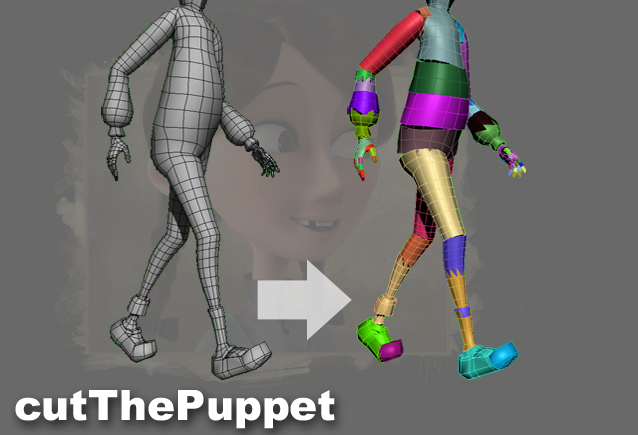
cutThePuppet

Animating a highpoly character can be very slow in the viewport, as the skinning needs to be calculated. In that case, a lowpoly version of the character can be cut into pieces which are then linked to the bones, so the animator has a good visual reference without any skinning happening. Cutting the pieces manually is quite time-consuming, so I wrote this script to automate it.

Material and Object Renamer

4 votes

Simple script for renaming Material and objects.
It also select objects based on object and material names.
Just right click in list view to select objects

To install script
1. Run script "Material and Objects renamer_v1.0.ms"
2. Go to Customize - Customize User Interface
3. Find "Material_renamer" under "Sharad Tools"
4. Assign shortcut for it.

Drive_files_Renamer

1 vote

Simple script for renaming files on HardDrive.
It also collects all the bitmaps in the scene.
Default collection folder is "new folder" on "D" drive.
If folder is not there script will create folder "new folder" on D drive.
Also you can choose custom folder to collect and rename files.

To install script
1. Run script "Drive files renamer_v1.0.ms"
2. Go to Customize - Customize User Interface
3. Find "Drive_files_Renamer" under "Sharad Tools"
4. Assign shortcut for it.

Visibility keys

2 votes

Its simple script for adding Visibility keys.
It also has functionality to delete all animation keys in scene.

Syndicate content