3ds Max | Scripts

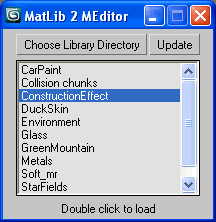
ML2ME (Material Library To Material Editor)

27 votes

Quick load Material Libraries to the Material Editor.
Quick code just from scratch as well.
Generally useful for all people that found 24 ME slots for not enough.

ML2EM

3DS Max - Match Materials and Mapping - Plugin

3 votes

This script will help the user match the material of a source object to a target object
First, you need to select the source object then click the script, now start picking your target objects
When you finish picking just right-click, or press Enter, and the picked Objects will have the same material as the source
Object plus any UVW Map modifier or Unwrap UVW modifier applied to it.

Arnold Light Lister

1 vote

Light Lister for Arnold in 3ds max.
A small tool which will allow you to list Arnold lights and control some of their parameters from a unified interface, like the standard light lister.

pX Poly Paint

2 votes

low poly owl poly painted

pX Poly Paint is a macro script to facilitate quick painting (UV Mapping+Texturing) of Low Poly models, read more and download from my blog! 

Rigging Army Knife

28 votes

This is an advanced toolset for rigging. For a full features list refer to the included readme.

How to query data type of variable in maxscript

K = 0
print((ClassOf K) as string)
print((SuperClassOf K) as string)
--The end.
--JMIM.

MiniListener Focus

6 votes

Sets keyboard focus to the MiniListener input field. If you want to use it, run the .mcr file once via Scripting -> Run Script or by drag&dropping it to the viewport. It creates an item in the Shortcuts category under Customize UI, which you can then assign a shortcut to.


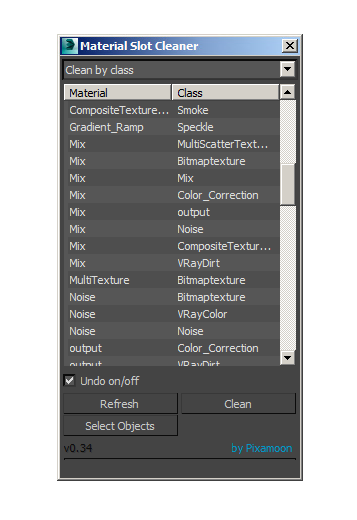
Material Slots Cleaner

11 votes

Simple script to batch clean material slots... by slot name or by Class used in slot (eg NormalBump etc)

It shows a list of material classes + used slots, (only used slots will be listed).
Then you can select what you need to clean and press Clean

IOR•Values

3 votes

"IOR•Values" script shows some representative refractive indices of materials.

G-Buffer ID SwitchBoard

21 votes

This script is intended to ease the workflow with G-Buffer ID's.
Exposing ID's ranging from 0-300 on a switchboard that gives you a visual feedback of which ID's are active in the scene. Also you can select objects by ID just by right clicking on the ID button. Enjoy :)

Syndicate content