ScriptSpot

Script

Subobjects Converter

By Nik · Credited author: Nikolay Litvinov · 2013-03-29

Version
3.07
Date updated
2025-04-30
Votes
9
Description


v3.07
Fixed Shift+1 Shift+2

v3.01
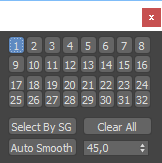
If Esc+Key of script keyboard pressed and current subobjectlevel is 4 or 5 (Face or Element) and selected all faces then will run Smoothing Groups floater (a separate special window)
Если нажата Esc+кнопка скрипта и текущий подобъект 4 или 5 (Грани или Элементы) и все грани выделены, то будет запущен Smoothing Groups floater (отдельным специальным окошком)

Fixed bug of switch from subobject 5 to 4
Added Extended Subobjects:

Subobject 1:

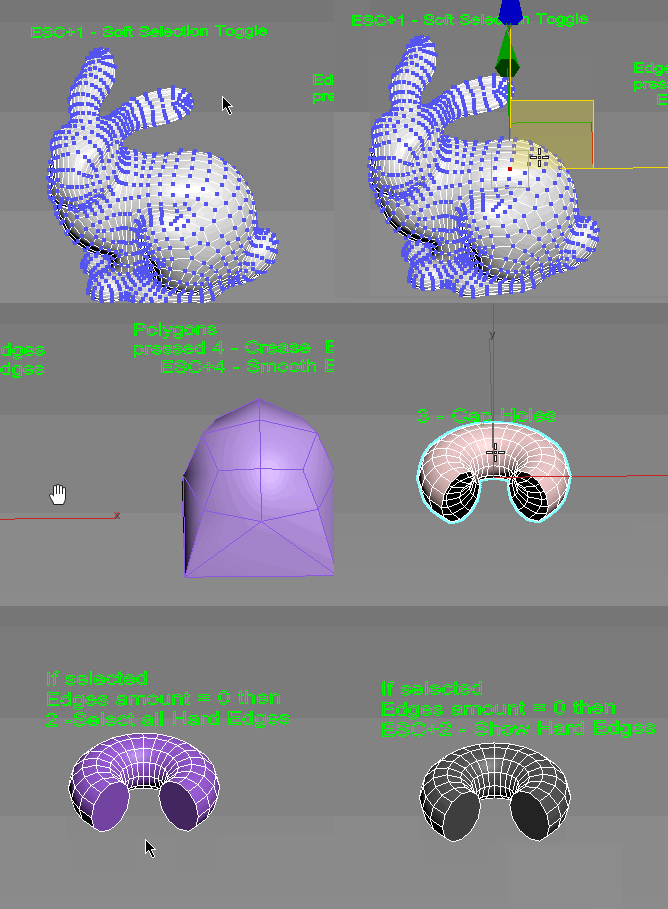
If Esc+1 pressed then switch Enable/Disable Softselection

Subobject 2:

If the number of selected edges > 0 and
If Esc+2 pressed then make HardEdges else makeSmoothEdges

Subobject 3:

If the number of selected edges > 0 Then Cap of hole produces

Subobject 4:

If the number of selected faces > 0 then and keyboard Esc Pressed + 4 then
Make Hard Edges around polygons else
Make Smooth Edges around polygons

Subobject 5:

If is open UnwrapUVW editor then switch to Element subobject for UnwrapUVW else usual Subobject 5 enable

If Esc+Key of script keyboard pressed and current subobjectlevel is Face or Element and selected all faces then will run Smoothing Groups floater (a separate special window)
Если нажата Esc+кнопка скрипта и текущий подобъект Грани или Элементы и все грани выделены, то будет запущен Smoothing Groups floater (отдельным специальным окошком)

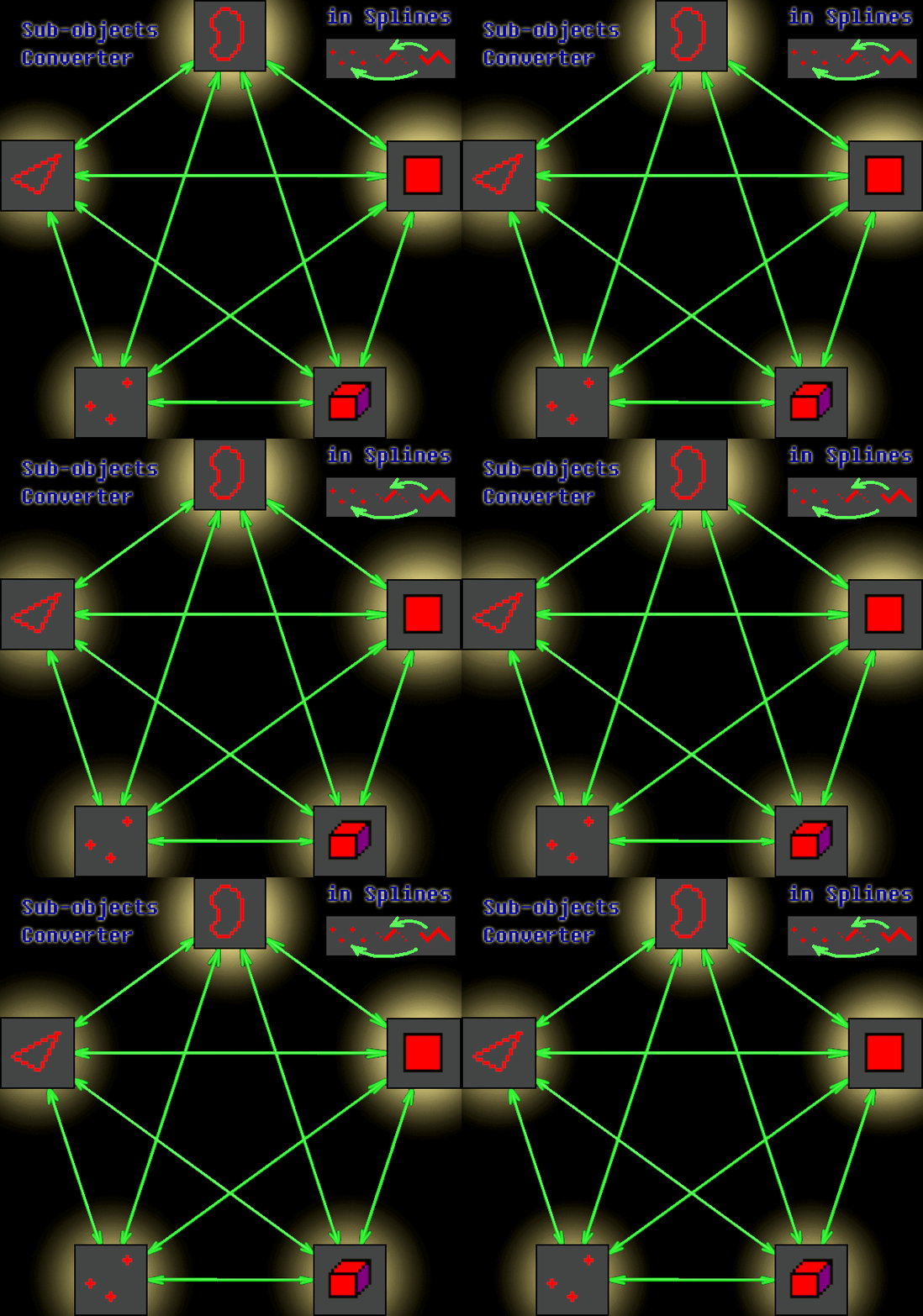
Converts subobjects by shortcuts.
Indispensable tool for work in the Expert mode.
Конвертирует подобъекты по горячим клавишам.
Незаменимый инструмент для работы в режиме Expert.

Additional Info

Install:
  • Drop *.ms to viewport
  • Перетащить *.ms во въюпорт
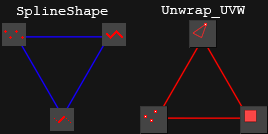
  • v3.06 When importing models, there is often a single first smoothing group when the object is broken into elements. When seams are welded together, the result is not a model with faces, but a monolithic piece by Smoothing group. To solution this problem: In subobjects 5 (Elements) added a function to assign a different smoothing group to each element. To RUN this function press ESC+5. After that all seams of surfaces can be soldered normally. При импорте моделей часто бывает единая первая группа сглаживания, при том что объект разорван на элементы. При сваривании швов получается не модель с гранями, а монолитный кусок по группам сглаживания. Для решения этой проблемой: В подобъектах 5 (Элементы) добавлена функция присвоения каждому элементу своей различной группы сглаживания. Для ВЫПОЛНЕНИЯ этой функции нажмите ESC+5. После чего можно нормально спаивать все швы поверхностей. v3.05 Fixed error in standart primitives by Convert to poly v3.04 Fixed bug of enable Subobjects from create mode v3.03 Fixed bug of Subobject 5 v3.02 Added Select All Hard Edges by pressed Esc+2 If current subobject is Edges and not selected edges Добавлено выделение всех жёстких рёбер по нажатию Esc+2 При условии что подобъект в данный момент это рёбра и не выделено ни одо а. v2.98 Fixed bugs in convertion of few objects. Исправлены ошибки с конвертацией в нескольких об]ектах. v2.93 Change knot type of splines by press Ctrl+1 (Corner/BezierCorner) or Shift+1 (Smooth/Bezier) Изменение типа узлов сплайнов по нажатию Ctrl+1 (Corner/BezierCorner) или Shift+1 (Smooth/Bezier) v2.92 optimized code v2.9 If subobjectlevel 1 and press Ctrl+1 or Shift+1 then will Convert UV to geomerty vertices Если выделен подобъект 1 и нажать Ctrl+1 или Shift+1 то будет конвертация вертексов UV в геометрию. v2.8 Added the ability to convert multiple objects under the modifier Edit_Poly. Добавлена возможность конвертировать несколько объектов под модификатором Edit_Poly v2.7 Added support subobjects of SplineShape. Добавлена поддержка сплайн-форм
    Attachments

    Tags: modeling, Poly, selection, converter, edges, convert, edit, select, edge, face, vertex, subobject, vertices, shift, element, Modify, subobjects, Crtl, panel, Alt

    Comments (20)

    Super!!!

    Alexandr Glazachev · 2022-04-03

    I don't want to delete, I wanted to understand how it works. Nothing works for me with ESC. I described earlier.

    .

    Nik · 2022-04-11

    Assign hotkeys in Customize >> Hotkey Editor >> Subobjects Converter Category

    My apologies

    Alexandr Glazachev · 2022-04-03

    I meant duplicate my posts.

    sorry

    Alexandr Glazachev · 2022-03-22

    I'm sorry for lot of messed. I have slowed down the Internet. I don't know how it now delete this.

    Hi

    Nik · 2022-03-28

    What does the Internet have to do with it? The maxscript scripts do not affect the internet connection in any way. The scripts only work inside 3dsmax.
    However, if you want to remove the script, then
    call menu Scripting >> New Script
    Copy this code into the MaxscriptEditor window

    shellLaunch "explorer.exe" ((getDir #maxData)+("usermacros") )

    And press Ctrl+E
    This will open a Windows Explorer window of the folder where scripts are installed and you can find and delete any script there.
    Then restart 3dsmax

    Super!!!

    Alexandr Glazachev · 2022-03-22

    Николай вы меня совсем запутали..)) Как это вообще можно понять.. В скриптах в названиях прописаны я так понял рекомендованные Hotkey? Что то ни чего не работает. Esc+1,2,3,4,5 не работает и остальное тоже. Конвертация одной назначенной клавишей работает только. Можете помочь? Очень интересная по моему идея скрипта. И после любимого мной беззаветно "юниконектора" надежд много.)) Макс у меня 2022.

    Nikolai, you completely confused me ..)) How can you understand this at all .. As I understand it, the recommended Hotkeys are written in the scripts in the names? Something doesn't work. Esc+1,2,3,4,5 doesn't work and the rest too. Converting by one assigned key only works. Can you help? Very interesting script idea. And after my selflessly beloved "uniconector", there are many hopes.)) I have Max 2022.

    Super!!!

    Alexandr Glazachev · 2022-03-22

    Николай вы меня совсем запутали..)) Как это вообще можно понять.. В скриптах в названиях прописаны я так понял рекомендованные Hotkey? Что то ни чего не работает. Esc+1,2,3,4,5 не работает и остальное тоже. Конвертация одной назначенной клавишей работает только. Можете помочь? Очень интересная по моему идея скрипта. И после любимого мной беззаветно "юниконектора" надежд много.)) Макс у меня 2022.

    Nikolai, you completely confused me ..)) How can you understand this at all .. As I understand it, the recommended Hotkeys are written in the scripts in the names? Something doesn't work. Esc+1,2,3,4,5 doesn't work and the rest too. Converting by one assigned key only works. Can you help? Very interesting script idea. And after my selflessly beloved "uniconector", there are many hopes.)) I have Max 2022.

    Super!!!

    Alexandr Glazachev · 2022-03-22

    Николай вы меня совсем запутали..)) Как это вообще можно понять.. В скриптах в названиях прописаны я так понял рекомендованные Hotkey? Что то ни чего не работает. Esc+1,2,3,4,5 не работает и остальное тоже. Конвертация одной назначенной клавишей работает только. Можете помочь? Очень интересная по моему идея скрипта. И после любимого мной беззаветно "юниконектора" надежд много.)) Макс у меня 2022.

    Nikolai, you completely confused me ..)) How can you understand this at all .. As I understand it, the recommended Hotkeys are written in the scripts in the names? Something doesn't work. Esc+1,2,3,4,5 doesn't work and the rest too. Converting by one assigned key only works. Can you help? Very interesting script idea. And after my selflessly beloved "uniconector", there are many hopes.)) I have Max 2022.

    Super!!!

    Alexandr Glazachev · 2022-03-22

    Николай вы меня совсем запутали..)) Как это вообще можно понять.. В скриптах в названиях прописаны я так понял рекомендованные Hotkey? Что то ни чего не работает. Esc+1,2,3,4,5 не работает и остальное тоже. Конвертация одной назначенной клавишей работает только. Можете помочь? Очень интересная по моему идея скрипта. И после любимого мной беззаветно "юниконектора" надежд много.)) Макс у меня 2022.

    Nikolai, you completely confused me ..)) How can you understand this at all .. As I understand it, the recommended Hotkeys are written in the scripts in the names? Something doesn't work. Esc+1,2,3,4,5 doesn't work and the rest too. Converting by one assigned key only works. Can you help? Very interesting script idea. And after my selflessly beloved "uniconector", there are many hopes.)) I have Max 2022.

    Super!!!

    Alexandr Glazachev · 2022-03-22

    Николай вы меня совсем запутали..)) Как это вообще можно понять.. В скриптах в названиях прописаны я так понял рекомендованные Hotkey? Что то ни чего не работает. Esc+1,2,3,4,5 не работает и остальное тоже. Конвертация одной назначенной клавишей работает только. Можете помочь? Очень интересная по моему идея скрипта. И после любимого мной беззаветно "юниконектора" надежд много.)) Макс у меня 2022.

    Nikolai, you completely confused me ..)) How can you understand this at all .. As I understand it, the recommended Hotkeys are written in the scripts in the names? Something doesn't work. Esc+1,2,3,4,5 doesn't work and the rest too. Converting by one assigned key only works. Can you help? Very interesting script idea. And after my selflessly beloved "uniconector", there are many hopes.)) I have Max 2022.

    Super!!!

    Alexandr Glazachev · 2022-03-22

    Николай вы меня совсем запутали..)) Как это вообще можно понять.. В скриптах в названиях прописаны я так понял рекомендованные Hotkey? Что то ни чего не работает. Esc+1,2,3,4,5 не работает и остальное тоже. Конвертация одной назначенной клавишей работает только. Можете помочь? Очень интересная по моему идея скрипта. И после любимого мной беззаветно "юниконектора" надежд много.)) Макс у меня 2022.

    Nikolai, you completely confused me ..)) How can you understand this at all .. As I understand it, the recommended Hotkeys are written in the scripts in the names? Something doesn't work. Esc+1,2,3,4,5 doesn't work and the rest too. Converting by one assigned key only works. Can you help? Very interesting script idea. And after my selflessly beloved "uniconector", there are many hopes.)) I have Max 2022.

    2017 Compatibility

    modest-bp · 2017-06-01

    Seems like the script is not compatible with max 2017... At least nothing happens after grag-n-drop in my case (Ctrl+1 and Shift+1 have no effect neither in spline editing mode, nor in poly editing) (((

    *

    Nik · 2017-06-29

    Disable UAC of Windows
    And give full rights to max security settings

    I am doing something wrong

    mb3d · 2017-03-28

    Hi mate, nice script, i drop in 3dsmax the script, but "control+1" and "shift+1" dont work on splines, why?

    Thanx

    Nik · 2013-10-29

    :)

    lantlant · 2013-05-31

    I like this script. :) +1

    Thanx Lantlant :)

    Nik · 2013-07-15

    I try, though I'm not very steep in the MaxScrtpt

    Enjoy

    Nik · 2013-04-29

    :)

    Artie · 2013-04-29

    Thanx, dude. Will check this out soon.