3ds Max | Scripts

TimeLine Control

If you have several animations in 1 file and want a quick way to switch between them, this script might be useful for you.
TimeLine Control lets you create a list of named time ranges. Also add, remove, rename and sort items in this list. List is stored in INI and automatically loaded on next opening of your max file.

Docks above max timeline for quick and easy access.

UI screenshot

Yes. There is a few similar scripts for same general purpose. Some are pretty complex.

111_cameraMatch

This is a script that creates camera according to perspective lines on your image. It is sort of a beta version and has no error handling yet, so be warned:).

1 - get an image for which you want a camera being created.
2 - run the script (it is ordinary maxscript).
3 - press first button in UI and select the image
4 - an image plane and helper curve will be created
5 - modify helper curve (subcurves) so that they follow perspective lines, the vanishing points with three pairs of subcurves

Select Objects By BitmapTex

•••••••••••••••••••••••••••••••••••••••••••••••••••••••••••••••••••••••••••• VERSION 1.6
Image and video hosting by TinyPic
With this tool you can quickly perform certain operations that normally require more time to perform, such as:
. Selecting all scene objects by choosing a specified bitmap texture used in the current scene file. >>>

PaintSelector by drFlash

Select verts - edges - faces of the 'editable poly' and the 'edit poly' objects by 'painting' with a variable sized brush.

multiscatterTool

multiscatterTool picture

Help when using many multiscatters.

RenderPreset operator for LPM 1.09+

I'd like offer another way to solving this bug . (Autodesk doesn't seem to fix it ) I've written operator plugin for Lpass Manager which stores Mental Ray setup parameters.


L Pass Manager


L Pass Manager is a pass manager I created for (3ds Max 9 SP2 and above) as a personal maxscript project. It was primarily inspired by Vanilla Pass Manager, RPManager and XSI's Pass Mananger. To learn its capabilities and how to install it, please check out the Video Tutorial

Link To Forum

Advanced Fragmenter

Script for artistic fragmenting and flexible control of cutter object.

3dhippie_stereoCam

VERSION 2 AVAILABLE:
Get 3dhippie stereocam v2

ADDED in 2.1.2
Camera Clipping.
Bugfixes.

ADDED in 2.1.0

Particle Flow Auto Cache

Script to make a cache automatically on all PFlow systems

miauu's Edge Cutter


Version 1.6 - added installator. Now the script is properly installed in OS: Windows VIsta, 7, 8

Version 1.5 - added Compact UI mode - idea by @Silix

Version 1.4 - added support for 3ds max 2012.

Connect Always

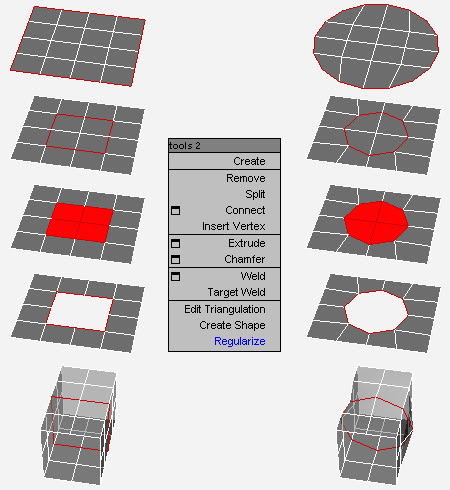
By default, Max has two separate commands for Connecting Edges and Connecting Vertices. You had to have two menus for both of them.With Connect Always, you just have to select the vertices/edges and hit "Connect Always"

Here is the code if you dont want to download:-

macroscript Connect_always
Category: "Butt tools" buttonText: "Connect Always"
(
$.EditablePoly.ConnectVertices ()
$.EditablePoly.ConnectEdges ()
)

The category and buttontext is needed if you want to put it in a menu or quad.

[CREDIT}

Remove components

It is replacement of standard 'Remove'
Remove verts - edges - polys clean like a XSI 'Dissolve and Clean Adjacent Vertices'

SpaceWarps Selector

Script to quickly select SpaceWarps present in a scene

- Click on a spacewarps in the list, select it in the scene
- Double-click on a spacewarps in the list, select it and display its settings in the panel "Modify"

Particle Flow - Random Seed

Script to assign a random value to all the "seed" particle flow operators present in the scene

Prime passes

automated workflow for product rendering

in order to speed up your workflow in product rendering , avoiding long time rendering process, this script is for you.

auto passes available

--color pass
-- diffuse pass
--rim pass
--reflection
--blurry reflections
--AO

multi-path animation tools

multi object path deform
just make some splines and choose object to follow and it will make it looks great
timing control , random timing

Notes modifier

A modifier that does nothing to the object but just holds a piece of text with it.
Think 'post-it notes'.

BCS_Projector (Boxify-Cylindrify-Spherify)

With this modifier, you can project your object into either a box, a cylinder or a sphere.

In box mode, you will have ability to modify the width, length and height.

In cylinder mode, you can change the radius, the height and the direction.

In Sphere mode, you can only change the radius.

There is also a global parameter in percentage that control the overall deformation effect.

Syndicate content