ScriptSpot is a diverse online community of artists and developers who come together to find and share scripts that empower their creativity with 3ds Max. Our users come from all parts of the world and work in everything from visual effects to gaming, architecture, students or hobbyists.
Submitted by Lindsay Jorgensen on Fri, 2006-10-20 20:45
9
votes
"Resets the various things reset x-form does - but independently - and /or jointly. It works with hierchy's - but only if children in the hierchy are selected also."
A fully 3D - graphical - animated blackjack game written 100% in MaxScript.
Tired of working on your current Max scene? Just click the MaxJack button to escape the drudgery of modeling and animation. MaxJack will hold your scene for you and
Submitted by Kelly Snapka on Fri, 2006-10-20 20:45
12
votes
"vcTools2 is a collection of many separate scripted tools for manipulating vertex colors. It includes 'Assign Vertex Colors' - 'Bake Radiosity' - 'Adjust R -G -B -H -S -V -Contrast' -'Scale/Clamp' -'Align/Weld Colors' -'Blur' -'Blend Edges' -'Pits and Peaks' - and more. The script works on individual objects as well as multiple objects. Be sure to view the helpfile for details."
Submitted by Benny Edlund on Fri, 2006-10-20 20:45
7
votes
Polyvis is a maxscript utility intended to help artist determin what polygons on certain objects are visable to a particular camera during animation of that camera/objects. The utility is especially intended to determin what polygons are visable on weapons in FPS games...
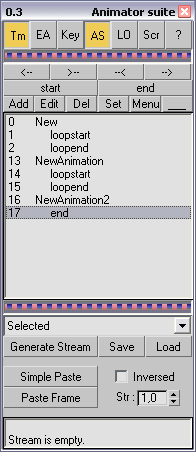
Full toolset for game animator. Time range controlling , copy / paste animation, edit key params from tool ui, custom scripts that able to execute over each frame, custom objects linking and folding ui. Read help file for more information.
Submitted by Michael and Joh... on Fri, 2006-10-20 20:45
32
votes
This Script is a complete package for building game levels in max - and is an essential tool for building Half-Life - Counter-Strike and Quake Levels. Building your level is easy - all you have to do is draw where you want your walls to be created - and then click on the walls where you would like doors or windows placed. Floors can be created with a single click and then copied to make ceilings.
This tool can slice selected faces in mesh and poly at any angle with given step.
Usefull in game development for slicing lightgrids or landscapes.
You can use Slice Plane Helper grid for slicing and set your own custom step. It also has 'Hold' function for undoing results.
Ever want to speed up a deforming object? Gotta export to a game that doesn't handle skinning? This script will create a morph object from any deforming mesh.