Tagged 'materials'

Selection Toolbox

1 vote


Quick Select

Objects In View
– Selects all objects visible in the current viewport

Objects Not In View
– Selects all objects not visible in the current viewport

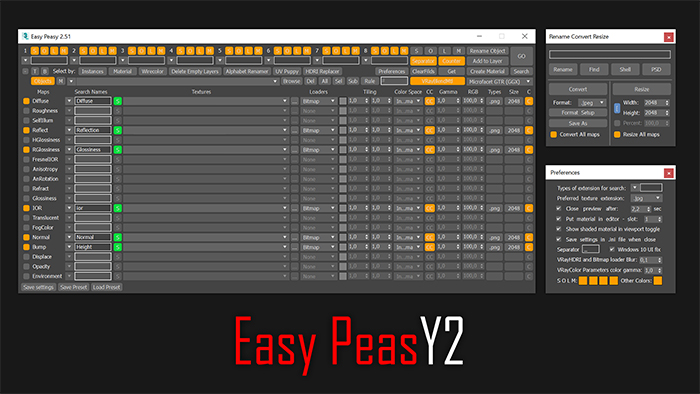
Easy Peasy 2

3 votes

Cheetah!

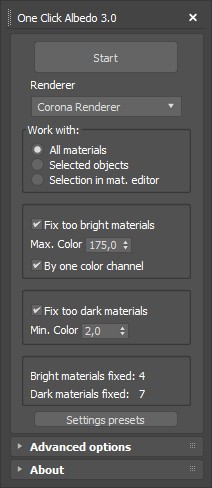
One Click Albedo for Corona render and V-ray

6 votes

Script Description:

This script is made to automatically adjust the albedo of materials in the scene. Too high albedo may slow rendering process down and make the materials look unrealistic. Especially when an object with a high albedo occupies the most part of frame area. Corona Render developers recommend to keep albedo of your materials under RGB 180 (For diffuse color or texture).

Materializer

5 votes

poster

Materializer (materials equalizer) is the fastest way to create materials mixing different templates. It works like a sound equalizer but for materials!
Example: To make glossy wood press the 'Wood' button and then add a little bit of plastic.

Every time you hit 'Set' selected material will be updated without removing of maps.

Plugin works both with Compact and Slate material editors.

Show Textures in viewport (one click!)

6 votes

A simple check button to place on your toolbar, to show or hide your material textures on viewport.

If there's nothing selected, it works on all materials in scene. Otherwise, on materials from selected objects only.

It supports almost any kind of material or render engine.

The script was written in a way that depends as minimum as possible on render engine, so it should support a wide range of engines and materials. But it's not infallible.

Materials to Scene

3 votes

Straight forward script to load a directory of your choice or by recursively going through a single directory (be careful it doesn't go through too many as this will be slow to load) and loading up .mat files.

From here the script will apply Materials only (no maps) to teapots.

I use this to quickly populate the scene with all materials inside a .mat file to tweak and update it quicker.

See screenshot.

Can be found under the category: 3dwannab

Open script and change:
local intialMLPath = "F:\SS_3diT\Textures & Materials\Corona"

to your own user library of your choice.

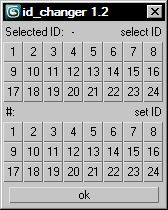
id_changer

7 votes

Selecting or applying material ID's with one click!

Rollout with button grid for selecting or setting material ID's of selected polys up to ID 24. Works with editable poly only. Displays selected poly's material ID if they're same.
Ctrl + click add specific IDs. Alt + click deselects specific IDs.

Examples:
Want to set some specific material ID up to 24 to selected polys? One click.
Want to select polys with same material ID's of selected poly? One click.

Purge Unused Materials

2 votes

A simple macroscript to delete all unused materials from the Compact Editor Material Slots AND the Slate Material Editor Views.
The Compact Editor Code is from the existing Macro found under the Compact Material Editor "Utilities" menu.
I have added the code to also purge the SME at the same time.

You might want to check out the "Purge Empty Layers" macroscript as well. There are some awesome scene management tools out there but these are both small, simple tools without a lot of overhead for doing a little housekeeping before saving your file.

Slate Connector

5 votes

SlateConnector

SlateConnector - Makes the everyday task of exposing nodes and adjusting material parameters easier and faster! New version (0.59a) with lots of impromevents!

Vray Mat Lister

4 votes

Hi everyone,

I'd like to share a script I have made.
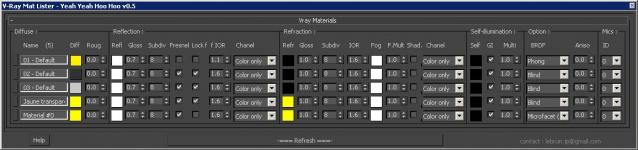
It's for Vray and it makes a list of all your VrayMtl (and of the main parameters) you have in your scene.

UPDATE Version 0.5 for vray 3.xx

This tool allow you to modify all your vray materials parameters quickly. Globally it works like the Vray Lightlister

Syndicate content