Tagged 'maxscript'

3DS Max - Copy Paste Objects Between Scenes

7 votes

This is a script I created to help the user in copying and pasting
objects between multiple opened 3DS Max scenes.
Under the hood, it's a quick merge operation that is done without
Any prompt. If there is a name conflict, the coming object will be renamed. Also if there is a material's name conflict, the coming object
will preserve its own material but the material will be renamed.

Memento

1 vote

New MaxScript. Simple and handy as aways. Free.
It's very useful for my use. You can quickly save and recall up to 5 groups of selections. You can increment memories adding objects to them (Which is SO useful in some situations (to help in the process of organizing big and messy scenes)...
Hide and Un-Hide from Memory buttons. Isolate groups, etc.

BTW, the video says QuickSelect, but i changed the script name to Memento.;)

Refresh Icons

0 votes

Macroscript for making a button that refreshes button icons using colorMan.reinitIcons(). That's basically the entire script right there. :)

Dynamic Text

4 votes

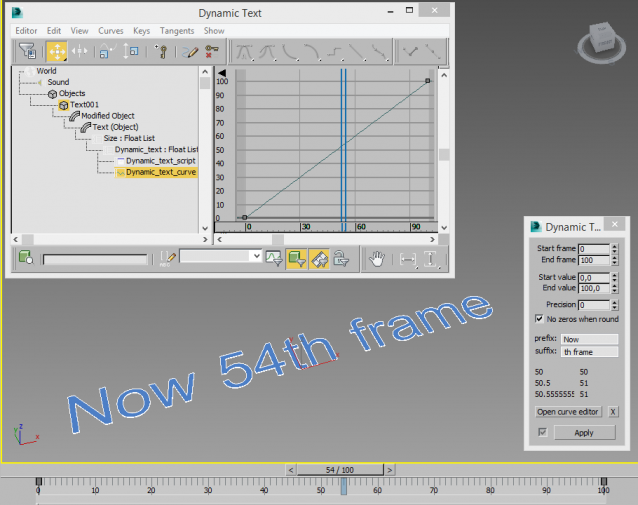
Creates a animatable text that changes depending on time. You can use curve editor for changing dependence.

Useful for creating animated infographic labels and tags.

Easy Spring Controller Tool

1 vote

I made this script last year , but Now i made it more usable for everyone as (Spring Controller Tool)
features:
1) Add Spring Controller to hierarchy of bones,Objects or etc...
2) Add Spring To Selection Objects (its Require The Object Hierarchy Links)
3) Add A Modifier Controller For Each Spring Controller
4) Change The Spring Values One By One
5) Change Spring Values Of Massive Group Of Objects In Hierarchy At Once , Using Offset
6) 2 Default Presets To Change Spring Values Quikly
7) Run Timeline After Every Change To Spring Value (For Catch Spring And Play Fast After)

Mesh Insert

5 votes

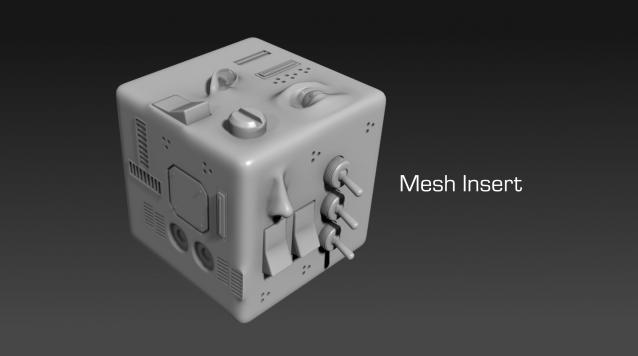
Mesh Insert is a new 3dsmax plugin inspired from Polystein for Modo ( http://pushingpoints.com/v2/the-pushing-points-polystein-kit-for-modo/ ). It speeds up your modeling process by replacing face selections by an asset from your library.

Features :

Interactive Rollout Builder

13 votes

The visual maxscript editor has issues... doesn't make nice code and is generally useless.  So instead I made this...

Visit my facebook page for more info

Run the mcr file and find it in your customise user interface windows under 'DW Tools'

Version 1_0 - Release
Version 1_1 - Bug fixed which could allow nested groups, which maxscript doesn't like and would therefore crash.
Version 1_2 - Released unencrypted so that it works in 3dsmax 2017 and well... because who doesn't like to learn (judge) from other people's code....

Batch Detach Selected Polygons

1 vote

This script will help the user to detach a large number of polygons into individual objects in one click.

The script will be available if one object only is selected, and this Object has to be from the geometry family.

Note: The script doesn't work on Editable Patch objects

3DS Max - Remove Objects From Isolate Mode

1 vote

This little script will help the user in removing objects from the isolate mode.
After selecting one or more objects and choosing isolate, sometimes you want to remove one or more objects from the isolated objects group. So select one or more objects that you want to remove and click the script.
Another benefit is that when the script is grayed out and not available, the user will know
That 3DS Max is not in the Isolate Mode

3DS Max - Match Materials and Mapping - Plugin

3 votes

This script will help the user match the material of a source object to a target object
First, you need to select the source object then click the script, now start picking your target objects
When you finish picking just right-click, or press Enter, and the picked Objects will have the same material as the source
Object plus any UVW Map modifier or Unwrap UVW modifier applied to it.

Syndicate content