I/O

Tertium Organum CollectoREX

1
point

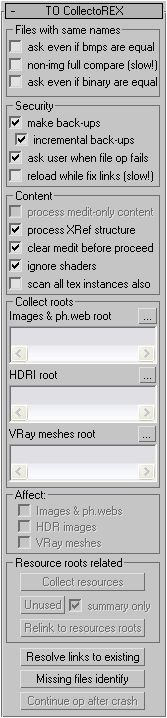
TOCollectoREX is utility replacing and supplementing standard Resource Collector.
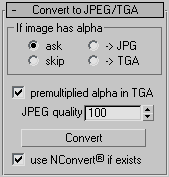
It allows gather all scene resources together, put them in specified place, find where all missing files are used (exactly in which objects). It can find which files in specified place are no longer used by scene. It also allows convert bitmaps to jpg, etc.
Utility supports XRefs of all types and processes all scenes linked to current.
Unlike all other such scripts, it really finds all resources (images, HDR-images, Vray meshes, IES-files, shaders), not only some bitmaps (Relink Bitmaps, Resource Collector). Below there is full description.
Interface:
IGES Batch Importer

0
points

IGES batch import and save of files.


CameraTransfer

0
points

Takes a camera and outputs it's movement to a textfile - which can then be read in by the same script and applied to a camera. This is useful for transfering camera information between different packages (in the future) or different releases of max - for example - converting an r4 camera to r3.


3DSImporter

2
points

"Script for importing Autodesk .3DS files. The 3DS file format is one of the most widely used for 3D models - so you'll have no trouble finding modelling programs and utilities that can export to it. It's never been easier to get your models into gmax! Imports full geometry - materials with textures - keyframed animations - model hierarchies - lights - and smoothing groups


ArchiCAD import wizard

3
points

ArchiCAD import wizard takes care of your exported ArchiCADâ„¢ geometry. it allows filtering out unwanted objects and cleans up the geometry by welding overlapping vertices - without affecting the shape - or degrading detail quality. it also creates a named selection set for every import step - allowing better scene management.


Backup save script

0
points

Everytime you save a max scene - this copies the same file in backup directory with incrementing sequence number (adds itself as a post-save callback)


Read Mo Cap Data

0
points

Need to get some Motion Capture data into Max? This script might help.


CompareFiles

0
points

A function to compare two files using the DOS 'comp' command.


Turbo Squid Max Scripts

0
points

"Allows you to prepare and package your models from directly inside Max. They will cut thumbnails - count polys - and zip up your assets quickly and efficiently."


batchImporter

2
points

Imports all the known local formats from any folder to your current scene. To use just select a folder - if it's importable it imports it...