3ds Max | All

PC Spec

2 votes

Can gather information from users PC such as Memory - Graphics Card - OS - CPU type and speed - 3DS Max Version - PC name - current Renderer as well as hard drives on PC. Uses existing maxscript code as well as uses activex to read included HTML file with Javascript which uses WMI to get other PC data.

UIMod

52 votes

UImod is a new UI for modifiers that is displayed in overlay of your active viewport in 3ds Max.

You can make a button from the modifierstack of your selection. This will save all the modifiers on this object and all the values of the properties of the modifiers. You can see this in the video where I change some checkboxes and values of modifiers.

Right clicking on the button gives you the properties of the button. You can change the name and folor of the button. More options will be coming soon.


ChannelCleaner

4 votes

Hello, it's a simple script which make life easier for game-dev 3d artists.
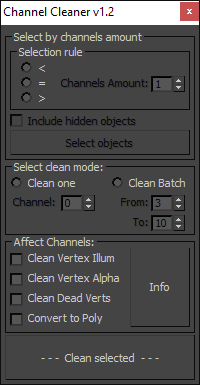
Channel Cleaner 1.2

Channel Cleaner:

-Clean selected UV channel

-Clean several UV  channels "From: N-channel To: N-channel"

-Clean Vertex Color/Illumination/Alpha channels

-Works with editable poly and mesh

-Works with one and multiple objects

Thats all.

UPDATED to version 1.2:

Magic HotKey

17 votes

Depends of subobject level this script will execute different commands.

Random lights

1 vote

Simple script for randomizing selected lights intensity temperature and delete percentage of lights.

Attach Object To Vertices

3 votes

This script allows you to bind any object to vertices geometry using simple expressions.

Category: "GregoryMaxScript"

Maxscript deadline submit script tutorial

2 votes

Submitting jobs to deadline is not very difficult, but it can be automated with maxscript. It’s always a good thing to automate when you can. And it’s a good thing to submit stuff to a render-queue to free your own computer from the workload. So why not submit automated maxscript-jobs to deadline instead of renderjobs? Well, you can do that relatively easily with deadline. Consider this if you need to process a large amount of meshes with maxscript, or do some kind of image-manipulation with maxscript. Or do this when you have some kind of scripted renderpipeline.

Easy Turntable

7 votes

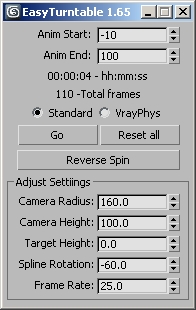
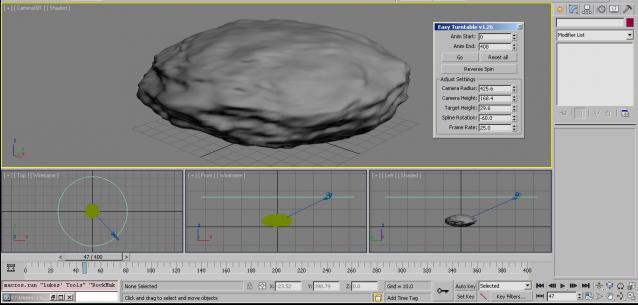
A quick script to aid in setting up a turntable render for your assets.

Press go.

Set the frame rate

Set the animation length.

The spline rotation allows you to set the start position

Regardless of animation range only performs 360 dgrees of travel

Added Slidertime to 0 on reset

Augment plugin for 3dsMax

1 vote

Augment is an augmented reality mobile app that lets you visualize your 3D models in real time, real size, in your direct environment.

You just need to upload your models on the web platform: http://manager.augmentedev.com/#/login, and they will be synchronized on your mobile device with the Augment mobile app.

There is also a plugin for 3ds Max to export your 3D models directly to Augment and visualize them straight away in augmented reality, with nice Mental Ray and V-Ray texture baking.

You can download it here: http://augmentedev.com/help/3ds-max/#exporting-with-the-plugin

Toon Eyes quick setup for cartoon character rigs

13 votes

[DESCRIPTION]
setup ffd eyes for cartoon type characters so you can easily adjust those to fit character needs, it manage symmetry and instancing nicely. then hit finalize to make them independent.
symmetry setup is really useful for modellers and riggers in team to work on UTV india project efficiently.

[USAGE]
max customize>> lm_rigging>>tooneyes (quad / shortcut key etc)
type character code and create eyes
tweak ffd as you like
finalize eyes button to remove symmetry setup

Syndicate content