3ds Max | All

MultiCamLister

50 votes

MultiCamLister is the free script for 3ds Max helps to you control cameras in a scene.

MultiCamLister Features:

Supported camera types: Standard, V-Ray, Maxwell, FRY- (just switching between cameras).
The ability to copy and paste the properties from one camera to another one.
Collapsible settings panel.
The ability to delete the selected camera from the scene through the script.
Scalable interface.

NukeOps

39 votes

A set of functions wrapped into a minimalist single-click button to help 3ds Max and Nuke artists to bring the 3ds Max 3d scene assets into Nuke's powerful 3d compositing scene.

This tool allows:

1) Copy cameras and any other objects (as points) and their animation into clipboard for an easy Copy+Paste action inside Nuke.

2) Generate .chan files from selected cameras and any other objects (as points) and save them either many at once or one at a time to selected destination.

MeshManager

34 votes

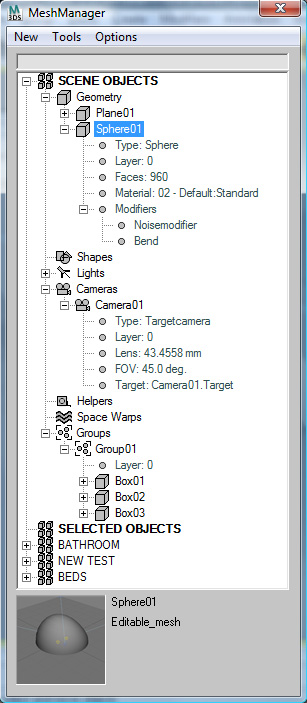
MeshManager combines a powerful scene explorer with a mesh asset manager in order to simplify and speed up the process of creating and modifying a scene in 3D Studio MAX. This is a commercial script that is't still in the beta stage. For a similar script oriented towards materials, check out MatManager . 


MAIN FEATURES

Super Simple Rig

4 votes

Frustrated by the built-in 3ds Max rigging systems, I decided in 2008 to program my own simple and easy-to-use custom rig. I wanted something with minimal setup, high framerates and little fuss. I've kept upgrading it for every new character project the past five years, and I've just received a grant to add more functions and release it to the public.

FR_morphTool

8 votes

help you create a symmetrical morph targets and accelerate the creation of your morph targets

-pick your master object
-if your object doesnt have morpher modifier you can press "add Morpher" button
-set offset value, depend how far you want to offset your morph target
-press copy button to create morph target
-modify your vertex then press "mirror morph" button (the object will be a new object), make sure you have selected the object you want to mirror
-then press "send to channel" button to send your selected object to morpher channel

MJPolyTools

9 votes

"Poly modelling tools including: Connect Verts / Edges - Connect Edges X - Multi loop Split - Multi Loop Split X - Multi Loop Select - Loop Split - Loop Split X - Edge To Quad - Divide Edge X.
Make sure to check out the website for detailed diagrams showing how each tool works!"

Material Lister

14 votes

Material List is soon to be made redundant with the release of Mission Control!

Read more about it here : http://reformstudios.com/mission-control-for-3ds-max/

or joing the Beta here : http://reformstudios.com/mission-control-beta-programme/

I have added a feature list to the website here :
I am also looking for beta testers, so please sign up here for a chance to take Mission Control for a spin. 

3DS Max - 2D - Create Parametric Lines

4 votes

In this video, I will present you with a new script I created to help the User creating 2D lines with specific length and angles. The script Allows you to modify the length of the last created line at any time.
This is a feature I always wanted to have in Max and for some reason, The developers are neglecting this simple feature.
I will try to update it as much as possible to add more features to it,
And if you have any suggestions, please leave them in the comment
Area. If you like the script please press the like button and Subscribe to the channel. Thank you! :)

XrayCat Survival Toolkit 1.5

0 votes

Italy’s leading independent games and tools developer, Raylight, today announced that their XrayCat ST v.1.5 toolset is now available for purchase. After the success of the first release they worked closely to Autodesk and customers to provide a new set of features which make XrayCat ST v.1.5 the ultimate tool to speed up rigging and animation work pipelines.

The new features includes:

Layer Manager
- Autoscan of Cat rigs in the scene
- Resizable Window

Pose Manager
- Playback tools

JoyCreator Pro
- Totally rewritten
- 8 directions joystick added

objectDetacher

8 votes

Takes selected objects (meshs - polys or splines) and seperates all their elements into seperate objects.

Syndicate content