3ds Max | All

Quick X-View

15 votes

This is a script utility that allows to see-throught (X-View) the objects during the work. Excellent for the stages of modeling with a reference image. Implements the function of 3dsMax of See-Through (Alt+X key).

Quick XView

Virtual GI v.0.3b

16 votes

This is the version 0.3b of the Virtual Global Illumination (VGI) script, and allows to simulate the Global Illumination outside.
Simply, a light sphere is created about to an object selected to simulate the bounce of the ray in the object.
VGI is very useful to preview some short animations in "Virtual GI" using not only the render Scanline but Mental Ray engine with very short times for the rendering! Optimum to illuminate integer scenes outdoor with a hot and suffused light.

Joystick Manipulator

8 votes

"Joystick Manipulator is a two-value scripted manipulator with the following features:

  • Multiline Text Field for long descriptive names
  • X and Y values with own Min. - Max.
  • Road Markings Generator

    0 votes

    ROAD MARKINGS GENERATOR is a script that efficiently creates 2D Masks of road markings in 3dsMax. It can be applied flexibly in Archviz projects while saving 3D artists a lot of time.

    Some of its features are:

    Creating Custom pedestrian crossing lines that are editable.

    Editable Street side and middle dashed and continuous lines.

    Using custom maps that have a texture with correct UVs applied.

    Readymade Presets, with the ability to change the elevation height.

    .: Compatible with 3dsMax 2018 and higher

    .: Compatible with Corona Renderer & Vray Renderer

    MCG SpacingTool

    3 votes

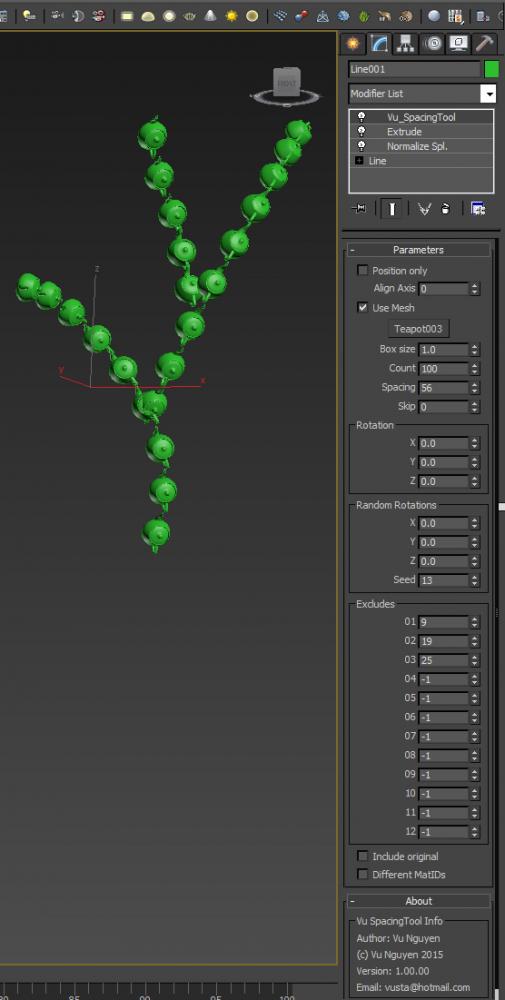
    This MCG is a Spacing Tool for splines. Unlike the default Max one, this does NOT intermittently disappear from your viewport !!! And it gives you rotation controls as well.

    (You can use it on a mesh as well but it's best for curves)

    Simple Building Creator

    0 votes

    ***To install it just run the script

    ***It has some bugs so please comment

    *** If you want to change the footprint just add editspline to the footprint

    ** If you want to use a specified amount of floors see that the min floors and max floors have the same value

    viewFrustum

    21 votes

    "Select a camera - then run this MacroScript in 3ds max R6 to create a geometric representation of the camera's view frustum (can be useful - for example - in combination with Vol.Select to remove geometry that is not seen by the camera).Will handle non-square pixels - renaming objects and allows for an offset between camera FOV and view frustum angle. [Based on code by Christopher Subiago]"

    Material Presets Shop Standard

    61 votes

    Material Presets Shop Standard is a scripted material collection for V-Ray and mental ray in 3ds Max. It includes 78 V-Ray and mental ray Material presets and templates:
    - Metal Materials (24)
    - Ceramics Materials (18)
    - Leather Materials (12)
    - Stone Materials (18)
    - Concrete Materials (6)

    The V-Ray materials are compatible with SolidRocks, and all of the textures used are seamless.

    Spline Geo import (kml, GPX and csv geographic coordinates) to 3ds MAX

    1 vote

    Import CSV and import Geo (kml, GPX) to 3ds MAX

    Importing data to 3ds max is fundamental to try to reproduce the real world in3d environment.
    I made two scripts spline CSV IO (Import/Export) and Import Geo.

    Install: Copy files to /scripts/startup
    Use: go to “utilities” tab (hammer) –> MAXscripts->Utilities

    The script import Geographic coordinates (longitude,latitude and Altitude).
    The coordinates are decimal format (40.446195, -79.948862) Altitude is in meters.

    speedometer

    12 votes

    So simple!
    It tells you the speed of the selected object in [km/h] if your scene in meter unit.
    You can easily modify to [mph] or [m/s].

    If you would like, upgrade it and share for all of us! ;)
    GiaNT

    Syndicate content