3ds Max | All

V-Ray Material Presets Pro

357 votes

V-Ray Material Presets Pro is a powerful material collection for 3ds Max and V-Ray. It will includes shaders like: Metal, Glass, Leather, Liquid, Ceramics, etc.
SIGERSHADERS V-Ray Material Presets Pro version 4.1.5

VrayHDRITool

39 votes

Easy way to set VrayHDRI map. Select  only one object and run the script

 Version: 2.4

  • "HDRI List" now search in lights and environment for HDRI maps

Screenshot

ConvertBitmaps

0 votes

ConvertBitmaps is a script for fast bitmap sequences conversion between different extensions. Helps not to waste your hdd drive space storing mask sequences in exr.

To convert sequence browse parent folder, select folder with sequence to convert, choose extension and press convert.


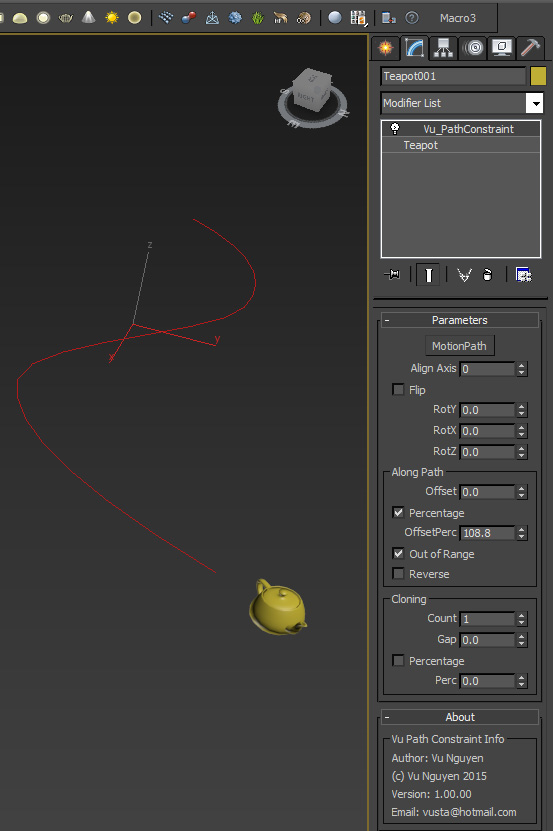
MCG Path Constraint a.k.a IncrCloneOnCurve

12 votes

This MCG constraints your object motion to a path. The motion can be repeated forever beyond the curve.

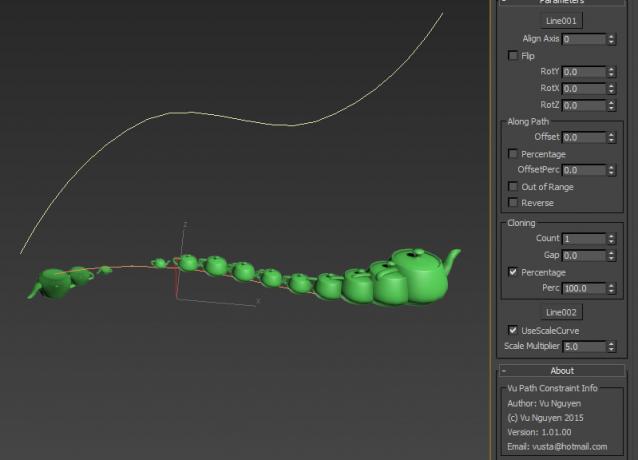
It can also be used to incrementally clone object along a curve and there is no need to adjust the distance

between the clones and count when length of curve changes.
 

Ver 1.01.00: You can now use a curve to control scaling of the clones.
VrayLightLister

32 votes

Lister for Vray Lights. I use this script permanently. Extremely comfortable for controlling VrayLights present in the scene. You can find the script in "IllusionBoxStudio" category (Customize/Customize User Interface/IllusionBoxStudio)

TotalCommanderRCM

8 votes

OK, tell me that you use TotalCommander. I can not work without him. With this script I made contact with a TotalCommander. This is RightClickMenu which has quick access to the locations of key files (loaded maxfile, render file location, material maps). The script search only for x64 version of TotalCommander. You can find the script in "IllusionBoxStudio" category (Customize/Customize User Interface/IllusionBoxStudio)

ModifierControl

8 votes

Using this script, you can turn on, turn off, or delete certain modifier simultaneously within all objects that contain such modifier (or only within the selected objects). The list of modifiers attend only those used in the scene. You can find the script in "IllusionBoxStudio" category (Customize/Customize User Interface/IllusionBoxStudio)

Expression Benchmark

4 votes

Rename objects... - extended with search/replace function

2 votes

I extended the original "Rename objects..." tool with search and replace function. I hope you find it as useful as me :)

Installation:
1. Exit 3ds Max.
2. Copy .mcr file to <3dsmax_path>\MacroScripts folder
3. Copy .res file to <3dsmax_path>\en-US\MacroScripts folder (or in any other language directory depend on the language you use)
4. Start 3ds Max.

Oblong and Oblong Void Primitives

2 votes

Oblong and Oblong Void is a pack of two primitives for 3DS Max.
Change parameters in real time. Map coordinates. Separated materials ID.

Syndicate content
