3ds Max | All

WarpToggle

11 votes

WarpToggle creates a small floater with 2 buttons to either turn on - or turn off all space warp bindings. You have a choice of operating on either all objects - or only on selected objects. Very handy for speeding up viewport interaction if you are warping many or complex objects. Turn off the warps 'till you need em! Seems to work fine in Max v.7 - 2008, have not yet tested with Max2009, though it is a simple script, and should be OK.

multi Objects Unwrap

11 votes

This script allows to unwrap (edit UVW coordinates) several objects at the same time.

Copy To Clipboard

11 votes

CopyToClipboard - 3DS MAX Render Effect allows you to copy the rendered image to the Windows clipboard.

- v1.0.1 (20.10.2007) added support for MAX 2008.

Projector

11 votes

update v1.01: should work fine in 2011/2012 now.

update 93b: the projection plane now resizes and sticks to the background when changing the focal length.

A tool to help speed up the workflow for 3d modelling using image reference.

Projector creates a projection image and a camera. The controls allow you to quickly change the camera focal length and the projection distance scale etc. so that you can align images to a model and quickly match the perspective.

Instructions:

NiezMatte

11 votes

first time make script
save the project before use it, it can render sequence as you set the time range in render setup (F10), and set the output path also.
this script makes the objects that selected will be render as white and other will be black and makes environment background off and be black and set the renderer to scanline, but it keeps the time range and output , so you should change the output path or will be overwrite.

cheers

Dennis WK

Random Rotate UV Islands

11 votes

Randomly rotate the selected UV islands.

Watch th video demonstration.

Installation: Drag and drop in 3ds max. Go to Customize - Customize User Interface - "miauu" category.

Kenzors Previsualization tool

11 votes

This is a 3dsMax previsualization tool. It allows you to jump cameras and time to previs scenes.

Its the only tool I know that allows you to skip anywhere in time to create 'cuts' in 3dsmax like a video editing package

Installation instructions are here.

Camera Resolution Mod

11 votes

Camera Resolution Mod is a modifier for 3ds Max which allows you to set the render resolution for each camera individually.

Profile shape

11 votes

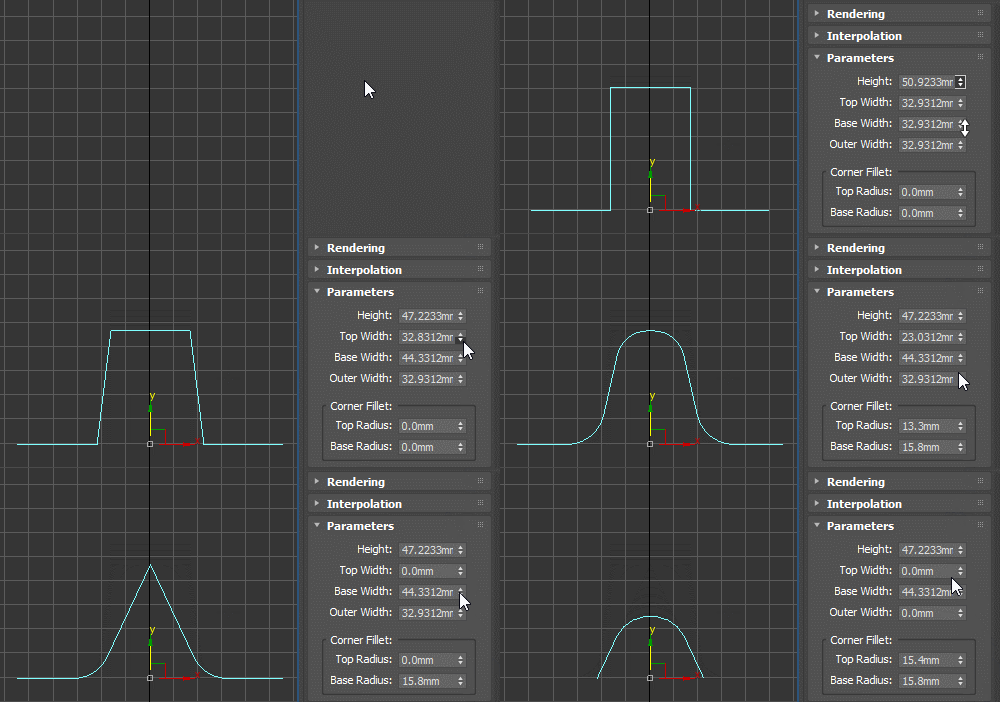
Profile spline primitive to be used with classic Bevel Profile or Shell modifier as the edge profile shape, as a sweep profile and for other similar use cases. Can be rotated, flipped and reversed as needed (for example for Shell, you should use the X Direction).

2DTracker

11 votes

"Here is a script that calculates the 2D position of a 3D object on the rendered image depending on the camera properties and render resolution. Two files are exported containing animation curves to be loaded into Shake for tracking purpose. It doesn't matter if the object isn't visible on screen.

Syndicate content