
SolidRocks
Version:
2.4.0
Date Updated:
08/20/2022 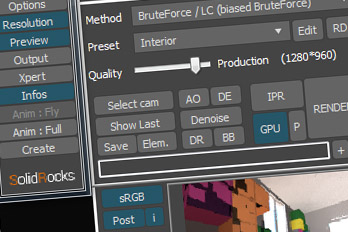
SolidRocks V2.4 is out !! Support for V-Ray 6 (hotfix 2) and MAX 2013-2023 !
SolidRocks adjusts and optimise all needed Vray parameters to reach the best rendertime/quality ratio.
Learn Vray progressively, see in realtime changes made by SolidRocks when you change resolution/quality.
SolidRocks includes new tools for both VrayMasters and Beginners:
- Support for Max 2020 and V-Ray NEXT!
- Handle The two V-Ray NEXT engines : Adv and GPU (single clic switch !)
- Presets now handle separate settings for each engine for best comfort
- Presets have been revisited for vetter quality in production settings
- IPR button working with the 2 V-Ray next engines
- Bucket and progressive mode for 2 engines
- Denoiser button
- New gamma Workflow by default to match the actual workflows
- All new V-Ray algorithms activated by default : VBAA, Autopilot, SRGB VFB, Gi caustics, dyn thr.
- Rebus Farm/RANCH Computing interoperability
- New "NO GI" method ! Perfect for exterior dome(+sun)+VrayAmbientlight anim setup (fast and flicker free)
- Compatible with MAX Physical Cameras
- Better glossy subdivs algorithm. Materials with low glossiness value have more subdivs.
- SRGB button (Vray VFB) is now managed automatically.
- New special DOF/motion blur preset (based on interior preset, experimental)
- Unified Save feature for easy save management
- Includes MOA Wizard (animation wizard) - More info here !
- DR and BB buttons for network rendering
- FlyThrough animation Wizard !
- Compatible with SigerShaders
- 1 click for complete Vray setup !
- Modular and small interface (GUI)
- mini preview for fast feedback
- auto Exposure and Auto White balance tools
- friendly and Very simple usage
- Full LWF gamma correction with useful options
- modifiable presets : exterior, interior...
- learn Vray watching SolidRocks at work !
- shareLightcache tool to speedup slaves warmup
- materials and lights optimisation for best rendertimes
- switch from draft to production settings in one click !
- gain time... Lot of time !!
New Vray users can also learn essential rules of Vray, observing changes made by SolidRocks when resolution and/or quality are changed.
Vray Masters can customise SR and presets and use SolidRocks as a custom settings automator.
note : This is a commercial script. (FREE LITE version available on website !)
As always, Have FUN with SolidRocks !
Version Requirement:
Max 2013 to max2023 and V-Ray 2.4 to Vray 6 hotfix2
Comments
Hello, simons, And thanks for
Hello, simons,
And thanks for your feedback, even if it's hard.
Only critics makes things better.
But...
I must say that less than 24hours of use is really short to post this kind of killing advice.
And I confirm that SR0.85b is fully compatible (and designed for) Vray 1.5 SP4.
Before answering, please note that if you're unsatisfied, just ask me, and I'll give your money back. No problem about that.
Let's try to find a way together. Solidrocks is in constant evolution and takes account of users complains.
First of all, SR is NOT intended only for newbies, but has evolved to match Power users requests. VrayMasters like Simmsimaging, glorybound, cecofuli, steelbug, phizikil, trick use it all the time...
I'll try to answer point by point :
optimize lights : Solidrocks quality algorithms needs first to unify subdivs values on Vraylights and Vray shadows (and glossies). The default value is 8 but you can change it. (see preset edit). Some newbies put extreme subdivs values on sun or other lights and this perturbate the solidrocks quality computation. That's why it forces the same subdivs value on all lights before.
Note that if this feature don't interest you, you can simply turn it off into the solidrocks configuration panel by switching off the "auto Vray shadows subdivs" option. (and, too, the glossies interpolation options)
AutoExpo and White balance have an important option. Perhaps you've missed it : into solidrocks configuration panel, there an option named : "ignore alpha pixels" or "whole image". This options forces the AutoExpo algo to take account of alpha pixels (background) or not to compute the exposure. Sometimes it fails, but this is caused by extreme camera settings. Try to start with standard cam values (f:8 shutter 125 and iso 100) to see if it's better. You can also run the tool twice to make the computation more precise.
Please note that a 1000 € reflex cam can often fail when computing White balance or Autoexpo ;)
But, you're right, the best thing would be realtime sliders ! I'm working on that point.
The default gamma is 1.8 (good compromise for newbies), but you can easily change this default value (and many others) to became YOUR default values. Watch the end of the demo video to see how to do that (init/save rollout, button named : >> Save actual settings as solidrocks defaults <<).
I've spended lot of time to develop this feature. Everyone can have it's own preferred settings when launching SolidRocks on a fresh scene.
Lots of materials causes troubles....!? did you take 5 minutes to give an eye on SolidRocks users gallery ?
Others users seems to have very good results, even with tons of complex materials...
For example : http://solidrocks.subburb.com/index.php?option=com_fireboard&Itemid=34&f...
Feel free to send me an email (or post on SR forum) to have a support for your problematic scene. It's included in the price !
Note that SolidRocks is a Vray settings automator.
As you are a power user, you can create your own preset (via the "edit" button near the preset dropdown list) to get the results you want.
There are also many options into the SolidRocks configuration panel wich can impact the final result, like glossies interpolation options.
About colormapping :
The Reinhard colormapping is a mix between linear and exponential. The slider helps you to determine the amount of linear and exponential into your final image. The goal is to keep the most linear as possible, and avoid red pixels (burned) in minipreview. You can low down a little bit the exposure to do this, or put 100% exponential if you're hurry.
You can also turn OFF the color mapping management in solidrocks (see SR configuration panel) and manage color mapping by hand if your prefer.
But, hey !! WHY damn are you using a standard cam ???? SolidRocks (And Vray!) are intended to use VrayPhyscam and sun/sky.
About lowering Hsph when raising quality... Are you sure about your skills on Vray ? Hsph is strongly tied with global multiplier...
Click on Adv tools button to see what's happening : for example, with interior preset :
- at medium, hsph is 16, but global multiplier is 2. The real subdivs value (as shown in adv.tools info panel) is 16*2 = 32
- at production, hsph is 12, but global multiplier is 8. The real subdivs value is 12*8 = 96.
That's why the preset editor asks you for the real desired hsph values and makes the calculation for you. Easy !
So just be comfident with SR settings.. If you don't understand something, just watch settings adjustements made by SR to understand what's happening progressively.
Of course, nothing is perfect because natively setting up a render engine is always finding a compromise between quality and render time, but i'm pretty sure about SR presets, as they have been progressively affined since 3 years with the help of many Vray power users (beta testers).
About the preview : Just hit the ESC key on your keyboard to abort ;)
The mini preview will be faster in the next builds, but will not be magical. If you need instant feedback, you need to buy Vray RT ! (SolidRocks and RT works fine together).
Hope it helps, and, like I said, if you're not fully satisfied with SolidRocks, just send me an email and I'll give your money back with no discuss.
Regards,
jerome Prévost (Subburb)
Well, I am a legitimate user
Well, I am a legitimate user of vray and solid rocks. So I am using the latest Vray Build 1.5 SP4a and Solidrocks
0.85b.
My guess is that this program is not compatible with the newest vray yet. If I am wrong this is the biggest piece of
junk and waste of money and time.
I am very diappointed and don't know what other user in here use this program for and most of all why they praise
solidrocks. My guess to this is that here are only newbie user of vray confused by the many settings and finally
glad that they somehow get a picture out of vray with solidrocks. No matter what quality the picture has. or you
just have easy scenes with not many or better no materials.
Here is what problems occured to me:
Apply Lights is a fake and lie. Message saying lights and sun were optimized, but actually nothing was changed at
all. even when you use the weirdest and most absurd values for your lights and sun. solidrocks is not able to turn
them back to common values.
The options Auto Exposure and Auto White Balance are a joke too. Either you have to accept the sometimes strange
settings or cancel the whole process. If there would be an alternative of adjusting the sliders manually, these
options would have been helpful.
Why is the automatic Gamma value 1.8? Actually if you use LWF (which is not at all possible with solidrocks, since
managing the color mapping through solidrocks is a pain) the gamma of your monitor is 2.2!
In the tutorial on the website the kitchen has almost no materials but plain white faces. But having a lot of
materials obviously causes a lot of problems for solidrocks.
I don't know what the ColorMapping option is for. I always have to push the slider to 100% to get rid of the red
marked overexposed areas. Though I am just using a standard vray camera and a standard vray sun. And even then the
final render still has an overexposed area. thus the burn value for reinhard is 0,0? what is this?
and besides: why does solidrocks use so weird and uneven values? thanks god that you can change them all to your own
needs.
another thing: by increasing the quality solidrocks lowers the hemispheric subdivs? pardon? this must be the other way round else all gets blotchy.
when the vray frame buffer is enabled, but the resolution not taken from max, it will not render with the presets in solidrocks, but actually with the vray frame buffer resolution.
why is there no option to cancel the rendering of the preview? if you have complex scenes it is no rarity that it
takes a lot of time to calculate this small preview picture (i am on a quad core and 8gb ram).
well, if this is actually solidrocks without any bugs and working with vray 1.5 sp4a this program is overestimated
and way to expensive. use it for heavy scenes (which is actually the way a decent work is) and please tell me what
experiences you have.
as said solidrocks might be extremely useful for beginners, but is this really the aim?
regards
I am using 3DS Max 2010 x64
I am using 3DS Max 2010 x64 and VRay. This is an awesome program definitely worth the money. Within 30 seconds it turned my horrible lighting scene into a photo-real scene with vray. Customer service is amazingly fast at responding to customers. Everyone should own this program. Its going to be a great learning tool.
amazing program , great job
amazing program , great job
SolidRocks is now Vray SP4
SolidRocks is now Vray SP4 compatible !
Hi guys !
I've just updated SolidRocks. New version is 0.85b is compatible with new Vray SP4.
jerome Prévost (Subburb)
jerome Prévost (Subburb)
hi jerome, solidrocks really
hi jerome,
solidrocks really rocks ;-)))
just bought it today and it works great...
best regards from graz
anao
Perfect plug-in, i love
Perfect plug-in, i love it.
i just bought it today..
best regards.
I have a question... I have
I have a question... I have an opportunity to try solidrocks B04... Is it compatible with 3ds max 2009 and vray 1.5 sp2?
And if not wich is the first vesrsion that is?
TY
immortality is living a life worth remembering
jerome, still waiting on
jerome, still waiting on non-GI mode to set scene up without GI, this should be possible?! :D
// www.v-motion.co //
i tried the demo and bought
i tried the demo and bought it few days later
Really a helpfull plug !!
regards
fire3d