3ds Max | Scripts

handHeldCam

3 votes

"creates a camera that simulates the slight shake of a handheld camera. you can see the effect here. in max - switch to perspective mode and align your viewport how you want it & click the button (or shortcut or quad) & the camera will automatically align itself to the view and the viewport will switch to camera view."

HandleTools

1 vote

Works with the new R4 bezier controller bezier-key handles. This tool allows you to reset the handle lengths for selected keys; reset continuity - average - or match in/out; scale the handles in a controlled way (since dragging them has little control about it); and also modify the angles of the handles easily.

HandMaker

5 votes

HandMaker is a scripted plug-in that creates a parametric hand with any number of fingers and finger joints - and an optional thumb. Includes finger splay and tapering - adjustable thumb placement and angle - smoothing - and even a button to convert to an Editable Poly when you’re ready to get down and edit the vertices. The mesh is created interactively as a TriMesh.

Hard / Soft Edge

31 votes

2011-12-26:
This script has had a massive update. It's now a plugin called EdgeSmooth and can now be found here: http://www.scriptspot.com/3ds-max/scripts/edgesmooth

Hard Edges

4 votes

With this script, you can easily and simply select all hard edges of Editable Poly object,
with the given minimum and maximum angle between two faces who share same edge.

Hard Edges Selection (maxscript pack)

2 votes


Hard Edges Selection maxscript pack is couple of maxscript which allows select Hard Edges in Editable Poly object or in Edit Poly modifier in 3ds Max. This allows us to significantly speed up the work of modeling objects. 

Script pack contains scripts:

Harry's Proxy Creator

1 vote

This script is very similar to a script Jason Schleifer wrote from Maya, it allows you to split a predefined object into several segments based on the transforms of special cutter objects, these segments can then be linked back into a skeleton hierarchy. The advantage of displaying segmented geometry in the viewport rather than the skinned mesh is that you get faster playback speeds.

When you evaluate this script it create a new "Category" in the "Customize User Interface" window called "Harry's Proxy Creator" where you'll find the tool

HCG Asset Browser

38 votes

NEW Video!!!

HCG Asset Browser Interface

Features:

HDR dome light for max 2009

37 votes

I have modified the amazing script HDR dome light from Chris Subagio and now it works in Max 2009;
also, I have added some new features, and now it works OK if you link it to a moving object.

It uses Spot lights with Shadow Map, so it´s very fast, about 7 seconds the renders I have attached
in a Quad Q6600 2´4Ghz.

But it has a little problem: if there are many dome lights in the same scene linked to many moving
objects, the global illumination has changes along the time, with brighter and darker frames.

This is not always, only sometimes.

HDR Rig

3 votes

Hi there!

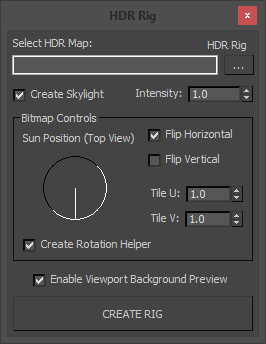
I've put together another small script, this time to quickly add HDR environments to your scenes. It's got a simple and intuitive interface, but I'll quickly go over some of the functionality. (There's also a video if you prefer, see below.)

Select HDR Map:
Here you can specify which map to load in to your scene's environment.

Syndicate content