3ds Max | Scripts

Conformist

5 votes

Conformist is a maxscript that allows you to conform a low poly mesh onto a high poly mesh nearly perfectly. Currently it offers 3 different methods (Inwards projection, outwards projection or both).

In addition to that, if you already have UVs set up for your low poly mesh, to combat distortion the conforming process will bring, the dialog windows also offers uv relaxing and repacking, with a wide variety of options.

Convert Biped to Bones

17 votes

After setting up a biped to your character's base pose, use this tool to create a base skeleton rig.

Since you are using biped, you can scale the rig into place, and utilize its mirror function so you only have to do half the side. Then run the tool, and the rig will be made.

Copy Material Editor

0 votes

Simple script to make a mesh snapshot of Medit materials.

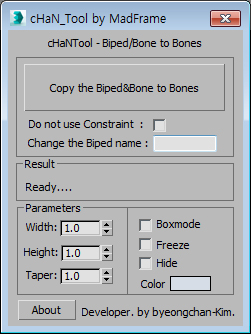
Copy the Biped&Bone to Bones

2 votes


1.Select Target(Biped or Bone)

2.[Copy the Biped&Bone to Bones] pressed button

3.The target name is automatically changed to Hep001.(If you want to enter directly  Change the Biped name)

Copy Viewport to Clipboard

5 votes

Simply copies your selected viewport to the clipboard. Great for quickly getting a viewport grab into photoshop - or if bandwidth doesn't matter - getting an uncompressed image pasted into your email client.

Copy/Paste Skin Modifier via Max Script

0 votes

I recently discovered that copying a skin modifier via maxscript (using addmodifier) doesn't set the weights correctly, so I wrote a function to transfer the weights from one mesh to another. (they need to have the same topology though)
Some other scripts out there won't work because at some point autodesk decided to change the way that the skin's bone table is indexed, and they would need a lookup table with the bone names to convert the old index to the new one. *sight It seems I fixed it.

copyUVWchannels

8 votes

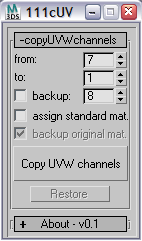
this script copyes uv data from one uv channel to another. and this script was written to aid exporting objects to cinema4d for painting (as cinema4d does not support multiple uv channels in the way 3dsmax does). so you need to copy your uvs to the first channel and then export.


Corona Proxies Tool

2 votes

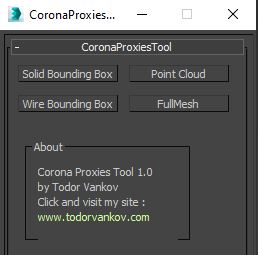
Select you corona proxies and press a button - "Solid Bounding Box", "Wire Bounding Box", "Point Cloud" and "Full Mesh" to switch the procies. This scrip is written and tested at 3ds max 2016. If you have some problem with your max version please text me.

Script category: “#todorScripts”.

You can downlod it from my website:

Create Editable Box on Target

4 votes

This script will create an editable box that will match volume size of target(group, object, light, camera, spline, helper, basically anything that has a bounding box). In addition it will match name, position, and create UVW Mapping modifier(box), and setting mat id's uniques to all sides.

Create Sliding Window

9 votes

Creates a sliding window from a selection of Rectangles. This script takes the rectangles and fills the interior with a Sliding window flush with the rectangle. Make sure to change the 'include script' path statement to reflect you 3ds max location

Syndicate content