3ds Max | Scripts

Scripts Central

3 votes

Scripts Central

Scripts Central v1.0

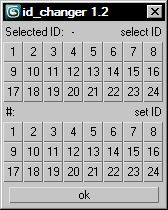
id_changer

7 votes

Selecting or applying material ID's with one click!

Rollout with button grid for selecting or setting material ID's of selected polys up to ID 24. Works with editable poly only. Displays selected poly's material ID if they're same.
Ctrl + click add specific IDs. Alt + click deselects specific IDs.

Examples:
Want to set some specific material ID up to 24 to selected polys? One click.
Want to select polys with same material ID's of selected poly? One click.

Ultimate Switcher

0 votes

 Introducing the Ultimate Switcher!

Presets for Scanline and MentalRay!

Quality Mode is preferable for baking!

AO + LightTracer Adds a white Skylight and enables lighttracer. -Toggle off to delete the light!

Brand New Vray Switcher! Buttons should be self explanatory!

Also new is the object switcher, which mainly speeds up replacing objects in your scene.

Control Hidden and Frozen Objects

1 vote

what this script does:
1- unfreeze objects by name
2- select freeze objects and move, rotate or scale them without unfreezing them.
--this is useful when you have several frozen objects and you do not want unfreeze all of them to select one of them.

3- select hidden objects, delete, more or...without unhide them

if you have some heavy hidden objects and you need delete them, first you should unhide them, then delete them but with this script you can select hidden objects and just delete them without unhide them.

--how it work,

Vray Material - Metal

1 vote

recently, i am working on some script for vray material and rendering. i would like to share one of them which is for making vray metal material.

#) purpose of making vray material scripts:
-many vray users are architect who use 3dsmax and vray just for presenting their design. they are not 3d developer or software expert. they don't need to know much about logic and Math behind making materials. if they want to create a simple "gold" they look at many tutorials with different settings which make them confuse to choose the good one.

Collect Wirecolors into Diffuse Materials

1 vote

This is the script I've built to fix FBX imports from Navisworks & the mass duplicated materials. Optionally it will also split them out to layers based on object wirecolor.

Majority of the code for the main function comes from http://www.scriptspot.com/blog/capitanred/collectbywirecolor

I'm using it in my workflow to effectively 'collapse' duplicate materials when bringing in an FBX. It's the last step shown in my video here: https://www.youtube.com/watch?v=VxmDA0NdWT8

antiNURBS chamfer

6 votes

Usefull tool for antiNURBS modeling technique.

It can chamfer whenever other vertices or edges on the way, the script will eat them all and you'll nice and clean regular geometry along the edge.

For evaluation of the script you'll need to:

1. Select ONLY ONE edge loop of one EditablePoly object. When you've done, run the script and adjust a radius of a chamfer.

2.Then press OK and get the result.

Transformer

3 votes

Transformer is a tool for fast manipulating main properties of an objects and renderer. Works fine with vray and corona renderer.

Purge Empty Layers

1 vote

This script deletes all empty layers. In max 2015 (at this time) it can keep ALL nested layers (user prompt) if any one of them has objects on it. In other words, if a user chooses "Yes" at the query, ONLY layers with NO children AND no objects will be deleted. All nested hierarchies are maintained down to the last layer that has objects in it. Choosing "No" at the prompt will unnest all layers and delete all empty layers. When using a version of max prior to 2015, the script will simpy delete any empty layers. There are no nesting options in previous versions of the Layer Manager.

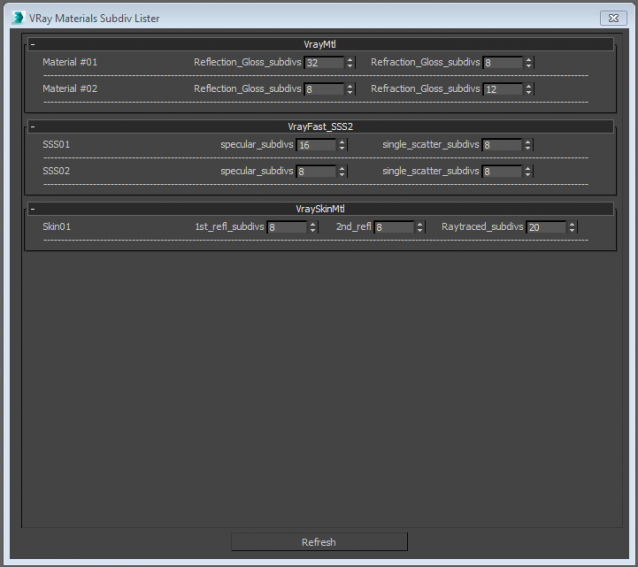
Vray_Material_subdiv_lister

4 votes

This script collects all the Vray materials of the scene and allows you to easily change theirs subdivisions parameters.
Only tested with max 2015
Any feedback is highly appreciated


Syndicate content