Tagged 'Animation'

Apply Increment

3 votes

Allows you to store a single object's initial position and rotation values, then store the new values after moving and/or rotating and apply the calculated difference between these values (as a relative offset) to any selected objects with existing keys. Offsets can be applied to either position or rotations controllers or both. The offsets applied can also be inverted.

Usage:

1. Select a single object and click Get Initial Values to record it's position and orientation values at that time.

Biped and CAT Mass Markers

2 votes

A tool for visualising the projected lower and upper masses (pelvis and base of the neck respectively) in relation to the feet of a standard Biped or CAT rig. Markers between the feet show where the masses intersect, which may help with determining where the static weight is distributed when posing. It does not take into account motion dynamics and so is intended for use when standing still. Additionally, when a foot is raised above the ground the foot line markers turn blue. Likewise if lowered below the ground they turn red.

Center Pivot

7 votes

This script centers the pivot point for all selected objects. This is the same as Maya's center pivot command. Useful if you add it as a macro script probably.

Bake Splines Animation

0 votes

Bakes the animation of one or more selected shapes to vertex animation, with a series of options.

Set: animation range (start/end), sample rate, action over original shapes (hide/delete/none).

Support for: modifiers animation / hierarchy animation / transform (position/rotation/scale) animation.
Pending support for space warp animation.

Compatible with 3dsMax 2012 and higher.

Trackview Filters For 3ds max

0 votes

speed up the filtering process in the Trackview windows and save a lot of time for animators

Sal Pose Manager

7 votes

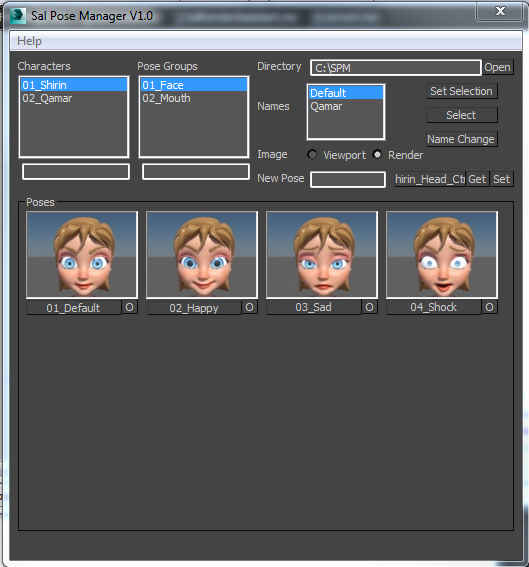
Sal Pose Manager V1.0

download and unzip the script files
copy them to 3Ds Max startup script directory
like this one
C:\Program Files\Autodesk\3ds Max 2014\scripts\Startup
or this one
C:\Users\--User Name--\AppData\Local\Autodesk\3dsMax\2014 - 64bit\ENU\scripts\startup
For help and more visit the script main page

V1.0 Features:
-Create poses for your rig, and organized them in Character folders and Pose Group folders
-Add, Remove, Edit your poses and take their images form viewport or render

TronoTools: Animated Gravity Helper / Projection Path

0 votes

How would your object be projected with gravity? Nothing is more annoying than to see basic physics being broken!

This little helper creates a help path for your object to show you the most realistic path it will follow when falling from it's initial path. Keep your objects to the right scale and speed, and this script should be 99% correct for almost any object. (Feathers excluded ;))

Follow Surface

35 votes

"Here's a script to allow an object to follow the contours/etc. of another object. It's called 'Follow_Surface' and it will enable you to have an object follow a surface even if the surface is animated. You can also follow the surface with a time delay (like a buoy does when it's floating on water)."

Boujou2Max

1 vote

Boujou2max plug-in poster

Boujou2max imports raw markers from Boujou as an animated cubes or dummies. This is a good solution for raw motion tracking without camera solve.

Spiros

1 vote

Spiros 3dsmax script - banner

Perfect beautiful curly shapes!


Description

Spiros is a 3dsMax script for creating beautiful spirals, helices, curls and torus knot splines, with mathematical precision.
Make ornaments, decorations, ironwork designs, jewelry, cloth accessories, symbols from ancient cultures, tentacles, paths for animation / distribution / deformation, and a lot more.

Syndicate content