3ds Max | All

G-Buffer ID SwitchBoard

21 votes

This script is intended to ease the workflow with G-Buffer ID's.
Exposing ID's ranging from 0-300 on a switchboard that gives you a visual feedback of which ID's are active in the scene. Also you can select objects by ID just by right clicking on the ID button. Enjoy :)

Scale To

5 votes

This is tool helps you to scale objects to their actual size in real world easily, by just knowing one dimension length.

Idea and Developed By: Walid Abou Ali

RegionRenderPRO

6 votes

This tool allows you to render a scene using region-render and see results directly in the viewport. The idea was taken from Softimage XSI.

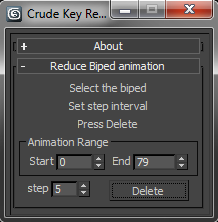
Crude Biped Key Reduction

0 votes

CrudeBipedKeyReducer

This will dismantle that wall of motion captured key frames into something more manageable. It’s not the most sophisticated of algorithms. But, it gets the job done and leaves you with nicely lined up key-poses. To use simply:

Test

13 votes

Feathers RigTools 3dsmax HPK

6 votes

Hi Everybody
Recently I've Done a Simple 3dsmax Script For Making Number Of Feathers Which Every Single Feathers Can Control By Animator Plus Wind Simulation on Feathers and its Kind of Auto rigger For Feathers Stuff.
i am sure there will be some bugs , so please let me Know and Leave a comment if you find one . Thankyou :)
and i can make a howtouse Tutorial for that if i find out you are interested.

3DS Max - Create Vray Physical Camera

0 votes

As you know the Vray Physical Camera is no longer available
In the recent releases of 3DS Max.
So I created a small script that will allow you to create it as you used to do. After installing the script you can create a toolbar for it and place in your main UI.

Snap to Closest View

2 votes

it is a modified version based on Rotation Axis Snap ,the view change mode is more like viewcube rather than zoom to selection that will minimize view jumps

Octane Quick mask

0 votes

Install : drag and drop .mcr file. You find the script in "yoko" category

How to use : run the script. select objects. check "MASK" checkbutton and render.
When rendered, port to max framebuffer, display alpha channel, and copy image....you can past in photoshop.
After rendering uncheck.

WARNING: I DONT GIVE ANY WARRANTY, USE AT OWN RISK.

Octane auto movable proxy

1 vote

how to use :
- drag and drop at each session of max
or
- place in script/startup

what is for :
when octane viewport is opened, you can create, add, duplicate,.. objects as movable proxies directly.

octane version :
This script seems to works fine with 4.00 RC2 - 6.05

WARNING: I DONT GIVE ANY WARRANTY, USE AT OWN RISK,

Syndicate content