3ds Max | All

Modifiers Clipboard

5 votes

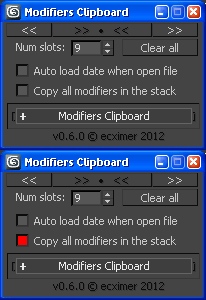
Clipboard for modifiers.

!!! UPDATE !!!

Smart Vrmesh Converter

49 votes

Cupboard/Bookcase

1 vote

Hello there.

I created a Cupboard/Bookcase primitive. Unfortunately it has no UVs. There are included some usefull compounds that I created (the h_create_box is under further development for UVs and a new weld compound because the default weld messes the vertex order).

Enjoy

Maxwell Light Lister

2 votes

2013-05-10: Small bug was fixed that caused the script to fail in Max 2014.  Grab the latest if you are having problems.

2012-04-16: I made a small bug fix that clears up a problem with some uses of multi-sub materials.  If you've already installed it, download and run it again to clear up that problem.

Project Switcher

Just uploaded a new script for quickly switching back and forth between different projects folders. They were new in 3dsmax and allow for relative path names (so you can quickly move an entire project to some other folder). Unfortunately, there is no history about previously used folders, and I my projects are deeply nested on the network so I wrote that script to be able to switch between the projects without browsing the entire network structure.

Update:
There seems to be a small bug in 3ds Max 2008. It causes projectSwitcher to always show a
Browse-Folder-Dialog when swichting projects. This can be fixed by manually editing the file Macro_SetProjectFolder.mcr in the <3dsmax_root>\ui\macroscripts directory and changing

local _SetProjectFolder_macro_option_promptUser
local _SetProjectFolder_macro_option_newFolder

in line 25 and 26 to

global _SetProjectFolder_macro_option_promptUser
global _SetProjectFolder_macro_option_newFolder

Save the .mcr file and restart 3ds Max. This should return normal functionality for projectSwitcher

 

Single Click Render Menu

0 votes

renderMenu rollout gives you an ability to start different types rendering (single frame, active segment, specified frames, or single frame at current time) with one click, toggle some render options and adjust animation range. Useful for animations that are being rendered and edited often in different places and segments.

"C" button clears GI cache
"H" button triggers "render hidden geometry" option

Spline Rope

15 votes

V-Ray 2.0 for 3ds Max now available

65 votes

V-Ray 2.0 for 3ds Max comes with V-Ray RT and V-Ray RT GPU included

Chaos Group is pleased to introduce V-Ray 2.0 for 3ds Max, which is officially on the market starting 6th December 2010.
V-Ray 2.0 for 3ds Max is a complete rendering solution, which combines the power of the well-known V-Ray award-winning production rendering engine with the flexibility and exceptional speed of the interactive rendering system V-Ray RT and the even more impressive new V-Ray RT running on GPUs.

Cloner 2D

3 votes


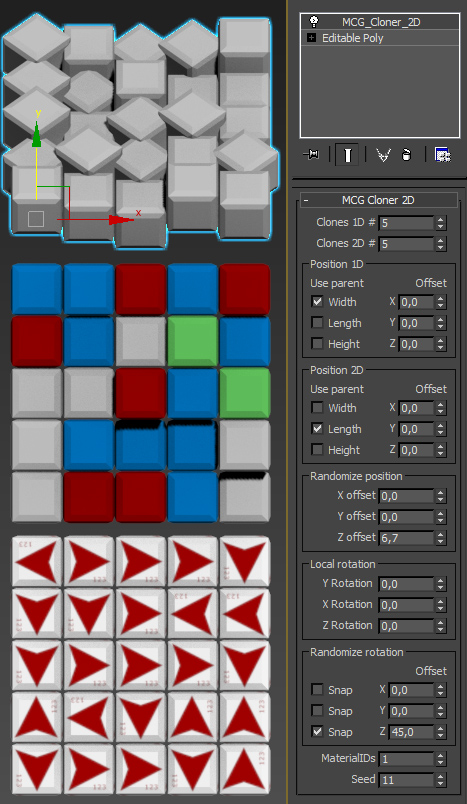
Two dimensional clone modifier with random position offsets, random local rotations and random MaterialIDs.

Use to create tiles of any sort.

Known bugs:

- Local rotations and random rotations don`t work together very well

Release info:

- 1.0

Now you can define what angle to use for snapping in random rotation.

All features work in both dimentions.

 - 0.96 

SIGERTEXMAPS NCS Color Solid

2 votes

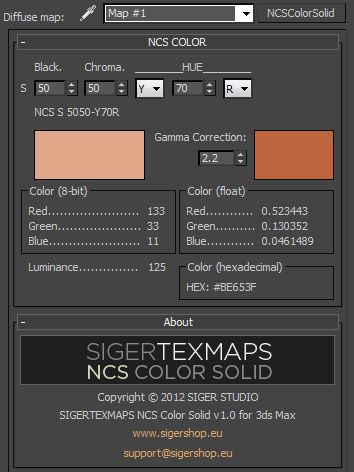
The SIGERTEXMAPS NCS Color Solid is a scripted 2D Texture map plug-in for 3ds MAX.

KEY FEATURES

  • Convenient input of the NCS color code
  • Compatible with V-Ray, finalRender, Brazil, default Scanline render
  • Compatible with mental ray (3ds Max 2010 and above)
  • Gamma correction possibility
  • Color info (8-bit: 0… 255, float: 0… 1 and Hexadecimal)
  • Friendly and simple interface
Syndicate content