
Batch Export/Import
Version:
v04.12
Date Updated:
11/23/2017 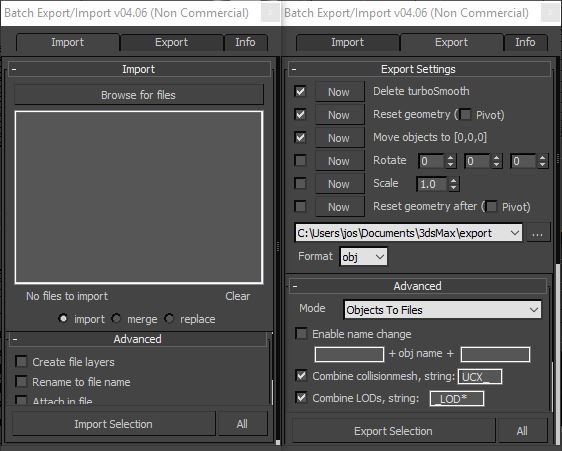
This is a free script, for non commercial use.
This is the perfect script to transfer your models from 3ds Max to ZBrush/Unity/UDK/...
Basically it batch exports objects to multiple files.
Supported formats : max, obj, fbx, 3ds, ase, dwf, dwg, dxf, dae, nif.
General features
- Very easy to use script
- All options are saved.This means all checkboxes, text fields will remember your change.
Import features
- Create file layers. Create a layer for every file and add the file contents to it.
- Rename to file name. Rename all objects to the filename_1
- Attach in file. Attach all objects from the same file together
- Group in file. Group all objects from the same file
Export features
- Reset geometry. Apply the boxmethod to every object (reset transformation etc.). Optionally move the pivot to the origin.
- Delete turbosmooth. Delete the TurboSmooth modifier before exporting.
- Move to [0,0,0]. Move objects to the origin before exporting
- Rotate the objects before exporting (to fix rotation problems)
- Scale the objects before exporting (to fix scale issues)
- Name change. Add prefix and/or postfix to the name of the objects before exporting.
- Combine collision mesh. Mesh with the same name and the given prefix/postifx will be exported together (ex. UCX_).
- Combine LOD's. Meshes with the given prefix/postfix will be exported to the same file. For example _LOD* (* means numbering) for unity.
- Group support. Objects in a group are automatically exported to the same file. If the Collapse groups option is enabled, the group will be collapsed to one mesh.
- FBX export options. Use the FBX Preset option under the advanced section.
So no need for an export scene. You can check the options and everything will be perfectly exported.
After exporting the scene will be restored.
This script has been updated several times by user requests.
If you have any remarks, requests or feedback, feel free to contact me.
Additional Info:
How to install
The new version now has a installer. Just run the .mzp file to install the script.
Version Requirement:
2011/2012/2013/2014/2015/2016/2017 | Attachment | Size |
|---|---|
| josbalcaen_batch_exporter_importer.mzp | 79.79 KB |
Comments
great script
great tool! thank you very much
would it be possible to add an option to create simple *.txt file on *.max file export which contains the list of the layers, dimensions, and polygon/vertices count (with Turbosmooth off):
- Scene objects are organized by layers:
LayerName
LayerName
LayerName
LayerName
- 17 x 16 x 5 meters
- 189.937 polygons
- 186.780 vertices
Thats a good idea, should be
Thats a good idea, should be easy. I'll have a look tomorrow!
Done - Added to version 4.12. Please uninstall and install the script again to list the additional macro script
Script to run export process
Hi, I really dig this exporter but it would be nice if there was a script which runs the exporter without having to open the UI. I tried making a macroscript with exporter.mse and hotkeying it but it still opens the UI.
If possible please make a script which runs the export process with the saved settings, so I can select a bunch of objects and press a button so it exports. It would save a lot of time when iterating with the meshes in engine to test lighting, thanks!
Grid alignment on import
It would be a cool addition to the script to align each imported object to the grid.
The script does seem to space the objects out fairly well, but placing them on a grid would be great
#Feature Request
The ability to save the entire selection as a single FBX and an option to set a custom name for the afore mentioned FBX :)
Batch Export layers not working
Hey I know you mentioned you fixed the layer issue several times but It is still exporting multiple fbx's. Is the version of your tool on this site correct? the tool is .06 when downloaded but it says .08 on this site. Great tool btw the layer export would be a huge help for me. Cheers
Please delete
Please delete C:\Users\YOURNAME\AppData\Roaming\Maxscript\BatchExportImportOptions.ini
Let me know if it's still happening after that
error
how to solve this error?
cant import. after i tried it a few times.. export works..
Thanks for letting me know!
Thanks for letting me know! Uploaded a fix!
Uploaded a new version with
Uploaded a new version with the attach option fixed and a new option to group the imported objects by file. This should fix your problems!