3ds Max | Scripts

FumeFX Spacing Tool

0 votes

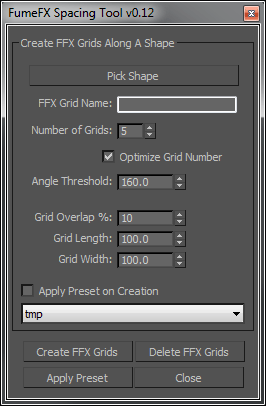
This tool creates overlapping FumeFX grids along a selected spline, similar to the native Max spacing tool.

Scripts Central

3 votes

Scripts Central

Scripts Central v1.0

Super Poly Bridge

60 votes

Bridge faces or holes(edge borders).

Flower creator

56 votes

I’m currently trying to make this a geometry plugin using maxscript so you can set and animate the parameters in real time, just like any other geometry object in max. Scroll down for video.

I appreciate all feedback :)
Download URL: http://havardsc.com/scripts/flowerCreator.ms

How to:
To install it permanently on your system, just copy the file to the \plugins folder or to any folder listed in the plug-ins paths.

Pits & Peaks

14 votes

"Quickly approximates dirt accumulation by analyzing the concavity of faces surrounding a vertex and stores the results in the vertex colors. Useful for adding some texture detail to models with hard edges and creases - like trees & terrain.
1.13 Update:

  • updated some of the documentation and contact info
  • ran some basic compatibility tests with MAX 4.2
  • "

    VRayMtl Opacity

    2 votes

    This tool allows you to quickly change Opacity Mode of VRay Material on selected objects. It would help a lot to optimize any kind of material with opacity map.

    Camera JibRig Creator

    13 votes

    The script will create a fully rigged Crane or Jibrig with a camera attached. This is useful for creating some nice camera movements for interior shots, product visualizations etc. that simulates real life rigs.

    This version is very customizable. You can change the scale, height and length of the rig arm, allthough this can only be done before you hit the rig button.


    JibRig

    Vray Trace Sets Editor

    1 vote

    Quickly edit reflection and refraction exclusion list (AKA trace sets) on multiple objects, for Vray.

    Multi Link Info

    2 votes

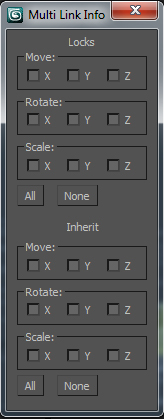
    a very simple script. It helps to check and uncheck the Move, rotate and scale axis in Link Info. It works with Locks axis and Inherit Axis on all the objects in selection.

    Scale on Value

    3 votes

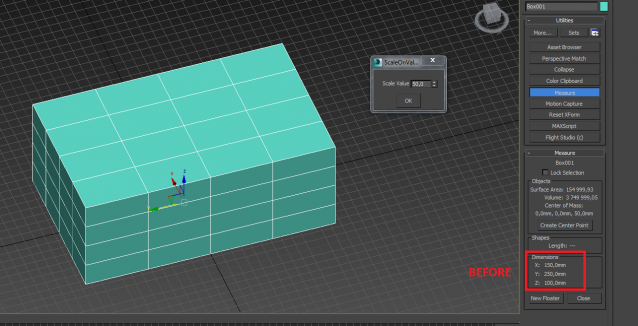
    Scale on the custom value (+ or -) for X, Y, Z axises (for planes on second axises)

    Syndicate content