3ds Max | Scripts

Autoback Renamer

1 vote

This is a super simple script to help anyone who faces this ridiculous issue in max on a daily bases.

Scenario:
Your working on a scene and autoback kicks in. Cool now you have an autoback file in case of emergency.

You now open a new scene and then autoback kicks in again. Now its replaced your previous autoback. D'oh!

Obviously this wouldn't be the case if you had setup your project folder........but yeah.

Autoback Toggle

17 votes

A simple script to toggle max's autobackup on and off, this helps me when I work with very big scenes. it also shows you when auto backup is enabled or disabled.

autobackup check

19 votes

this script add check button to your toolbar so you can simly turn on/off autoback, if is autoback off a warnig will appear so you never forget turn autoback on and loose your progress if max crash
hope you like it

ATTENTION:
THIS SCRIPT IS NO LONGER SELF-DISTIBUTED, YOU CAN FIND LATEST VERSION IN MY PACKAGE: http://www.scriptspot.com/3ds-max/scripts/frodos-magic-scripts-pack-v2

Autobackup Starter

11 votes

Info:
3dsmax needs a save to start "autobacking" .This script always does the first save.

Install:
copy the script to your 3dsmax\scripts\startup  folder

AutoBones: New auto-rigging tool for 3ds Max

2 votes

Hello, my name is Kevin Mackey.

During my time as an animator and technical artist, I have developed a tool called AutoBones, a system for
1) quickly creating character rigs using the Max bones system
2) allowing each chain of bones to be keyframed as a single object, and
3) switching seamlessly between IK and FK animation.

I have run a beta test in order to confirm a high degree of performance and stability, and am now making a commercial version available, including a 30-day free trial.

AutoCAD Commands

16 votes

Adds a toolbar with all AutoCAD Commands on it. Unzip all .CUI files in the UI folder and the ACAD.MCR file in uimacroscripts. A new AutoCAD toolbar will be created in all Interfaces.

Autocad text to 3dsmax text via data extraction

2 votes

AutoCam

9 votes

Creates a camera and animates it automatically, based on the objects you have selected in the scene.

AUTOCAT 3DSMAX 2022_2023

0 votes

Update of the mixamo's "AUTOCAT" tool for max versions 2022-2023. The scripts are not tested with other max versions but there should work with max versions up to 2014.

Make sure that your "bones" are imported as helpers.

Mixamo reserves the copyright of the scripts. This was created for self-improvement purposes on maxscript.

Autodesk Material Converter - obsolete

5 votes

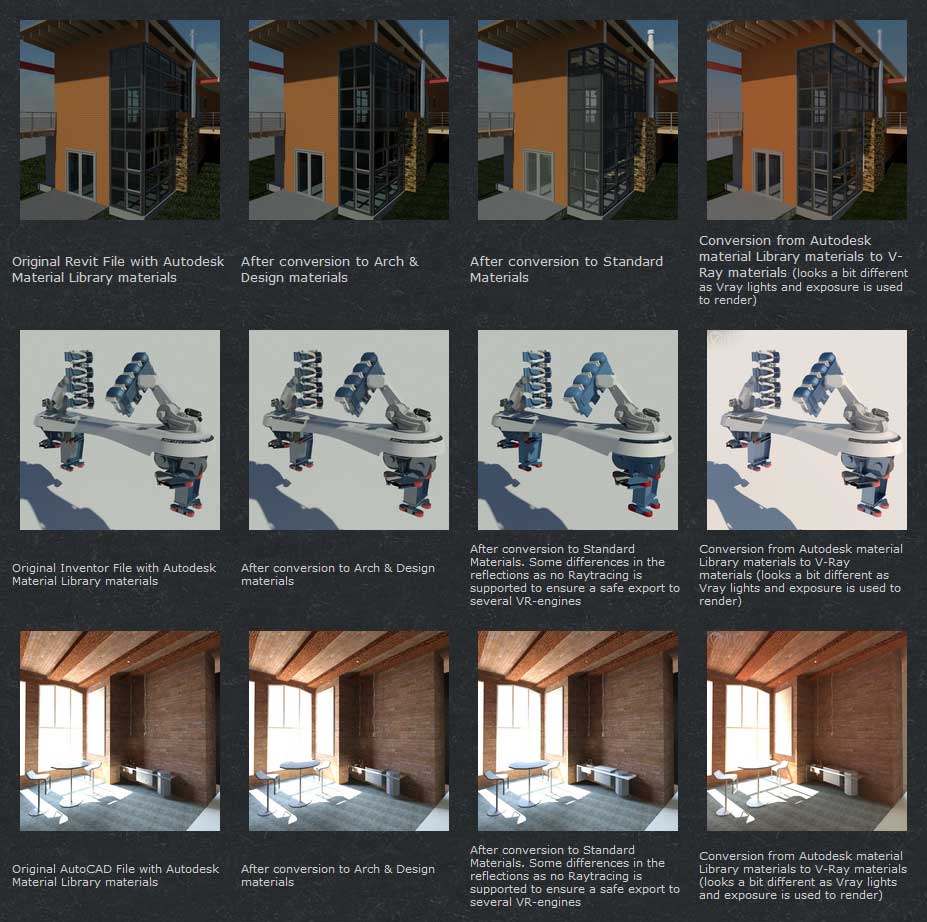
The Autodesk Material Converter is a commercial script for all 3ds Max and 3ds Max Design users starting from release 2011 and up who need optimized materials for mental ray, V-Ray or VR applications. With one click all Autodesk Material Library materials are converted into Arch & Design or V-Ray materials. Conversion to Standard materials takes only two clicks

The major adavantage will be an increase in rendering speed (on average 35%) plus it will give you the flexibility you need for your material fine tuning. and of course you don't want to manually convert materials which are coming in from AutoCAD, Revit and Inventor into 3ds Max (Design)

Most VR applications need Standard materials to work with. The conversion to Standard works from Arch & Design or Vray materials

In addition to material conversion the script checks if there are double materials inside the scene. If they are there, they will be changed into instances, keeping the number of materials as low as can be.

New features in v2.5!

  • conversion from Arch&Design to V-Ray and back...it's there!
  • conversion of all Autodesk maps
  • conversion of some V-Ray specific maps or MentalRay specific maps
Syndicate content