3ds Max | Scripts

Auto Non Quads

4 votes

-- With a editable poly object selected you can run this script
-- and it will take you to polygon sub object mode and select the now quads for you.
-- Even works when you are in other sub object modes.
-- A simple script yes, but a time save none the less.
-- It is a simple script to use as a short cut key or as a text button
-- that with one click you can see all non quad polygons.
-- Tested in Max 2011 design.
-- Written by Tom Mitchell
-- Found in the TomMitchell category after starting Max

Auto Object ID

18 votes

A script I modified to automatically create Object ID for all the objects selected in the scene. It has Vray friendly option now.

Auto ProOptimizer

4 votes

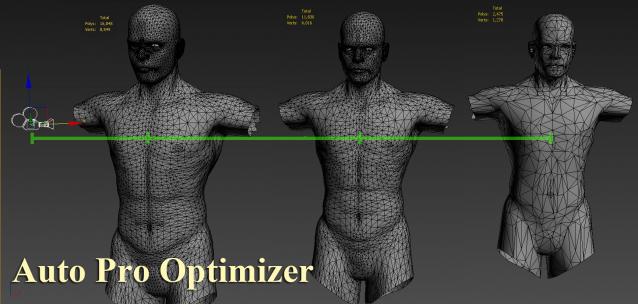
Auto ProOptimizer Add 3Ds Max ProOptimizer Modifier plus some more parameters that make "Vertex %" change automatically by distance of object from camera.

Version 2 have same function for MultiRes Modifier.
ProOptimizer Destroy the UVW but MultiRes don`t.

Auto Render Element "VRayLightSelect"

340 votes

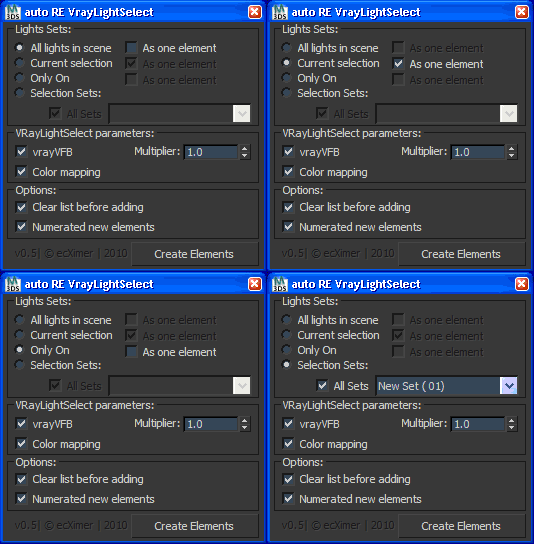
Create Render Elements "VRayLightSelect" for lights.

UI

Auto shutdown computer when finished rendering

1 vote

This 3dsMax script will help to shut down your computer after your computer finishes rendering. After installing this script, press the "?"(help) button to see how to use it.

Auto Snap Mode

3 votes

This is a simple (free) script that detects viewport changes. It will automatically set the current snap mode to 3D snaps when the current viewport is perspective, camera, etc; it will switch to either 2D/2.5D if the current viewport is set to standard orthographic projections.

The function only changes the current snap mode if:

1: Snaps are On
2: Either the target snap mode is 2/2.5 and the current snap mode is 3D OR the target snap mode is 3D and it isn't currently set to 3D. (In other words, for top/left/front the mode won't change if it is 2 or 2.5--it uses the current 2 or 2.5.)

Auto Wheel

14 votes

Automatic wheel rigging Tool.
Realtime rotations based on Controler movements

Auto-Link

3 votes

This macroscript adds an "Auto-Link" mode and allows to link objects very quickly when using "Paint selection region" method in the main toolbar. But it works with any selection method and "Ctrl+click". This mode is helpfull if you often need to link a lot of objects together.

Auto-save

11 votes

Unzip the files into your scripts/startup directory.

AutoBack File Loader Zorb

52 votes

*v1.31 - Bug fixes, removed error on opening on some max versions
*v1.30 - Now supports displaying 133 different date formats!! (Use the "Change Date Format" option in the right click menu)
*v1.21 - Updated for 2010 and added thumbnail support!

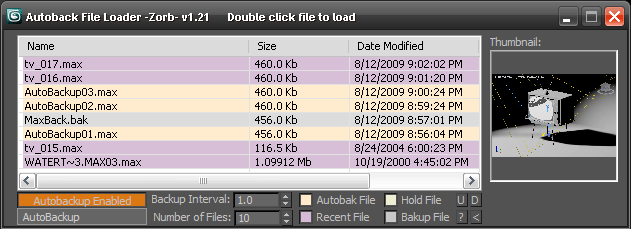
Tired of navigating to the autoback dir, selecting view as detail then sorting by date to find your latest autobak file. then comparing it to your last good saved file? This script will make it easy for you. Brings up a list of max files in your autobak dir, max hold files and your last opened file, sortable by date, size and name. Double clicking will load the file, right clicking will give you a delete option.Sort settings and files displayed are saved between sessions

Unzip to your Max root dir, will be available in macroscripts under "Zorb Tools", or run it as a script from the scrips directory

Syndicate content