3ds Max | Scripts

How to create spline trails in Pflow?

Hey Guys,

I have a Pflow setup with particles coming out of a piece of geometry and I want to create trails with splines that follow the motion of each particle. I have a script that generates splines out of the particles trajectory but they are not animatable. I am trying to get a bunch of branch-like things growing out of my geometry while twisting and curving (hence the Pflow setup).

HQ Proxy Tools

0 votes

HQ Proxy Tools is a free 3dsMax script that helps you to adjust some settings of proxy objects. This script supports Vray render and Corona render.

Highlight features:

MAKE INSTANCES SIMILAR PROXIES: proxies have the same .vrmesh file or .cgeo file will be made instances. It will save memory and render faster.

INSTANCES TO VRAY/CORONA PROXIES: convert objects to vray/corona proxy and maintain their instances (The original proxy export from Vray will convert objects to proxies but also make them unique objects, which will increase your file size and render slower)

Image Comp Helper

3 votes

This is my updated version of Christoph Bülter's awesome imageCompHelper script (http://www.scriptspot.com/3ds-max/scripts/imagecomphelper) for displaying composition guides in the active viewport.

This new version has a couple of additions to the original:

Image Pose Animation

4 votes

The script is useful if you want to animate some images in a certain sequence (e.g. - for cutout animation) in 3dsmax . The controls are in the CA modifier added to the object.
Help:
- soon will be added -
Full video tutorial:
- soon will be added -

Install notes:
- Unzip, run exe file, select max root dir. You can find the script in "Customize User Interface">"Category">"Blago Script">"ImagePoseAnim"

Tested on: 3dsmax 2011, 3dsmax 2012

for more info visit:
www.illusionboxstudio.com

ImagePlane For 3ds Max 2014

3 votes

Script for help the position create of objects in your scenes. With possibility of background, foreground or multiple planes. For still image or sequence of image with or without alpha channel.

Import Illustrator Files

2 votes

This Script imports multiple Illustrator files in one click, it attaches splines and weld vertices. you can add an extrude modifier by Shift Clicking the button.

Make sure to save your .ai files to illustrator 8 as 3dsmax can't import more recent version of illustrator files.

Install by drag and dropping in the viewport, then go to customize, customize user interface, tool bar, category "SimonScripts", create a new toolbar if you haven't got one already, then drag "Import AI" inside the toolbar.

Inequitable Chain Tools

1 vote

This is my first autorig. It's inspirited by the chaintools by Felix Joleanes.

It would permet you to creat a chain tools with unequitable bones (that you created before hand) and a line ( the knot represent the emplacement of your controller ).

I would be happy to hear your feedback :)

The script on my site is the macroscript (a button for your interface). You have to click right on max top, select "customize", go to "tooldars", in category find "MaryryCoScript" and drag and drop the script in your toolbar. Then have fun with it :)

Instance Fast Selection

3 votes

FREE

Fast select instances of selected objects

Instance-Align

4 votes

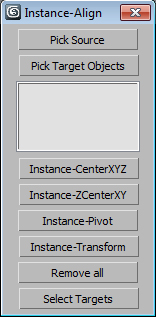
Very useful script for interior visualisation (cafe, bars, restaurants): add lights, change chairs/ tables, put tableware on many tables, e.t.c.

1. Pick object to clone

2. Select targets, click pick targets -> ok

3. Choose align method:

- CenterXYZ

- ZCenterXY (Align minZ of source to maxZ targets)

- Pivot align

- match all transform

After execute new objects will be selected. U can select target objects (to hide or delete).

Instance-O-Matic!

23 votes

Converts copied objects into instances of the original. Note that this is still very much a WIP: there has been minimal testing; there is not UI - etc. Your mileage may vary...

Syndicate content