3ds Max | Scripts

All for UE5

3 votes

Description:
This MaxScript is designed to save time working with Unreal Engine 5.
For UE5.4 and newer, use the console command: Interchange.FeatureFlags.Import.FBX 0
For UE5.0–5.3, no console command is needed.

AllForUE5

Features:
- Create folder structures based on the layer names;
- Export objects from 3ds Max to Unreal Engine;
- Copy the Position/Rotation/Scale;

miauu's Script Pack vol.2

18 votes


dwHideUnderSkin

0 votes

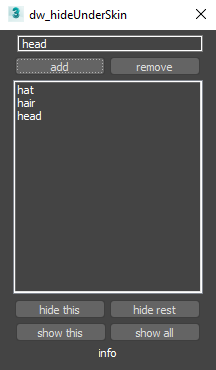
UI screenshot

Allows you to hide/show elements while working with skin for example.

First you need to create poly groups by selecting them and pressing Add (switch to Editable_Poly in stack).
Then you will be able to hide/show those groups.

You can also use fast way to control visibility:
Double-Click : hide group
Double-Click + Alt : hide everything else
Right-Click : show all
Only downside is that you can't work with multi-selection like that.

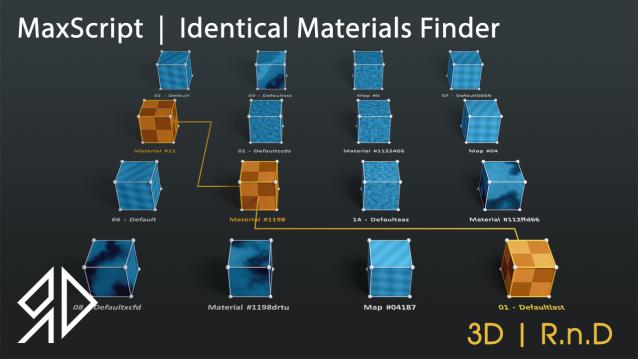
3D R.n.D | MaxScript | Identical Materials Finder

5 votes

Update Notes Version 3.18:

included slate material compatibility

automatically opens material editor when pressing "Put similar to the material editor" button


Update Notes Version 3.21:

included option to instance all scene material

included option to search within selected objects

 Update Notes Version 3.31:

Bug Fixes For Newer Versions of 3dsmax


Update Notes Version 3.36:

Improved code and much faster resaults

fixed unmatched materials issue

Bug Fixes For Newer Versions of 3dsmax

Update Notes Version 3.37:

added abilty to cancel search

clear the ram of arrays after closing the script dialog


Installation : Run script or drag and drop to 3ds max, then go to customize user interface and assign "Identical Material Finder" as keyboard short-cut or quad menu under  "3D_RnD"  Category

miauu's Tab Panel

1 vote


miauu's Tab Panel allows you to organize all of your toolbars into tabs.

What you can do:

dwDupFaceCleaner

0 votes

UI screenshot

Script to find duplicate faces. It was made for specific task of removing inner faces of a model made from voxel-like boxes. Don't expect it to be a universal solution.
Though also has an option for finding duplicates of outer faces.

Sweep Profile

563 votes

The new version of Sweep Profile PRO has been released

version 1.01.36

  • Adds support to 3Ds Max 2026
  • New Demo Molding profiles
  • Drops support to 3Ds Max 2014/2015

version 1.01.30

  • Adds support to 3Ds Max 2025

version 1.01.27

  • Adds the "Assign" button
  • Adds German and Japanese localizations
  • Better zooming to profile on rendering preview
  • Adds an ability to add multiple directories with profiles using the checkbox "Include Subfolders"
  • Fixes an issue with changing profile dimensions in 3ds Max 2023-2024

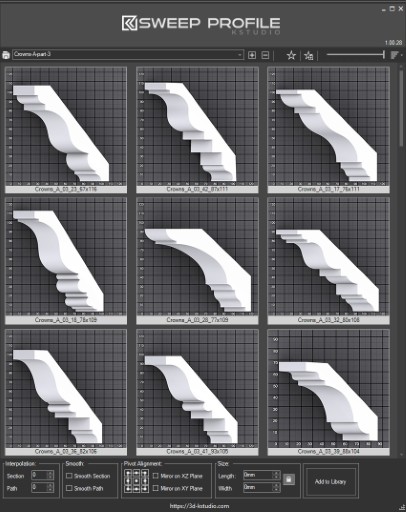
The main functionality of the Sweep Pro lies in its ability to offer a quick and convenient way to build architectural profiles using the Sweep modifier.

The pack includes pre-made architectural profiles (10 for the free version and 37 for PRO version), providing users with a solid base to start from.

However, the functionality doesn’t stop there; users also have the option to add new profiles from the scene or add profiles from a specific folder.

Also, the tool has a very convenient option for changing the profile size on the fly.


Batch Save 3ds Max Files to Previous Version

4 votes

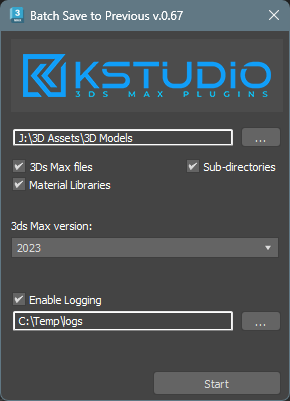
Script for saving 3ds Max files and Material Libraries* to the previous version in batch mode

*Batch saving Material Libraries to the previous version requires 3ds Max 2023 Update 1 or newest


EasyIncludeExclude

1 vote

This Script will simplify the process of including or excluding objects from lights.
Instead of choosing objects from the list as usual, you just need to select both objects and lights and click the corresponding button (include or exclude), for each action you can either add to the current list or replace it completely or even remove selected objects from the list.
No more endless scrolling to find the objects you need to include or exclude!
Also works on multiple lights selected.
Tested With Standard,Vray and Corona Lights, might work with other renderers...

miauu's Work Plane

11 votes

Syndicate content