3ds Max | All

LightMod

4 votes

All lights in scene are influenced by parameters of LightMod.
If you selected some lights on scene , all lights selected change based on LightMod parameters.
Usefull with non instanced light.
Script work with vRay Light.

Features:
- Cast Shadow
- Double Sided
- Invisible
- No Decay
- SkyLight Portal
- Simple Portal
- Affect Reflections
- Length and width parameters
- Subdivs parameter
- Multiplier parameter

Thanks for your feedback
netkingZ

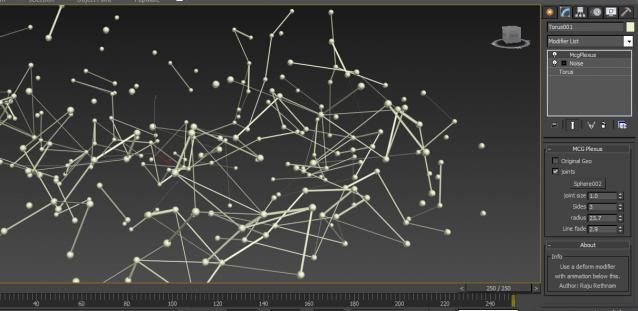
MCG Plexus

2 votes

It's a MCG modifire to create similar effects as you can see in After Effect's Plexus.It generate tubes on each edges in a mesh and place a geometry for the joints.. Apply this on a deforming mesh.

Screen shots


Obj2Spline Align

54 votes


A script that aligns objects along a path or spline. much more editable than the spacing tool. see how it works here or download complete package (with mini tut).

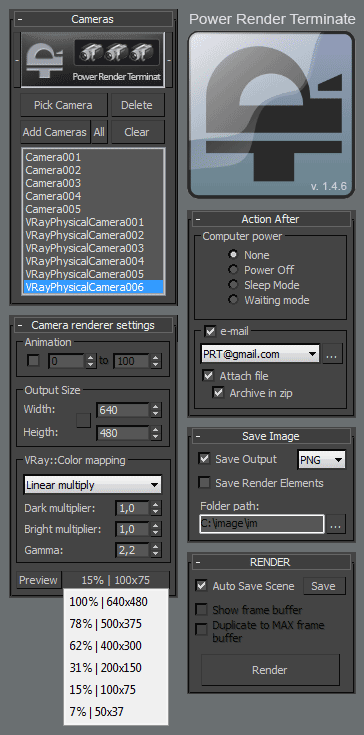
Power Render Terminate

74 votes


Description

Script Power Render Terminate - for 3d Max provides the ability to render multiple cameras at the end can turn off your computer, save rendered images, send e-mail notifications.

 Other versions 2016

Version 1.4.7:

  • Compatible with 3D max 2014

New features in version 1.4.5:

  • Fixed black images in vray 2.30
  • Fixed reset in Mental Ray
  • Added format vrimg

Version 1.4.3:

  • Compatible with 3D max 2013

Version 1.4:

  • Support for 3D Max Version 2012
  • Saving and loading of all settings

Material Layer Interface MLI

142 votes

3 new versions and reduced prices: MLI Light 2.0, MLI 2.0, MLI Pro 2.0

With the Material Layer Interface (MLI) you can create Material Layers and passes in 3D Studio Max and it’s easy to handle them!

mli_banner

Just create the layers and pick the objects. Assign materials to the objects and feel free to use different renderer or render settings for every single layer.

Count By Layer

1 vote


Simple tool that allows to calculate triangle and vertex count of any object inside specified layer.

RADOLOMEO extrude

3 votes

Uploaded version 0.9 of the script. Much more tools to be checked.
Not optimized too much.

Tools:
- prepare - converts model to editable poly
- extrude to - extrudes selected face to the point of mouse click
- bridge to - bridge tool
- make open - make an opening on selected face, no need to select opposite face
- make hole - make opening with inset not to have overlapping faces
- smart extrude - finds the nearest face and select it for extruding
- make simple window - makes simple window on selected face. no need to select opposite face

IOR - Index Refraction

0 votes

Simple, harmless and silly script which allows you to view data of index refraction or IOR in the listbox

ior - reflection index

Selection Palette

0 votes

Selection Palette is an easy-to-use customizable tool for creating and editing visual selection sets on the fly. It is a great way to speed up your work as an animator, since you can create your own way in minutes to handle controls. It is also useful for riggers or anyone who needs a quick visual way to create selection sets.
Feel free to contact me if you have any questions about the tool. Enjoy using it!

Maxwell Multi-Scene gallery exporter

0 votes

This script exports multiple MXS files from a single 3ds Max scene by assigning different MXM files to a user specified MXM reference material. It does so through a dialog with the following features:

  • Select one or more MXM Files using a dotNet file selector
  • Select an MXM Reference material that you want to assign each MXM file to
  • Select the camera that you want to export each MXS Scene with
  • Manually override the export path (it defaults to the same path as your 3ds Max scene)
Syndicate content