3ds Max | Scripts

TeaCup

38
votes


+WHAT IS IT?

FlyWiz - Vray Flythrough animation wizard 1.1

11
votes

This tool manages for you all the boring stuff to achieve a flythrough animation with Max And Vray.
All changes are made in the engine to help you control and render each necessary step.

Finally it can also do all the process in one click ! 

Give me back my dialogs!

6
votes

Tags:

Light Lister for V-Ray Advanced 1.50 SP2-SP4a (3dsmax 2008-2010 x32/x64)

24
votes

This macroscript replaces the built-in light lister with one that incorporates support for lights from V-Ray Advanced 1.50 SP2,SP3 and SP4a

Add support lights:
- VRayLight, VRaySun, VRayIES and VRayAmbientLight(SP4a).

Add support shadows type:
- VRayShadow and VRayShadowMap

Other additions:
- add button for pick ies file in photometric lights (if distribution as web)

Branchy

16
votes

Obj2Spline Align

18
votes


A script that aligns objects along a path or spline. much more editable than the spacing tool. see how it works here or download complete package (with mini tut).

FumeFX Partitioner

3
votes

This script will divide a fumeFx grid into partitions. This can also be used to simulate a batch of fume grids locally or via backburner.

More info and sample usages here.

Dotnet Property Inspector

1
vote

.Net Property Inspector

Detach Elements

3
votes

Detach all elements on multiple objects with a few options for better scene arrangement,
including convert to mesh, group by source or link to source or point helper.

Detach Elements

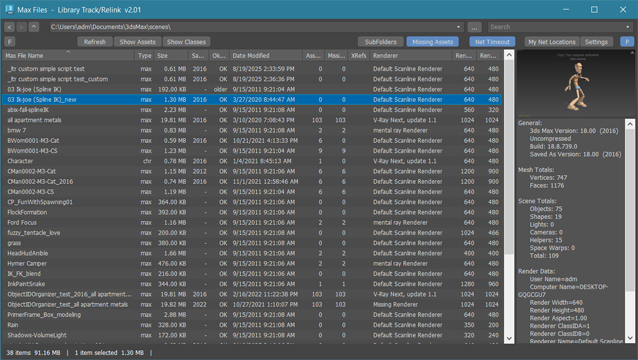
FilePathFinder Pro & Light versions

16
votes


Updated March 15 2010

FilepathFinder Pro v3.1.27


FilepathFinder it is a power tool for working with asset files in 3ds Max.
With FilepathFinder you can easy create or use existing materials, merge 3dmodels and Proxy into your scene.
Also with this tool your can easy find, collect and sort asset files.
FilePathFinder help you quick select objects in your scene or find desired materials and textures and placed they to Material Editor.

New Features:

  • DotNet interface
  • Image preview list (include formats HDR, EXR, PSD and other)
  • Image preview for Mental Ray Proxy, Vray Proxy, Ies,Material and xRef (if to them exist preview image)
  • 3 modes to display files - Details, Details with Thumbnails and Thumbnails
  • Independent from 3dsMax caching of files in formats BMP, JPG, PNG, TIFF
  • New methods of collection of files - via clipboard and drag&drop method
  • Ability to add bitmap files, proxy, Ies, materials and other files to the project
  • Ability to create new materials
  • Creating Multimaterial with dragging of several images
  • Texturing of objects and subobjects
  • Ability to change setting for texture before or after the creating of material
  • New "Render Preview" Tool

  • Fixes issues with retargeting of Custom Dependents in Asset Tracking
  • Object selection has been accelerated (up to 100 times!)
  • "Transparent" demo-version
  •  

    FilepathFinder v 3.1.27

    • Adds ability to drag files of materials (".mat") on objects in viewport and into the Material Editor
    • Adds filter for Images and Not-Images Files
    • Fixes issues with speed for Showing Files in List with filter
    • Fixes issue occurs on some computers when running utility

    Link to Vertex

    2
    votes


    You want to link floating Rabbits and other objects to a vertexLevel animated waterPlanes surface?
    You want to link a parrot or armor to a characters actual, deforming mesh-surface shoulder and not to bones or helpers?
    You want to test this tool.

    Video Capture Select Viewport

    0
    votes

    This is a Script that allows to recording and Grab the active viewport during the work. You can select any viewport during recording. Veersion 1.1
    Based on 'Create a Quick Preview' by Borislav 'Bobo' Petrov (www.scriptspot.com/bobo).
    New in release version 1.1: Revision code (work in progress) Revision the Interface Add save path button image "Output Save Path Image" Add save path button video "Output Save Path Video" Add checkbox uniquename file image "Uniquename File Image"

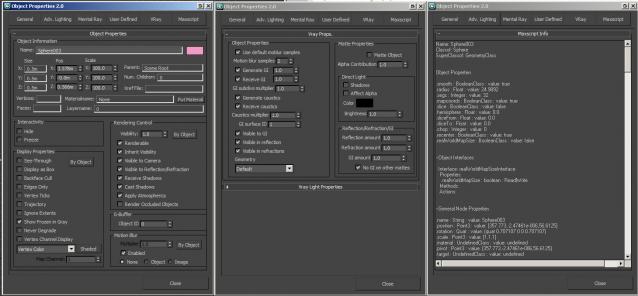
    Show DotNet Properties

    12
    votes

    G-Buffer ID

    6
    votes

    4 assistant operations for effects tasks which required G-Buffer ID's.
    All of them works on selection or all scene objects and support Undo.
    Plus Load/Save to log file to backup and restore your G-Buffer ID's settings.
    Save also works on selected or all scene objects.
    Only Load ops not support Undo.

    Render Region

    6
    votes

    Render Region - 3DS MAX scripted RenderEffect. While render region Mental Ray blacks out everything but the region render after it's done. This scripted RenderEffect allowes the previous image to remain in the VFB, along with the newly rendered region.

    - v1.0.1 (20.10.2007) - added support for MAX 2008. 

    Invasion

    5
    votes

    It is a simple game for 3Dsmax (2009 or higher). Try to catch the red flying saucer. :)
    The video shows you how it works.

    Fountain Animation Tools (F-Tools)

    12
    votes


    Batch Camera Render

    21
    votes


    New version release - 1.9 beta

    HCG Asset Browser PRO

    14
    votes

    HCG Asset Browser PRO
     
    Ver 1.01

    Syndicate content