3ds Max | Scripts

Smart Poly Extrude

I saw this thread and decide to make a script. :)

Then Syphorlate show a very elegant solution for quadratic extrusion and I add it to the script.

This is the final version of this script. Any future development of smart extrusion is in Syphorlate hands.

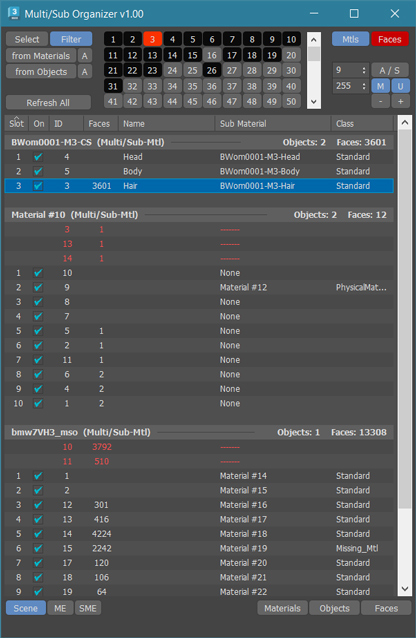
Maxwell Light Lister

2013-05-10: Small bug was fixed that caused the script to fail in Max 2014.  Grab the latest if you are having problems.

2012-04-16: I made a small bug fix that clears up a problem with some uses of multi-sub materials.  If you've already installed it, download and run it again to clear up that problem.

Nested Layer Manager 2 For 3ds Max

Nested Layer Manager 2 provides the ability to nest layers in 3ds Max. This script is small, fast and allows layers to be nested in an unlimited number of folders. It has complete 2 way communication with the default layer manager; If anything is altered in either, both layer managers are updated. This allows people without this script installed to still see the normal layer organisation present in the file.

Nested Layer Manager has a free 30 day trial.

CLine 2.08

CLine2 is advance line Drawing Tool in 3dsMax

this is possible to drawing spline with Pan, Zoom and arc Rotate


[2.0 --> 2.02]

- some bug fix

- add: orthogonal mode (Shift key)


Find Script By String

Recursive search in selected directory for string inside .ms scripts and finally double click on item in list of matches result to load the script for editing.

EaseLT Easy Lighting Tool

Ease Lighting tool is a Lighting Tool that helps in fast pace creation of quick Lighting setups for Rendering in 3D Studio Max (Mental Ray).

EaseLT plugin has a very basic UI which displays all the basic necessary options in one Rollout.

Advantages :
1. Minimal UI.
2. Quickly switch between different types of lights while maintaining the transformations
3. Batch Editing, change settings of multiple lights at same time.
4. Basic Backdrop included.

MultyConvertor

MultyConvertor - allow to convert any materials, lights (objects) of any renders to any materials, lights (objects) and renders!!! It is all in one.

You can simple create *.mct (edit text file in any text editors and change extension) file for new render and facilities that support this type of rendering. See any *.mct in archive

Now you start the script and setup link properties from one render type to other. You can also use expression for translate value to other value or execute any max script expression.

SolidRocks

SolidRocks V1.2.4 is out !!

SolidRocks adjusts and optimise all needed Vray parameters to reach the best rendertime/quality ratio.
Learn Vray progressively, see in realtime changes made by SolidRocks when you change resolution/quality.

SR V1.2.4 includes new tools for both VrayMasters and Beginners:

CamLister

A very simple Camera Lister which allows to select and assign cameras by clicking it in the list.

Leftclick: Select the camera
Rightclick: Assign to current active Viewport

Very simple one but still my most used Script for daily work ;)

Helixometry

Helixometry is a geometry plugin for 3ds Max that creates helix shaped meshes. All of its controls are animatable. The biggest benefit to this over the spline helix is the ability to taper the thickness of the mesh as well as twisting and turning. Check it out.

https://vimeo.com/65155264

Helixometry 1.0
- Start/End radius
- Height/Radius bias control
- Number segments that make up helix
- Number of turns
- Height of helix
- Radius randomizing option

splineToMXS

"This script allows to convert any selected Spline object(s) to MAXScript code that will recreate them.

SMES - Super Material Editor Switcher


Having a way to compensate for the (stupid) 24 material limit in 3D Studio is always a big request, so here's a script to do just that.


Advanced UV Normalizer

This is an extension of the Normalize function found in PolyUnwrapper and it allows you to use custom Texel Density to normalize the UV Shells across different models.

So you can pick up the Texel Density from one model and use it in another model (or group of faces) as well as manually modify the Texel Density and Texture Size.

QuadSphere

QuadSphere is an Object Plugin that creates spheres made of quads, which are useful for low polygon modeling and mesh subdivision.

Unlike TurboSmooth, with QuadSphere you can specify a level of subdivisions that is not power of 2. Another advantage is that the areas of the faces are more evenly distributed than using a Box with TurboSmooth.

Additionally you can unify the Materials IDs, create hemispheres with or without caps, and convert the object to poly with a single click.

VrayLightLister

Lister for Vray Lights. Extremely comfortable for controlling VrayLights present in the scene.

For more info - http://www.tepavicharov.com/scripts.html

TurboReverse

TurboReverse is a 3ds Max modifier that has the opposite effect of TurboSmooth. It will recreate the subdivision levels of an already subdivided mesh with 100% precision maintaining the existing UVs.

It is the successor of Subdivision Reversion.
• It is now 100 times faster, being a native 3ds Max plugin, not a maxscript anymore.
• It has the ability to reverse just parts of your models based on your selection.
• It can reverse multiple iterations at a time

Quad Cap Pro

Quad Cap Pro is a modifier plugin for 3ds Max that fills borders and ngons with quad polygons unlike the normal cap tool which produces one big ngon.

Quad Cap Pro is the successor of the Quad Cap maxscript. It is now faster, has many more features and also it can cap ngons with an uneven number sides producing quads and a single triangle

Syndicate content