3ds Max | Scripts

Morpherizer

24 votes

INTRO:

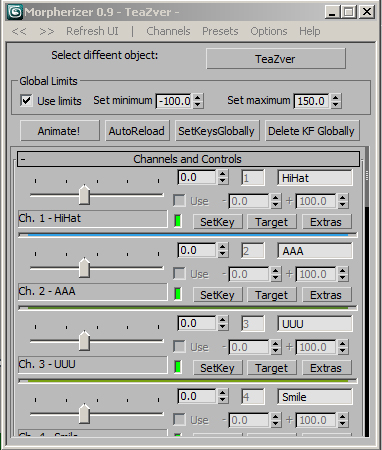
Morpherizer is a maxscript utility that gives access to MORPHER data outside the stack and modify panel itself and has some other handy buttons and tricks that can help you with yor morphing, lipsyncing and animating tasks.

Morphizer 0.9 UI


INSTALL INFO:

Morphica Tool

3 votes

Here s my first contribution script , it is pretty similar to many existing scripts over here used in connecting morphs to UI ,but it deserves a trial , it is weel production proven for 2 yrs so far .
i ve made a video demoing its usage here :https://vimeo.com/63446923

Move To Surface

23 votes

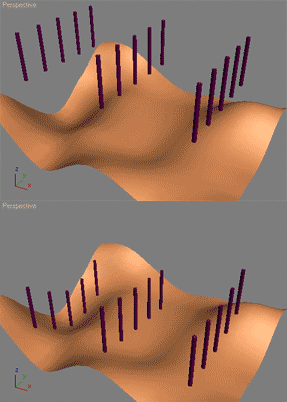
The following will let the user move objects along their Z axis to fit a specified surface. Such a script can be used to automatically plant trees, poles etc. on the ground.

This script is straight out of the 3ds Max MAXScript reference file. Its part of the MAXScript 'How To' lessons that teaches how to use MAXScript with practical problems. Load your MAXScript reference (the one that ships with 3ds Max) and do a search for 'align surface' and it'll be the first result.

I did not write this script I merely copied the code here as aligning to a surface is a very common request. Make sure to read the other 'How To' tutorials in the 3ds Max MAXScript reference - they're all really good!

Move to Surface - Updated

0 votes

I didn't create this script from scratch, this is an updated version of the script you can find in the maxscript documentation in the section called: How To - Practical Examples.
http://docs.autodesk.com/3DSMAX/16/ENU/MAXScript-Help/

I added two lines of code to that script to fix the problem of pivot points location
for the objects that going to be dropped. Those two lines will shift the pivot point
to the center of each object's lower part.

Moving an Egg on 3 axes

12 votes

Hi, this is our work made for a school project, it's an easy way to move an egg with the help of a dummy.

Its rotation is actually based on another script made by Cuneyt Ozdas and the positioning is made by getting the lowest vertex on the object (egg) and adding it to the distance where a ray(previously made) collide.

I hope you understand how it works. Just take the scene example and run the script, it'll work wonders! :D (I attach a word document though, just in case :P).

Greetings,
IPMULSA

Special Thanks:
Mander
TenshiYuna
LizQuiroz

MR Daylight system

17 votes

This is a quick way to test MR daylight in your scene. Only few params are included, so
if you want to adjust more, you still have to go to motion panel.
What it does:
1. makes daylight system with Helsinki latitudes
2. turns current renderer to MR with draft FG settings
3. adds exp control

Delete button turns back to scanline with no environment or exp control

Multi-Assign Scripted Billboard Controller

11 votes

"Seeing as the Look-At controller can't be scripted. I whipped this little utility up to multi-assign hundreds items to look-at a target node. Useful for trees. crowds. you know the drill...
1.01 Update:

  • Improved effeciency of and debugged dependsOn in assigned scripts: rotation now updates correctly when script-assigned objects move.
  • Added tooltips.
  • "

    MXSJson

    2 votes

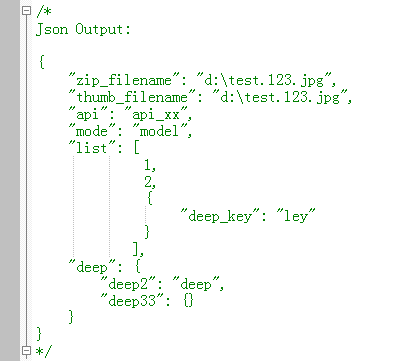
    Simple create json with MaxScript

    mxsjson

    Noise Manager

    2 votes

    A tool used for setting noise controller values on a selection of objects containing position and/or rotation noise animation tracks.


    General Notes:

    - Noise controllers must be added either directly to the main Position or Rotation tracks or setup as a list controller with a single noise in any available list track.

    - Does not support multiple noise controllers on a single object. Does not support nested list controllers. Does not support noise float tracks on XYZ controllers.

    non Quad Selector

    20 votes

    nonQuadSelector is a tool which is easy to use and which helps you with the cleaning up of your editable poly. It shows you the faces which haven't 4 sides. You can select the faces you want in order to highlight them : 3 sides, 4, 5 , 6 and 7 and more. It also shows the number of faces and their percentage. For editable Poly. Dockable.

    Syndicate content