ScriptSpot is a diverse online community of artists and developers who come together to find and share scripts that empower their creativity with 3ds Max. Our users come from all parts of the world and work in everything from visual effects to gaming, architecture, students or hobbyists.
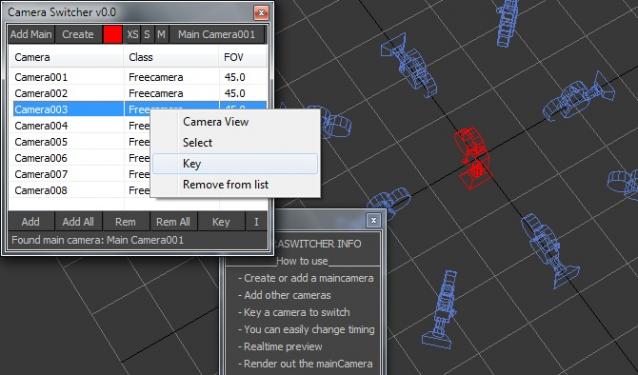
Okey I know there are some similar scripts outhere, but I created one I hope people will find this one useful.
- Create or add a maincamera - Add other cameras - Key a camera to switch - You can easily change timing by drag the keys - Realtime preview (because the use of one main camera) - Render out the mainCamera
Submitted by James Coulter on Fri, 2006-10-20 20:45
9
votes
Creates an animated Target Camera based on an animated Free camera version 1.04 works with both MAX 4 & MAX 5 - and adds position memory for the dialog.
Simulates camera shaking in earthquakes - explosions - etc.
Usage: take a good perspective view - go to frame where you want it to start and run the script. Now you have a new free Camera - Camera_Shaken01 - that has a procedural shake animation layered on position track.
With this useful and funny script, you can isolate in a ListBox, the category object in Geometry, Shape, Light, Helper, Camera and Space Warp in the viewport. We can select, rename and count the items in the scene. Useful in many work situation.
Submitted by Michiel Quist on Fri, 2006-10-20 20:45
12
votes
This script creates a new animated camera that animates along the scene cameras. Every position and rotation is stored in an animation key. It lets you render a number of cameras without making numerous network renderjobs or having to set up the video post every time.