V-RayMax Converter PRO is the best tool for convert 3d scene (materials, maps, lights, cameras, proxies, modifiers, helpers, render elements, etc.) from other render engines to V-Ray and from V-Ray to Corona Renderer, and also for converting V-Ray and Corona materials to Standard/Physical/PBR/OpenPBR materials and to glTF Material.
Current version: 4.0062
Supported for conversion:
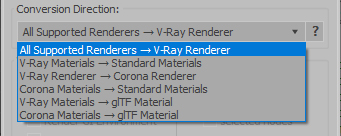
To V-Ray from:
- Standard (Default Scanline)
- Corona Render
- FStorm Render
- Octane Renderer
- finalRender
- Arnold
- Brazil_Advanced (RS v 1.2) material
- NVIDIA iray (unofficial) material.
From V-Ray to:
- Standard / Physical / PBR / OpenPBR materials
- Corona Renderer
- glTF Material (3ds Max 2023 or later)
From Corona to:
- Standard / Physical / PBR / OpenPBR materials
- glTF Material (3ds Max 2023 or later)
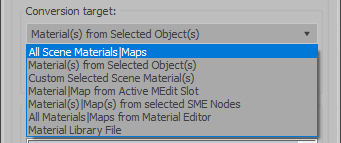
Сonversion scope:
Full list of supported conversions.
Main features:
- Converts materials, maps, lights, cameras, modifiers, helpers and GI environment from other render engines to V-Ray and from V-Ray to Corona
- Converts clouds from CoronaSky to VRaySun and vice versa.
- Converts Night Sky system (Moon, Stars & Milky Way) from V-Ray to Corona and vice versa
- Converts Render Elements to V-Ray (currently supported Scanline RE, Corona RE, FStorm RE, Octane RE) and from V-Ray to Corona
- Converts V-Ray and Corona materials to Standard (Default Scanline) materials
- Converts VRayMtl and CoronaPhysicalMtl materials to Physical Material and OpenPBR Material
- Converts V-Ray and Corona materials to glTF Material (which is necessary for exporting to the .glb for corresponding 3d software: Blender, Gestaltor, Babylon.JS etc).
- Converts proxies (currently supported from Corona, FStorm, Octane) to V-Ray Proxy (static and animated)
- Converts V-Ray Proxy to Corona Proxy (static and animated)
- Converts standard Bitmaps to VRayBitmap and vice versa
- Converts standard Bitmaps to CoronaBitmap and vice versa
- Converts 3ds Max Physical cameras to V-Ray Physical cameras and vice versa
- Automatic configure ACEScg workflow in V-Ray
- Batch processing for multiple 3dsMax Scene (*.max) or 3dsMax Material Library (*.mat) files
- Programmatically interact with most converter functions using built-in maxscript methods (API), which allows you to use the converter without UI and in combination with other 3rd-party scripts.
- ...and more additional tools for fixing and adjusting the scene.