3ds Max | All

Call for Python tutorials

866 votes

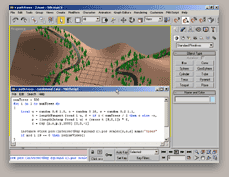
I've been seeing a lot of discussion about using Python with 3ds Max for quite a while now... I'd love to get some resources up describing Python - 3ds Max integration / workflow / processes. If you've got or would write a beginner tutorial or even an advanced tutorial, please share it with the community!

Some questions to get the ball rolling... What is Python? How does it compare to MAXScript? Why should someone use Python? Is Python best for end users or developers? How do you create a simple "hello world" Python script?

Maxscript 101 - Free Online Training

845 votes


The creator of Maxscript (John Wainwright) has made his previously commercial training DVD available for free on Vimeo! It's broken up into easy to watch chunks and even though it's a bit dated it remains one of the best introductions to MAXScript available.

A sincere thanks from the ScriptSpot community to John Wainwright for releasing his incredibly valuable training series for free and to our very own "Garp" for putting in the time to get the video split into sections & uploaded. Thanks!

Outliner

756 votes

 The Outliner 2.0 is a fast and easy to use scene management tool. It has a wide range of features, including selecting, hiding, freezing, linking and grouping objects in the "Hierarchy Mode". In the "Layer Mode" you can organize your scene by dragging&dropping objects from one layer to the other. What's more, the Outliner offers support for nested layers, to manage scenes more efficiently. The interface is nimble enough to keep it open constantly.

10 Year Anniversary Celebration

626 votes

10 years... What a ride! During the past decade artists & developers - people just like yourself - have come to this site to find tools that will make their lives easier. I've been honored to get to know many of you, to learn from your techniques and see thousands of artists find the tool they needed. I think one of the things that has amazed me the most over the years is how cross cultural ScriptSpot has become. This isn't just a site that people in Hollywood use, or for that matter a site that people in North America use.

Project Manager

597 votes

After a long stretch of development, Project Manager 4 is officially out — the biggest release in the product's history, and now with full 3ds Max 2027 support.
The headline is AI Asset Classification.
Your library gets sorted automatically — by object type, material, and style — no manual tagging.

Project Manager 4 — What's New Since v3

Changelog · 3ds Max 2016–2027

AI-Powered Asset Classification

  • Automatic categorisation of 3D models and textures by object type, material, form, and style — no manual tagging required
  • Runs entirely on your machine — no cloud, no subscription, your assets never leave your computer
  • GPU-accelerated background processing at low priority — won't interfere with rendering or active work
  • Reclassify specific folders or categories on demand — no need to reprocess the entire library
  • Scale across a team: multiple workstations share the same database and classify in parallel

Colour Tools

  • Find assets by colour — pick from a palette and instantly see matching models or textures
  • Perceptual colour similarity search — finds visually related assets, not just exact hex matches
  • Find Similar by Colour in the right-click menu for models and textures

Find Similar

  • Find similar by content — AI matches 3D models by style, shape, and visual look
  • Find similar by colour palette — matches assets to a reference image or mood board by dominant colour proportions

Smarter Search & Filtering

  • Multi-keyword search: "Chair, Glass" finds a file named Chair.max described as "glass"
  • Category filter correctly includes all subcategories — filtering Furniture also returns Furniture → Chairs → Dining
  • Combine category and material filters: find glass-and-metal tables, or wooden ones, in one click
  • Categorised / Uncategorised quick filters — see which assets still need attention

Gallery & 3D File Browsing

  • Three gallery tabs for .max files: Models, Materials, and External Links
  • Drag materials directly from the gallery into your open 3ds Max scene
  • 3D viewport preview for FBX, 3DS, OBJ, and other formats — inspect geometry before importing
  • Edit external links inline — fix or replace missing textures without opening the .max file
  • Zoom & Pan for images — inspect textures at full resolution inside Project Manager

Migration & Compatibility

  • v3 and v4 share the same database format — point v4 at your existing library and go; no rebuild required
  • Run v3 and v4 side by side on the same team; supported from 3ds Max 2016 through 2027

Performance & Other Fixes

  • Significantly improved overall performance — faster navigation, filtering, search, and file/folder operations
  • Live sync in shared database mode — changes by colleagues appear automatically without reloading
More about new features   Project Manager version 4
 

Max Hotbox

586 votes


This script is in open beta phase, available for public.

Who creates the best interface for the users? The users theirselves! This tool is inspired by the Maya Hotbox. It is not ment to be a tool collection on its own, its idea is to provide ways to you for accessing and organizing functionality. Build your own interface, customize your workflow to your needs.

SolidRocks

569 votes

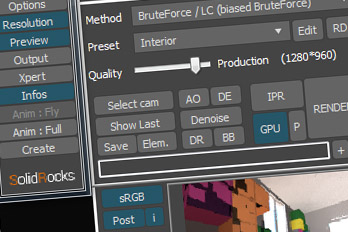
SolidRocks V2.4 is out !!  Support for V-Ray 6 (hotfix 2) and  MAX 2013-2023 ! 

SolidRocks adjusts and optimise all needed Vray parameters to reach the best rendertime/quality ratio.

Learn Vray progressively, see in realtime changes made by SolidRocks when you change resolution/quality.

SolidRocks includes new tools for both VrayMasters and Beginners:

Sweep Profile

563 votes

The new version of Sweep Profile PRO has been released

version 1.01.36

  • Adds support to 3Ds Max 2026
  • New Demo Molding profiles
  • Drops support to 3Ds Max 2014/2015

version 1.01.30

  • Adds support to 3Ds Max 2025

version 1.01.27

  • Adds the "Assign" button
  • Adds German and Japanese localizations
  • Better zooming to profile on rendering preview
  • Adds an ability to add multiple directories with profiles using the checkbox "Include Subfolders"
  • Fixes an issue with changing profile dimensions in 3ds Max 2023-2024

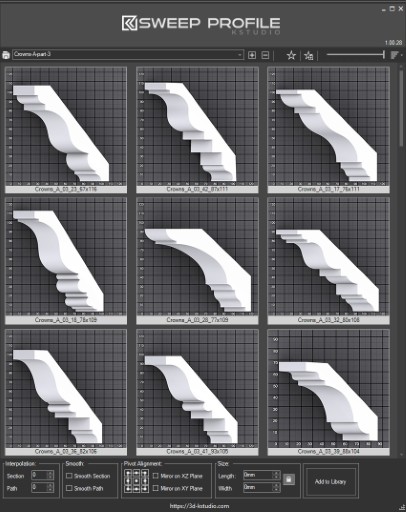
The main functionality of the Sweep Pro lies in its ability to offer a quick and convenient way to build architectural profiles using the Sweep modifier.

The pack includes pre-made architectural profiles (10 for the free version and 37 for PRO version), providing users with a solid base to start from.

However, the functionality doesn’t stop there; users also have the option to add new profiles from the scene or add profiles from a specific folder.

Also, the tool has a very convenient option for changing the profile size on the fly.
 

RappaTools v1.92

558 votes

RappaTools3 and RappaTools2 available... see new website: http://remusjuncu.com/rappatools/

See RappaTools3 PlayTime 02 Here  and RappaTools3 PlayTime 03 Here !

RTTassist

538 votes


About:

Syndicate content