3ds Max | All

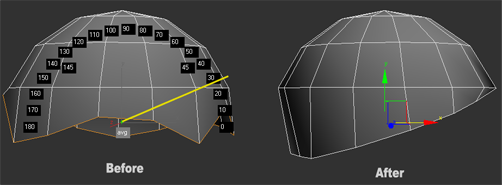
Straighten Edges in Screen View

11 votes

Work only with Editable Poly objects.

The video show all that the script can do. Reference coordinate system must be "Screen", can align verts, edges or faces.

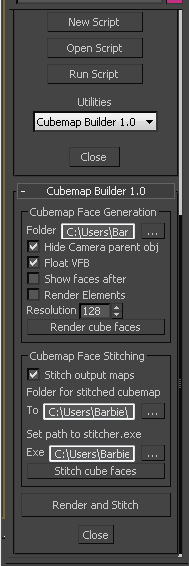
Cubemap Builder

0 votes

Description:
A maxscript Utility for the batch generation of cubemap faces across multiple cameras, and optional assembling of a "complete" cubemap in DDS format. The completed DDS texture is ready to use in the DirectX shader material - the original inspiration and motivation for this script.

3DS Max - Remove Objects From Isolate Mode

1 vote

This little script will help the user in removing objects from the isolate mode.
After selecting one or more objects and choosing isolate, sometimes you want to remove one or more objects from the isolated objects group. So select one or more objects that you want to remove and click the script.
Another benefit is that when the script is grayed out and not available, the user will know
That 3DS Max is not in the Isolate Mode

jbfunctions

4 votes

jbfunctions.ms is a library of miscellaneous handy MAXscript functions. This script only contains support functions for other scripts, and does nothing useful in and of itself.

Note from Admin: If you're not sure if you need this, then you don't.

Autodesk_Map to Bitmaptexture

3 votes

This script looks for Autodesk_Map textures in all scene materials and replaces them with standard bitmaps instead. Now that this script is finally general purpose, I'll be rolling a copy of it into the my Autodesk to Standard Material Converter script. The stand-alone version of the script will remain here as usual.

Autodesk_Map textures are generally found in Max files with data imported from Revit.

Stat Man: The Statistics Manager

2 votes

Stat Man: The Statistics Manager

Stat Man is a management tool, mass renamer and batch exporter to help keep track of objects in scenes big and small.

The tool displays every object in the scenes name, type, vertex count, face count and how many materials are applied to the object and can help with those pesky optimizations!

A batch exporter is built in and the file name is saved onto the object allowing you to quickly export mass objects in the click of a few buttons.

Enjoy :)

Align Pivot - set of scripts to managing pivots

2 votes

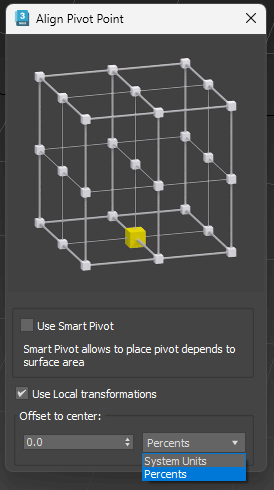
 Align Pivot (Smart/Standart) with Interface
Set Pivot by specifying the location point
Has multiple modes
Standard mode (Smart Mode is off ):
Pivot is set depending on the bounding box of the object. 
Smart Mode:
Pivot is set based on the surface of the object, not just its dimensions 
Use Local Transformations:
Pivot is set to the object’s local coordinates
If disabled – in world coordinates 
Offset to Center:
Offset Pivot to the center. Can be specified in percentage or system units. Supports positive and negative values.

QuickUVW

2 votes

This script will apply one 1x1x1 meters UVW-Map modifier in box mode to each selected object with a normal click.
Regardless of system unit type the size will always remain 1x1x1 meters.
If shift-clicked, it will apply a real world map size UVW Map modifier instead.

I use this frequently in architectural visualizations for applying a standard uvw map to most of the objects.

Only tested with 3ds max 2013!

I am not responsible for any damage caused by this or any other of my scripts to your scene, software or computer.

SkinHelper

2 votes

Hi, hope you like my SkinHelper.

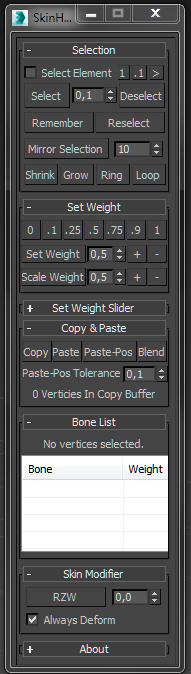
I tried to add a bunch of selection helping tools to the skinning process, so I replaced the hole UI of the 'Weight Tool' copied the default functions and added some more functionalities like, ...

Select by Weight; Save & Load Selection; Mirror Selection; Shrink, Grow, Loop, Ring addition; Set Weight Slider

I would like to read your feature ideas for this kind of tool.

Developed in 3dsMax2013.
cubicVR

15 votes

cubicVR is everything you need to create cubic QTVR files - as seen below - from 3ds max.


Syndicate content