3ds Max | All

Legolizer

13 votes

Converts an object into a lego like structure.

View an example lego teapot image created by Arne 'Arnage' Bezuijen or another example lego apple image created by Shane 'Percy' Purcell.

GetSelectedMaterial

13 votes

This script easily gets the material(s) and loads them into the material editor.

With multiple objects selected it will load them all into the editor.

I suggest keybinding this to CTRL-SHIFT-G for speeding up your workflow instead of using a toolbar icon!

Camera JibRig Creator

13 votes

The script will create a fully rigged Crane or Jibrig with a camera attached. This is useful for creating some nice camera movements for interior shots, product visualizations etc. that simulates real life rigs.

This version is very customizable. You can change the scale, height and length of the rig arm, allthough this can only be done before you hit the rig button.


JibRig

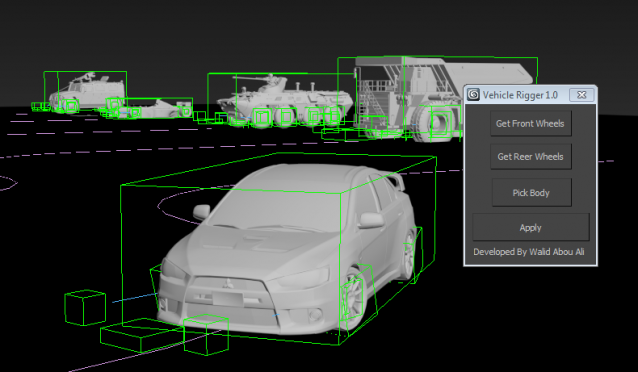
Vehicle Rigger

13 votes

This simple script allows you to rig your wheel based vehicle easily for creating nice vehicle animations in littile minutes


Draw Spline

13 votes

Draw a spline on a surface that optionally tracks the animated surface.

Chainmaker

13 votes

Creates a chain system from a link object and a spline path. Scales the link object to fit exactly the path and then setsup custom script look at controllers. Ability to dump controllers to normal keys for better speed.

The VRay Automator

13 votes

A simple MAXScript to automate otherwise tedious - repetitive - time-consuming - sleep-inducing tasks regarding VRay. :)

To view a screenshot - click here

SelectObjectsByMaterial

13 votes

This script extends and improves the functionality of the button in the material editor labeled "Select by Material". I was always frustrated by this button because to effectively get every object with a specific material applied I always had to unfreeze/unhide everything, and on heavy scenes, this proved to be difficult.

Not Anonther Bitmap Path Checker

13 votes

You know when you leave an animation test rendering at night so that you can see what the camera work looks like, and then the next morning you find that the scene had a bitmap with a bad path and nothing happened?

Rise your hand if that has ever happened to you!! How many times have you wished there was a way to avoid this?? WELL NOW THERE IS!!!

Copy/Paste transforms

13 votes

Copies the transforms of selected objects to a
buffer and then pastes them onto a new or existing selection.
It has the option to paste the position and/or the
rotation
and can paste it flipped around a world or custom object's
axis.
Handy for mirroring poses or animation rig components.

Syndicate content