3ds Max | Scripts

Create Vray Camera from Perspective View

This is a script that will allow you to create a Max Standard Target Camera (Ctrl+C) at the click of a button. More importantly it will allow you to create a VRay Phycical Camera from prespect view at the touch of a button. No more having to align your Vray-camera with the standard Max Camera. You can also choose which camera to display in the selected viewport from a drop-down list


Auto Render Element "VRayLightSelect"

Create Render Elements "VRayLightSelect" for lights.

UI

Quad Cap

Quad Cap is a 3Ds Max script that is designed to produce fast quad caps for even sided polygons saving you time and energy. Why do it manually if you can do it automatically?

Here are some of the benefits you get:
• Save time and energy to model what’s really important
• Perfect quad topology for you cylinders and spheres
• Subdivides perfectly
• Improves hard surfaces modeling and even organic modeling • Plus many more I can’t think of know

InterLight for Mental Ray, Final Rener, Brazil Rio and Vray

Update: May/05/2010. - support for Max2011

- Mental Ray 3.6.51.7 (Max 2009) :
with the materials:

Autodesk Material Converter

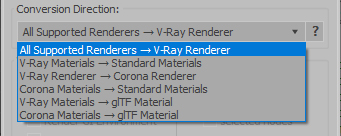
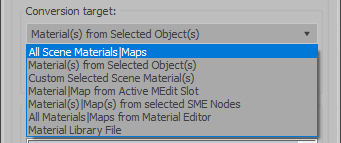
The Autodesk Material Converter is a commercial script for all 3ds Max and 3ds Max Design users starting from release 2011 and up who need optimized materials for mental ray, V-Ray or VR applications. With one click all Autodesk Material Library materials are converted into Arch & Design or V-Ray materials. Conversion to Standard materials takes only two clicks

The major adavantage will be an increase in rendering speed (on average 35%) plus it will give you the flexibility you need for your material fine tuning. and of course you don't want to manually convert materials which are coming in from AutoCAD, Revit and Inventor into 3ds Max (Design)

Most VR applications need Standard materials to work with. The conversion to Standard works from Arch & Design or Vray materials

In addition to material conversion the script checks if there are double materials inside the scene. If they are there, they will be changed into instances, keeping the number of materials as low as can be.

New features in v2.5!

  • conversion from Arch&Design to V-Ray and back...it's there!
  • conversion of all Autodesk maps
  • conversion of some V-Ray specific maps or MentalRay specific maps

Modifier Modifier Zorb

v2.7.03. Dosen't save size and position if closed when minimized. v2.7.02. Added Maxwell material support

v2.7.01: A few UI bug fixes so the window will open the correct size and have valid settings on the first open

v2.7.00: Added support from Array Parameters like material lists in the Multi-Sub and fR Layer material and their associated parameters. Maps in the standard material show up as "maps - Texture Map Array". Unfortunately these are only accessible by number not by map names.

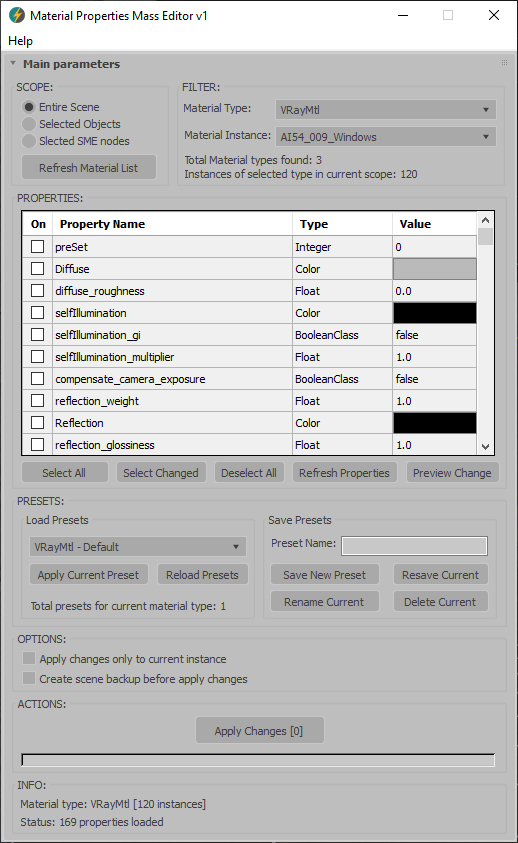
Edit ALL modifiers, ALL objects, ALL Materials, All Controllers, ALL Shadow types and ALL atmospherics/Render Effects. Work in max from a "Class-centric" way rather than a per object way. Edit thousands of object's perameters, randomize thousands of seeds, enable thousands of modifiers and more with a few clicks!

General Features (applies to all modifiers, controllers, materails, shadows, atmos and render effects):

MASS EDIT: Mass edit one property on all nodes at once, You can specify an absolute value, a relative value or apply an absolute value to modify

MASS RANDOMIZE: Randomize one property on all nodes at once

SELECT/DELETE BY CLASS: Select all objects with a meshsmooth, or all spheres or all objects with a path constraint etc

FULL INSTANCE/REFRENCE TOOLS: Make all objects/modifiers of a class or selection instances. Make Base object refrences. replace base objects with another obj (eg make all selected boxes an instance of a vrax proxie.) Available for Modifiers and Base objects only ATM.

LOAD/SAVE PRESETS: Load and save presets in xml format for modifiers, objects, etc.

Specific Features (Can be done to All or selected):

Modifiers: Enable, Disable, Enable in viewport, Disable in viewport.

PointCache Modifiers: Set ranges, Set path, Flush path, Reload, Record.

FumeFX: Simulate, Load settings

Lights: Turn all, selected, selected classes on or off. Multiply all light vlaues.

Xref Object: Merge object

Materials: Show/Hide In Viewport:  Shows the material in the viewport. Doesnt work with texture maps yet.

Spring Controller: Modifyspring controller settings (Needis its own section as springs are controlled differently with maxscript.

Merge Xref Controller:  Merges All/Selected controllers

Render Optimizer V3

Hi Guys,

Welcome to Render Optimizer V3. Use this tool to activate the mental ray "secrets". Optimize your Renderings with new Light-Method, Sampling-Method and RAM-Managment. 

Render Optimizer Options

Sudoku Max

Creates a menu in order to select difficulty in Sudoku and to display a full board for you to fill out. will check your answers and make sure you are correct before asking to play again. Please read the README.txt to get everything started it is that easy!

Z Tools

This is a 3dsMax manager tool for preferably for Vray users, very useful for editing architectural models created with other software (eg. ArchiCAD) and fast scene setup. Very useful tools for Selection, Renderin, Incremental Rendering, Copy/Paste objects from other scenes, Material Replacer, Animation with Moving Objects, Exporting/Importing Vray Proxy with material and so on...

Z MNG VR - The manager for working with Vray

CAD Circle

Create a circle by picking tangent points or circles.

Batch Loader

Quick Merge/Import multiple files.

UI v.1.7

Features:

  • Merge multiple .MAX files
  • Import multiple .* files (ie all that can be imported)!
  • Log all files where failed to load to Listener (if any)
  • Multiple history for recent used paths available
  • Limit count of recent paths to keep in history added
  • Group option available
  • Layer option available
  • Attach option available
  • "Auto" option (if is checked no prompt for Merge/Import) *

3dhippie_stereoCam

VERSION 2 AVAILABLE:
Get 3dhippie stereocam v2

ADDED in 2.1.2
Camera Clipping.
Bugfixes.

ADDED in 2.1.0

HCG Asset Browser PRO

Ver 1.2 - Check the New Video

HCG Asset Browser now FREE!

Current version:1.2.5

WireFence

Create easy WireFence shape (Editable Spline).
WireFence

Search Materials And Textures

Hello People,

I wrote a script with that you can list, search and copy material and textures from your scene. This MaxScript collecting all materials and texture, it also allow to search materials or textures by name. You can modify the texture path, also for multiple selections, and you can copy the selection to the material editor.

For using it, go in 3Ds Max under MaxScript: Run Script... and select the script file.


RenderMask

Render different types of masks (luminance, RGB, env.reflection, light, objectsID, SSS, texture, AO, ZDepth, Specular, BlackHole). The script don't affect the scene materials, lights and render settings.

v5.77.5    - bug fixed in "Texture" mask and "BlackHole" mask, add "TaskPerFrame" when submit to Deadline

http://www.vimeo.com/26107414 (Tutorial)

G-Buffer ID SwitchBoard

This script is intended to ease the workflow with G-Buffer ID's.
Exposing ID's ranging from 0-300 on a switchboard that gives you a visual feedback of which ID's are active in the scene. Also you can select objects by ID just by right clicking on the ID button. Enjoy :)

Material view

Quick display model to slate Editor.

Background tiled and angle.

Support HDR to slate view.

Reduce Test rendering time.

PhotobucketEmbarassed

SpiroTube

Generates a cylindrical mesh, created around a series of X, Y and Z positions, defined by 3 different functions. The mesh can be manipulated, with twisting, scaling the radius(a custom function can be used for this).

Outside variables(segments, m, n, p, q, h, t) can be used for quicker editing of the path, using a spinner, instead of changing each value manually.

Select By Size / Volume

This script allows you to select objects by their size or volume, by checking their
- bounding box size (= bounding box volume) or
- the actual volume of the mesh (the calculation function for this is taken from the MAXScript manual, I think Bobo is the genius behind it ! :-) )

Syndicate content