Tagged 'Material'

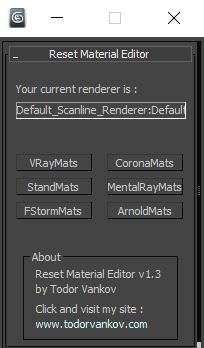
Reset Material Editor

2 votes

With this script you can reset all materials in your marerial editor to the Materials what you using in your workflow. For now you can reset to Standart marerials, Vray materials, Corona materials, Mental Ray, FStorm, or Arnold materials.
This script is tested at 3ds max 2016 and 3ds max 2021.

Version 1.0
- reset to Standart marerials
- reset to Vray materials
- reset to Corona materials
- reset to Mental Ray

Version 1.1
- reset to FStorm marerials

Version 1.2

Sergo's script pack

73 votes

SCRIPTS IN PACK:

RotateClockWise,
RotateCounterClockWise,
RotateAround
- three scripts for easy, one-click rotating objects on 90, -90 and 180 degree around active axis and in current coordinate system. Scripts also rotate UVW Mapping gizmo and Slice sub-object.
- to rotate a copy of the object - press shift+script button on the toolbar

3PointScale - script for scaling separate objects by specifing 3 points. Like AutoCAD's 'scale by reference' command. Uniform scaling supported.

Architecture to Standard Material Converter

4 votes

This macroscript converts Architectural materials to Standard materials for use with VR exporters that require this setup.

Names Fixer

0 votes

A Script for Replacing Chinese and illegal Characters from (Objects-Materials-Maps-Modifiers-layers) Names .

PS: Undo Disabled , So its Better to Save your Work Before Running the Script .

For Replacing Texture Names you can use Pop Chinese Script

UPDATE 1.1 :

  • Change the script name to "Names Fixer"  .
  • Add Fix for Names Sequences , ("Group464134564" will be fixed to normal sequence "Group023")

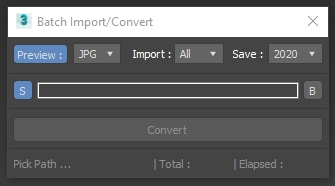
Batch Import Convert

1 vote

3DSMax Script for Importing Selected Type Files from Folder +Subfolders and Save them as Max Files +Version ,

with Option to Grab Viewport Preview .

NOTES :

Strip Paths from Bitmaps

3 votes

Removes current paths from all bitmaps in the scene. Primarily for getting rid of irrelevant paths on files recieved from users on other systems.

This functions in a similar way to stripping paths manually in asset tracking, but when doing that I've found that it can lag a lot and sometimes fail to strip some of the paths until you do it multiple times.

Bad paths can cause lag when Max tries to search for the missing textures, especially when they're pointing to a nonexistent network location.

SnowEffect

3 votes

SnowEffect plugin poster

The plugin allows you to create a global snow effect for the whole scene. You can cover selected objects with snow with just a few clicks. SnowEffect supports V-Ray, Arnold, Corona, and scanline render natively. All other render engines will see it as standard material that you can modify or replace. You can also change the amount of snow and bump/displacement size.
Watch the trailer for more details.

iToo Forest Edge-Mode Boundray

3 votes

This Script will Solve the problem of Activating Edge Mode in iToo Forest Plugins .

- WORK WITH V-RAY AND CORONA ONLY (UPDATE 1.02 Support All Materials) .

How to Install :

- Drag and Drop the File or Run it from Scripting Menu\Run Script

UPDATE v1.01 :

- The 2 New Items are shown in QuadMenu  when no object is Selected , Fixed .

- Drag and Drop the File or Run it from Scripting Menu\Run Script , it will Remove the Old QuadMenu Items and Add New Ones .

Dirtizer 2

5 votes

A very helpful plugin which can make your materials dirty in one click!
- You can control the level of dirtiness.
- You can make it dry or wet.
- Dirtizer supports Multi-materials (you can set random dirt to all materials at once)
- You can add your own textures of dirt. (Organize your textures in "Dirtizer" folder as you want)

Most render systems are supported now! Tested with V-Ray, Mental Ray, Scanline, Corona, Redshift.

Attach by Same Material

2 votes

Attached all geometry with the same material to the currently selected object. This collapses to editable poly first, so make sure you're cool with that before you click. :)

Created for merging objects in heavy architecture scenes recieved in Max format with large numbers of individual objects.

Syndicate content