3ds Max Scripts

MultiLight for Vray

2
points

UI

Test Video:


Fume Object Source Manager

3
points

Rollouts for duplicating and managing multiple object sources since you can't instance object sources (because you can only have one object per source)

*Can duplicate object source and assign objects to selected geometry automatically
*Optionally add new sources to fume grid obj/src list
*Contains all functionality of the object src modify panel

Fume Src Manager


Material Cleaner

1
point

I made this script mostly for FX people, or anybody that needs to wipe or replace the materials from an entire scene... you can do it on selected geometry or the entire scene (includes hidden geometry).

MatCleaner


Relink Bitmaps

27
points

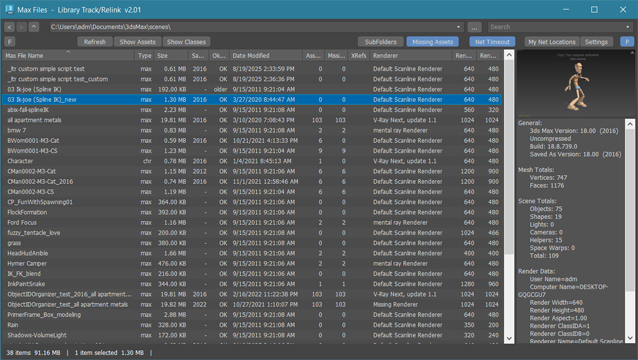
This script relinks missing bitmaps in scenes. It searches directories recursively unlike the Bitmaps/Photometric utility. Also features "Interactive Mode", which allows you to easily see which object is missing the bitmap. If you have missing bitmaps in your scene, this will be your best friend.

After being frustrated with Max's Photometic/Bitmap path plugin, I decided to write my own. Some features of mine that are not included in the plugin are:


Time Range Manager 1.5

0
points

Time Range Manager

This script was inspired by another script called "Frame Range Manager" written by Borislav "Bobo" Petrov.
Updates:
- Improved the UI a bit, see notes in script.

Basically, it allows you to edit and save a collection of time ranges and access
them via a dropdown list to change the scene time range based on each
of their settings.


VRay Light Lister

29
points

This script replaces the built-in light lister with one that incorporates support for VRay Lights and VRay Suns.


Straighten Edge

10
points


Straighten Edge – MAX script, allows to project and after it to place selected vertex/edges on the given straight line on the Editable Poly object, Edit Poly modifier and Editable Spline & Line objects.

v1.3.0 (05.08.2008)
- Added normalize when straight. Use ALT key for get vertexes/edges normalized.
v1.2.0 (23.05.2008)


Outliner

13
points


infoOverlay

7
points

infoOverlay UI screenshotUpdated to v0.9 - This Render Effect displays additional information such as frame number - file name - render time etc. as overlay onto your rendered image. Useful for previews - previzualisation and other non-final renderings - should work with any 3dsmax-compliant renderer. All parameters animatable.


Make parallel edges

8
points


This macro will produce parallel edges along selected edges, may be useful for subdivision modeling.

To set distance print plDist = <number> in MAXscript listener.

DO NOT expect to much, it's still in development but may be helpful.


RIBit

1
point

This is a free Renderman exporter for 3DSMax. It enables you to render your scenes using any Renderman complient renderer. For now - it doesn't do very much. It is after all a first alpha version - but it is usable to some extent. It exports you camera - lights and geometry (currenty - all geometry is exported using either polygons or subdivision meshes.) It does not export particles - though I would like to add them at some point. A lot of max attributes are not supported yet.


shareFFXdata 1.1

0
points

With this script you can copy settings from one FumFx to many others, you can also select which settings you want to copy.
Double clicking in the scripts list will open the clicked FumeFx's UI. Rightklicking the Reference FumeFx in the scripts UI will open the Reference FumeFx UI.
Selecting a path and forcing it will create a separate folder for each FumeFx with its name inside the specified parent folder.
And finally running the simulation for all FumeFx in the list, or if desired, running the Reference FumeFx as leader of the list is possible.

enjoy!


Unwrap Tools

6
points

A great update to the toolset that ships with the max 5 unwrap modifier that fixes the features that didn't work and adds many new ones to complete the set.

2008-08-05 Admin: updated broken DL link
...


Facial Animation Rig

0
points

Create a complete head rig, with facial animation controls as recommended by Jason Osipa in his book 'Stop Staring'. Starting just with a head mesh, create bones for jaw, head,neck and eyelids. Also create a couple of spline controls for the eyes and the chin. Running the 'eyerig' script creates a rollout with pick buttons for all needed bones and meshes, then sets up the eye and head rigs, as well as placing a skin modifier on the mesh, with the required bones added, ready for vertex weighting. The rig also caters for 'fleshy eyelids' that move with the eye.


Smooth to Prevalent Smoothing Group

0
points

Works in face sub-object level of editable polygon base objects.
Assigns the prevalent smoothing group found within the current selection of faces to the entire selection of faces (removing any other smoothing groups).

Feel free to modify as you like.