3ds Max | All

10 Year Anniversary Contest #1 - CG Textures Membership

72 votes

It's the 10th Anniversary of ScriptSpot and there are quite a few prizes to give away! There will be a new contest with new prizes every Monday - you'll have an opportunity to win and may increase your chances of winning by referring your friends! This is the first contest and is valid from 5/17 thru 5/21. 

Let the giveaways begin!

Quick Mask

72 votes

Quick black and white mask from the selected objects

Quick Mask

Now support XRef Scenes

Update Shader Utilities for 3dsmax2015

72 votes

Hi Guys,

Shader Utilities Pro for 3dsmax2015 is released. Update and Bug Fix!

New Tutorial  in english !!!

- support Vray 2.x to mental ray
- support Iray Material  & MILA Layering Shader from NVidia
- Global Shader Optimizing: Reflection/Refraction, AO, CutOff´s, Bitmap Blur/Filtering ...
- Cleaner ( incompatible Maps, DWG, Revit import)
- Global Settings Optimizer (Sample Curve Technology only by Infinity Vision)

have fun!

Release the KRAKEN!

71 votes

This plug in was made as a final project for our animation class.
It is designed for easy access to complete tentacle system adjustments and parameter setup. A single controller afects the whole system, however, there is a noise parameter to give every single tentacle its very own movement and personality.

Este plug in fue hecho como proyecto final de nuestra clase de animacion.

boneStretch

71 votes

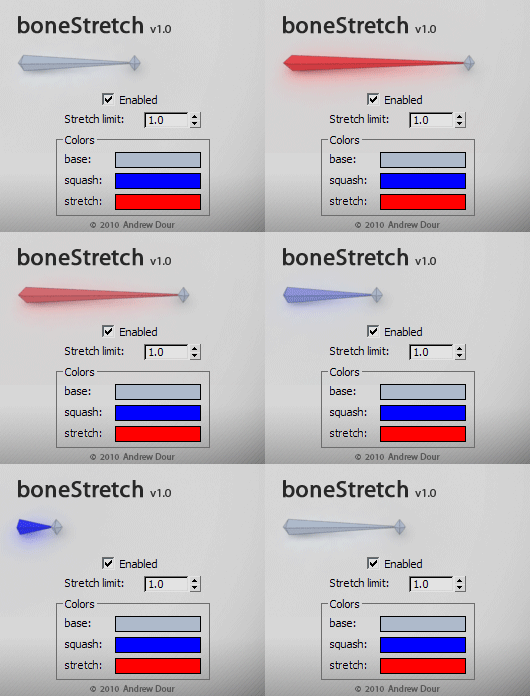
This tool will change the color of bones based on their squash/stretch amount, providing the user with feedback if they have gone beyond a desired threshold. It will live update as you move around and animate in the viewport.

Target VRay Light Scripted Plugin

71 votes

TargetVRayLight Plugin

 The plugin creates VrayLight with Target. Convenient for the creation of different studios for the subject of visualization.

History:

-- v2.0 First release.

-- v2.1(3)


  •  Now supported by V-Ray Light Lister!
  • Added some parameters.

Installation:


  • Copy plugin in stdplugs\stdscripts or scripts\startup;

Bitmap Tracking / Resizing

70 votes

++ Works with All Assets ++

New: column and filter "In Scene" - to show if bitmap is used in scene or only in material editor
New: columns Channels and Memory - to show bitmap channels and estimated memory load for each bitmap

.
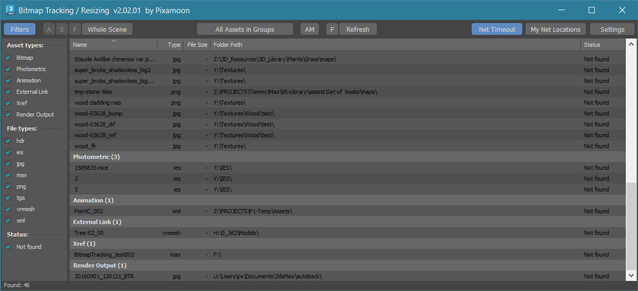
 

Bitmap Tracking / Resizing... is tool similar to Asset Tracking. But it gives more possibility to work with bitmaps:

- Support for All Assets
- Sort files by name, image width, height, file size, path, gamma, texture name, status (Found - network, Found -  local, Not found)
- Resize to JPG selected bitmaps to specified size or to Nearest Power of 2
    - can be used to resize and repath selected bitmaps (by size) before sending to external renderfarm,
    - resize bitmaps in large animation sceens to reduce memory ussage,
- Convert... see below
- Change / Rename paths (with paths history and rename path prefix eg. change only server/drive letter)
      * Choose path from history or scene paths
      * Pick new path
      * Rename paths beginng ( drive letter or paths C:\sample\abc\ and rename them to Z:\3d\sample\abc\ )
      * Find and Replace part of paths - supports Regular Extension
- Multi-threaded Auto-Relink with progress dialog
- And More...


Material Converter v0.98b

70 votes

Description:

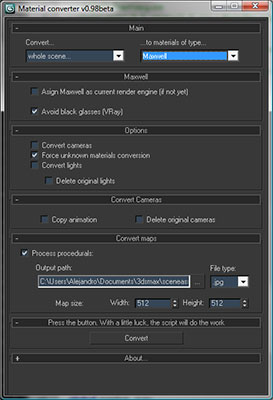
Simple utility to make it easier to move scenes from a rendering engine to another. Some work have to be done in terms of materials or types of engines, but it will progress step by step. In the following table you can appreciate the possibilities of the script at this moment:

Help file explaining the whole process included with script.

Turn Viewport Maps On/Off

70 votes

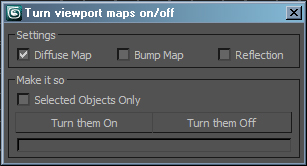
This is a very simple script for turning Bitmaps on and off in the view port. It has been very popular in the studio that I work at work so I though I would upload it. Its funny how the simple ones are the ones that every one likes. Anyways it will let you turn view port maps on or off, it works with Standard and V-Ray materials. It also handles multi sub materials with no troubles, you can also choose to display Bump or Reflection maps. If you have any troubles or ideas for new features please let me know.

WkOldStyleLook

70 votes


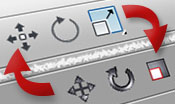
Because I find the old icons set clearer and more visually efficient that the one currently provided with 3dsMax since release 2010, I wrote this little script to install it again properly.

WkOldStyleLook - a WerwacK script


Syndicate content