3ds Max | All

Incremental Transform

14 votes

A script to move or rotate an object set of ObjName[_###] Will work on multiple ObjNames, but provides confirmation request for mis-matched object base names. Objects are sorted in alphanumeric name order for incremental transformation, i.e., obj_001 +10 deg., obj_002 +20 deg, obj_003 +30 deg...

Axis-space selectable. Not very elegant, but seems to work OK.

Connect Always

14 votes

By default, Max has two separate commands for Connecting Edges and Connecting Vertices. You had to have two menus for both of them.With Connect Always, you just have to select the vertices/edges and hit "Connect Always"

Here is the code if you dont want to download:-

macroscript Connect_always
Category: "Butt tools" buttonText: "Connect Always"
(
$.EditablePoly.ConnectVertices ()
$.EditablePoly.ConnectEdges ()
)

The category and buttontext is needed if you want to put it in a menu or quad.

[CREDIT}

Sort Render Elements

14 votes

This script will place your Render Element files in named subfolders according to where the main pass is stored and what the name of the Render Element is.

Example:

Main pass is set to render to:
C:\myProject\renderoutput

Rendered Elements like Alpha, Specular, Diffuse etc. will be placed at:
C:\myProject\renderoutput\Alpha
C:\myProject\renderoutput\Specular
C:\myProject\renderoutput\Diffuse
etc.

Enable this script as a Pre-Render script:
Render Setup Dialog -> Common Tab -> Scripts -> Pre-Render -> browse for the script file

ScriptSpot Search

14 votes

 Like 3ds Max InfoCenter but then you need to search for help in scriptspot.com

3DS max easy windows plug-in

14 votes

This is my first script in 3D Max. I wrote it for my own purpose to speed up modelling of the most boring things in architectural visualisations. Windows and doors. This script helps to make simple windows and doors with divisions of your own need. Just place a box as a symbol of a door or a window and imagine that the segments of this box are the divisions of your window or door.

V-Ray Proxy Tools

14 votes

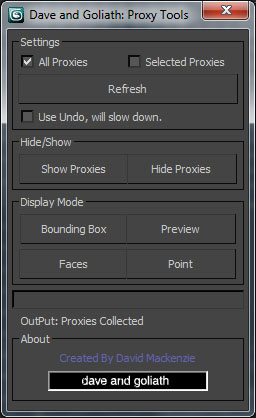
This is a very simple tool for controling the display of proxys in your scene. It is quite useful on large scenes with a great deal of proxys. 

Cheers, 

Dave

IDTool

14 votes

For people who work often with Objects ID, this script may make it easier. It allows you to see which objects have ID, to select objects by ID, assign a ID and all this without entering in properties of the objects.

Version: 2.34

  • Add "Assign ID by Layers" button
  • Add Option to Assign Wirecolor by ID

MCG FFS

14 votes

 Installation: Scripting, Install Max Creation Graph...

Max2017 should work straightaway, for max2016 ensure you have SP3 properly applied then Extension2 (maybe 1 would work too...can't be sure)

FFS...Floor Flux Sake !!! I empower you to take the Red pill or Blue pill....go into the graph and choose your destiny on the far right...Fastest compile time could be a second (Blue pills) or slowest (Red pills), with all functionalities, up to 15 secs !!! But once you've compiled the graph, it should be pretty quick.


SoulburnScripts Updated July 18th 2008

14 votes

(Copied from Neil Blevins' email list)

Created one new script:

polyCountSelector: Selects objects based on their facecount.

Updated several older scripts, here's the major updates:

bitmapCollector: Now searches your mappaths and local maxdir for missing bitmaps.
modifierUtilities: Added a new mode for selecting objects with uVWMapping Modifiers with a specific map channel.

ArchiCAD import wizard

14 votes

ArchiCAD import wizard takes care of your exported ArchiCADâ„¢ geometry. it allows filtering out unwanted objects and cleans up the geometry by welding overlapping vertices - without affecting the shape - or degrading detail quality. it also creates a named selection set for every import step - allowing better scene management.

Syndicate content