3ds Max | Scripts

Weld Autosmooth

0 votes

Overall functionality and advantages

  • The script welds separated vertices and later autosmooths the faces if it's needed
  • It is very useful when you have imported the file that was generated in other software and the vertices are somehow separated
  • You can use these two actions (welding and autosmoothing) together or separately
  • Saves time when you have a lot of objects that need welding and later autosmoothing
  • The script can work on entire scene or just the selection

Batch Studio Renderer

0 votes

Overall functionality and advantages

Object soft selection

9 votes

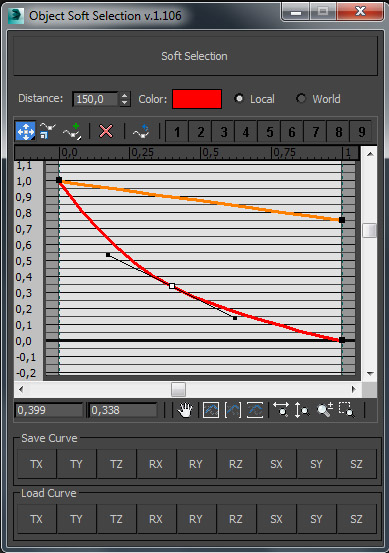
***********************************Object Soft Selection*************************************

Script is used to transform objects with soft selection based on user defined curves.

A CMD utility to externally re-path 3ds Max files

0 votes

This is a simple tool I wrote in IronPython and compiled to a usable .exe program for re-pathing or examining 3ds Max (.max and .mat) files without actually running 3ds Max.

It's pretty useful for batch re-pathing before rendering on render farms, for example. Or just to view what type of files are being linked in your .max and .mat scene files and material libraries, respectively.

Liked Category OpenCUI

1 vote

To continually not found among heaps of categories that category into which most inputs for setup hotkeys. For instant access to the category Customize-> CustomizeUserInterface-> desired category ...

Чтобы постоянно не искать среди кучи категорий ту категорию, в которую чаще всего залазишь для установки хоткеев. Для мгновенного доступа в категорию Customize->CustomizeUserInterface->Нужная категория...

Transfer Skin Data

1 vote

RegionRender

4 votes

Simple script. Self explanatory really. See screen shot above. Script found under the category '3dwannab' (drag the .mzp file into the max window to see further instruction, if you added the icon please restart max to see it in the toolbar) also a script to allow toggling the Region with a keyboard shortcut.

LazyMap

2 votes

A simple UVW map modifier randomizer, with a minimalistic UI and some extra tools like rotating and aligning gizmos, on multiple objects at once.

Recently I've had to model a lot of office furniture, and there were hundreds of wooden boards we had to map. To avoid texture repetition, we adjusted the UVW coordinates on individual boards, but it's a huge hassle to do by hand.

Copy Viewport to Clipboard

5 votes

Simply copies your selected viewport to the clipboard. Great for quickly getting a viewport grab into photoshop - or if bandwidth doesn't matter - getting an uncompressed image pasted into your email client.

Cryengine 3 export preparation

0 votes

This script is specific for use with Cryengine 3. So if you don't intend to use this with Cryengine 3, this script will not work and be of no use for you.

It creates all the appropriate layers for the lods and main object, creates the dummy and linking the mesh to the dummy. Creating the proper material, submaterials (4 by default) for the model and the proxies, assigning the crytek shader and the physicalize (no draw) to the proxies.

Left for you is assigning the proper IDs manually to the correct submaterials (if needed).

Syndicate content