3ds Max | All

deleted

-1 vote

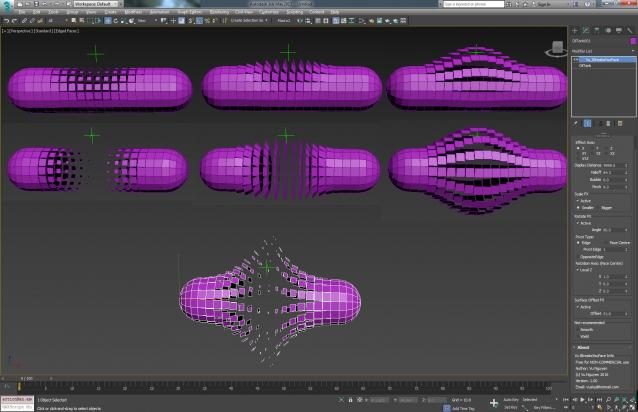
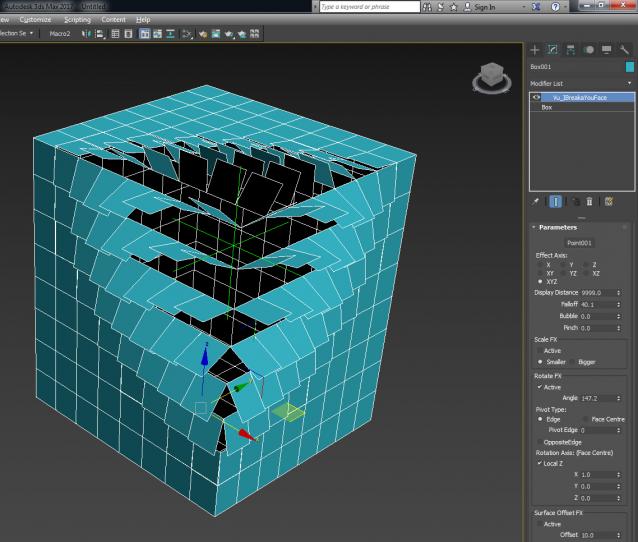
MCG IBreakaYouFace

5 votes

Various FX on your face....of a 3D geo that is...

Free for Non-commercial use.

ver 1.01: fixed bug so that now all sides of a box (specifically +/-X) rotate about the edge correctly

RAL to RGB Converter (+Hex)

0 votes

--RAL to RGB Converter--

Little tool for quick converting your RAL color to RGB and/or hexidecimal values.

--Installation--

Put the RALtoRGB folder in your .\scripts\Startup\ folder and restart 3dsmax.

In most cases this will be something like this:

C:\Program Files\Autodesk\3ds Max 20xx\scripts\Startup\

where 20xx is your 3ds max version.

Find the category named RALtoRGB in your Customize User Interface Dialog and then drag it on toolbar or assign a shortkey to it.

==Usage--

In the UI of the script fill in your 4 digit RAL code in the RAL field and click CONVERT.

Detach faces V2

10 votes

with this script, you can detach all the faces of selected objects as separate objects.
with pivot aligned to their center.
You also can detach only selected faces, with pivot and parent options.
You can detach faces from edges selection, if you check align pivot, it will align pivot to the center of each edge.
You can align pivots or parent after, on objects selection.

UCX Collision Creator

5 votes

This script allows you to make an Unreal UCX collision hull from your selection in one click.

Mass exporting of selected objects in 3dsmax

35 votes

'

V1_6:
Update to support 3dsmax 2018

New Features
-- Settings in the util are stored in a ini file, so they are kept when you quit the util
-- I added a reset ini button so you can go back to the default settings
-- A simple button that selects all visible objects
-- I also made the outputPath button show the current outputPath..

My first version of this script was created to simplify the process of exporting many objects from one 3dsmax scene into separate obj files.

miauu's Step Edge Ring

7 votes

A script that selects all "Ring" edges between two selected ones.

Requested here.


Installation: Drag-n-Drop the mzp file in 3ds max. Press the Install button. Go to Customize-Customize User Interface-miauu category.


360 MultiCubeMap BatchRender

0 votes

360 MultiCubeMap BatchRender is a script for Generate a 6-cameraRig and render individual Cubemaps automatically with Full VRAY Support including Render Elements.

It can be very useful to render several cubemaps in 360 in one single scene. Both Single frame or animation.

Supports VRAY only.

 Update 1.5.0

FIX Equilateral Render
ADD Project Name Folder
ADD File Render Extension - JPEG / Tiff / PNG / EXR / TGA

 Update 1.3.2

CamMapMod - Camera Map replacer and updater

38 votes

This is my first script ever, so improvements are to be made.

Doing Camera Mapping ?

Ever wished to replace and update all the Camera Map modifiers you want in one single click ?

Bored of selecting your meshes one by one and then choose your camera again and again ?

The wait is over. Because this tool may save you some great time, which you can then spend to refine you Matte Painting skills !

Sphere Plus

-12 votes

Check a new tool developed to improve 3ds Max's regular sphere primitive. This new primitive allows users to control how many columns and rows of verts there are. Holding Alt forces the sphere to be created at [0,0,0]. It allows users to independently adjust the radius on the X,Y,Z. It also gives users to option to adjust whether it's capped or not when turned into a hemisphere.

https://vimeo.com/61361920

Syndicate content